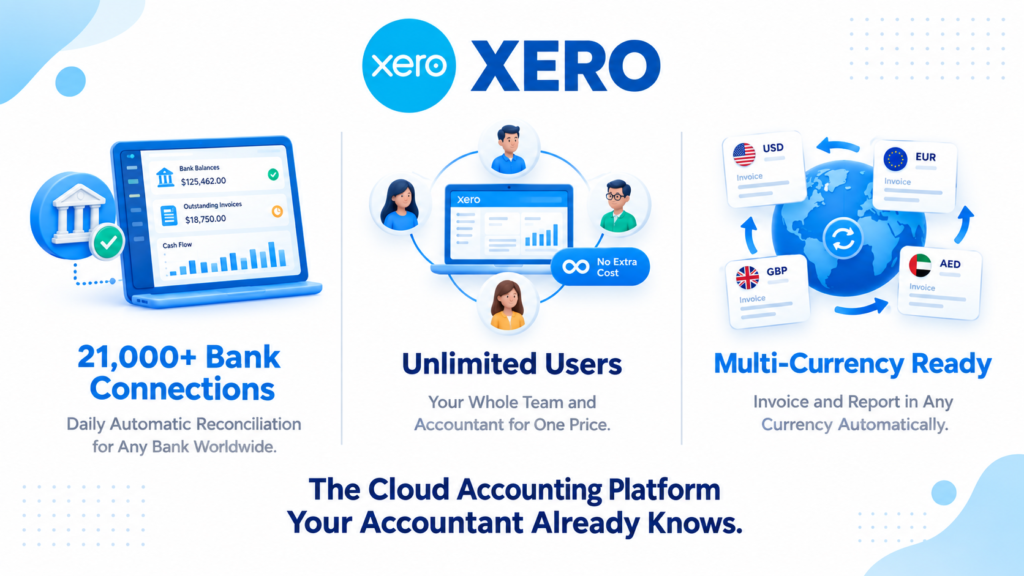
Xero review 2026: if you are looking for cloud accounting software that gives your entire team unlimited access without paying per user, connects to over 21,000 banks worldwide, and works seamlessly with your accountant from anywhere, Xero is the platform most growing businesses land on.
Founded in New Zealand in 2006, Xero now serves millions of small and medium businesses across 180 plus countries. It holds a 4.4 out of 5 rating on Capterra and is consistently recommended by accountants as one of the most collaboration-friendly platforms available. Furthermore, in May 2026, Xero launched Xero Coaches, a free personalized onboarding program giving new subscribers 90 days of one-on-one support from onboarding specialists.
However, Xero is not perfect. The Early plan’s invoice limits frustrate growing businesses. Nearly half of GetApp reviewers flag the cost of add-ons as a concern. And customer support quality without phone access is a consistent complaint. This honest review covers everything you need to decide whether Xero is the right accounting platform for your business in 2026.
What Is Xero?
Xero is a cloud-based accounting platform designed for small to medium-sized businesses, freelancers, consultants, agencies, and ecommerce stores that want professional accounting without a desktop software installation or per-user pricing.
The platform centralizes invoicing, bank reconciliation, expense tracking, inventory management, payroll (through Gusto integration in the US), financial reporting, and tax preparation in one cloud dashboard accessible from any device. Unlike QuickBooks, which charges extra for additional users, Xero includes unlimited users on every plan. Consequently, growing teams, external accountants, and multiple business partners can all access the same financial data simultaneously without additional cost. Read our QuickBooks review for a detailed head-to-head comparison of both platforms.
Xero Pricing in 2026
Xero offers three core plans in the US market as of September 2026. All plans include unlimited users and a 30-day free trial with no credit card required. Annual billing is available at a discount. Xero frequently runs promotional discounts of up to 90% off for the first several months, so always check xero.com for current offers before signing up.
Early: $25/month (regular price). Includes 20 invoices and quotes per month, 5 bills per month, bank reconciliation, inventory tracking, and reporting. The 20-invoice monthly cap is the most important limitation to understand before choosing Early. Any business sending more than 20 invoices per month needs Growing from day one. Consequently, Early suits freelancers and consultants with a small number of regular clients rather than businesses with high invoice volumes.
Growing: $55/month (regular price). Removes the invoice and bill caps entirely, adding unlimited invoices, quotes, and bills alongside all Early features. This is the most popular plan and the right starting point for most small businesses. Furthermore, the mid-tier Growing plan at approximately $46 per month on annual billing is often significantly cheaper than comparable QuickBooks Online plans when you factor in unlimited users, which QuickBooks charges extra for.
Established: $90/month (regular price). Adds multi-currency support for businesses transacting in multiple currencies, project tracking for profitability reporting on individual projects, expense claims management, and deeper analytics. For ecommerce businesses selling internationally, agencies billing project-based clients, and businesses with employees submitting expense reports, Established’s additional features justify the premium over Growing.
Payroll: Xero partners with Gusto for US payroll. The Gusto integration starts at $49 per month base fee plus $6 per employee per month. This is a meaningful add-on cost for businesses that need payroll alongside accounting.
The honest pricing verdict: Xero’s Growing plan at $55 per month with unlimited users delivers exceptional value for small businesses with multiple team members or accountant collaboration needs. The Early plan’s 20-invoice cap makes it viable only for very small operations. The Established plan’s multi-currency feature alone justifies the upgrade for international businesses. Always verify current promotional pricing on xero.com before budgeting, as discounts of 50 to 90% off for the first several months are frequently available to new subscribers.
Key Features
Dashboard and Financial Overview
Xero’s dashboard is consistently rated as one of the clearest financial overview screens in the accounting software category. When you log in, you immediately see your bank balances, outstanding invoices, upcoming bills, total cash in and out, and a short-term cash flow summary without navigating to separate reports.
This at-a-glance financial health view is particularly valuable for business owners without accounting backgrounds who need to understand their financial position quickly. The layout is clean, avoids accounting jargon, and works equally well on desktop and mobile. Consequently, business owners who previously avoided looking at their accounting software now find themselves checking Xero regularly because the dashboard makes financial data immediately understandable.
Bank Reconciliation and Automatic Feeds
Xero connects to 21,000 plus financial institutions worldwide for automatic daily bank feed import. Transactions flow into Xero automatically, and the reconciliation engine suggests matches between imported transactions and existing invoices, bills, and expenses. You confirm the matches with one click.
For businesses that previously spent hours manually reconciling bank statements with accounting records, Xero’s automatic reconciliation eliminates most of that work. Furthermore, the reconciliation quality improves over time as Xero learns your patterns and makes increasingly accurate match suggestions. Consequently, monthly bank reconciliation that used to take hours takes minutes for most well-organized Xero users.
Invoicing
Xero’s invoicing covers professional invoice creation with customizable branded templates, automatic payment reminders at configurable intervals, online payment acceptance through Stripe and other payment processors, and quote-to-invoice conversion without re-entering data. Furthermore, recurring invoice automation handles subscription billing without manual creation each period.
The invoice design quality is professional and sufficient for most business types. However, multiple user reviews note that Xero’s newer invoicing interface released in recent years is less intuitive than the classic version it replaced. Consequently, some longtime users report frustration with the redesigned invoice workflow even though the functionality itself remains complete.
Multi-Currency (Established Plan)
Xero’s multi-currency support on the Established plan handles invoicing, bills, and reporting in any currency with automatic exchange rate updates. For ecommerce businesses selling internationally, agencies billing overseas clients, or import businesses paying foreign suppliers, this feature eliminates the manual currency conversion that creates reconciliation headaches in single-currency accounting tools.
For businesses with significant international operations, the $35 per month premium of Established over Growing pays for itself quickly in time saved on manual currency management. Furthermore, multi-currency reporting lets you see your financial performance by currency, which is essential for understanding true profitability on international transactions.
Project Tracking (Established Plan)
Xero Projects on the Established plan tracks time, expenses, and profitability per project. You can see exactly how much each project earned versus what it cost, which is essential for agencies, consultants, and service businesses whose profitability varies significantly by client and project type.
For service businesses that currently guess at project profitability or track it in spreadsheets, Xero Projects provides structured visibility that directly improves pricing and resource decisions. Consequently, agencies that implement Xero Projects consistently discover which client relationships and project types are most profitable, enabling better business decisions.
Xero Coaches (New in 2026)
In May 2026, Xero launched the Xero Coaches program giving new subscribers free one-on-one onboarding support for their first 90 days. Virtual calls with onboarding specialists help with connecting bank feeds, setting up the chart of accounts, configuring dashboards, and learning the reconciliation workflow.
This is a meaningful addition to Xero’s onboarding experience. Previously, new users relied primarily on documentation and community forums to learn the platform. The Coaches program addresses the most common new user frustrations before they become reasons to cancel. Consequently, new subscriber retention and time-to-productive-use have both improved since the program launched.
Integrations
Xero connects with 1,000 plus third-party applications across payroll, inventory, ecommerce, CRM, payment processing, and point-of-sale categories. Key integrations include Stripe, PayPal, Shopify, WooCommerce, HubSpot, Salesforce, Square, and Gusto for payroll. Furthermore, the Zapier and n8n integrations extend connectivity to virtually any business tool not natively supported.
For businesses managing their operations across Notion, ClickUp, or Asana alongside their accounting, Xero connects naturally into existing software stacks. Read our Notion review and ClickUp review for how these tools complement accounting workflows.
What Xero Does Well
Unlimited users on every plan is a genuine differentiator. No competing accounting platform at Xero’s price point includes unlimited users without additional charge. For growing teams, businesses with multiple owners, and organizations that need accountant access alongside internal team members, the unlimited user model eliminates a cost that competitors charge significantly for.
Bank reconciliation quality is best-in-class for small business accounting. The 21,000 plus bank connections, daily automatic import, and intelligent match suggestions make reconciliation faster and more accurate than competing platforms. Accountants consistently recommend Xero for clients who want clean, collaborative books with minimal manual data entry.
Xero Coaches makes onboarding accessible for non-accountants. The free 90-day personalized onboarding program launched in May 2026 addresses the most common barrier for new users: getting the initial setup right. Consequently, businesses without accounting backgrounds can set up Xero correctly from day one rather than discovering configuration errors months later.
The integration ecosystem with 1,000 plus apps is comprehensive. The breadth of native integrations across ecommerce, payroll, CRM, and payment processing means most businesses can connect Xero to their existing software stack without custom development.
Multi-currency on Established is genuinely excellent for international businesses. The automatic exchange rate handling, multi-currency reporting, and clean reconciliation of international transactions make Xero the default recommendation for businesses operating across multiple currencies.
Where Xero Falls Short
The Early plan’s invoice cap is immediately frustrating for growing businesses. Twenty invoices per month is a very low limit. Many small businesses exceed this within their first month of operation. Consequently, the Early plan at $25 per month functions more as an extended trial than a viable long-term plan for any business with regular invoicing activity.
Nearly half of users find the pricing high when add-ons are included. GetApp analysis shows 46% of reviewers feel negatively about cost, particularly when payroll, advanced analytics, and industry-specific add-ons are factored in. The Growing plan at $55 per month plus Gusto payroll at $49 per month base plus $6 per employee quickly reaches $150 plus per month for a small team, which is competitive with much more feature-rich platforms.
Customer support without phone access frustrates users with urgent issues. Xero does not offer phone support. Support is through online tickets, a community forum, and the Xero Coaches program for new users. For business owners dealing with payroll errors, tax deadlines, or reconciliation problems that need immediate resolution, the absence of phone support creates genuine operational risk. Multiple reviewers specifically cite this limitation as their primary frustration.
The newer invoicing interface is less intuitive than the classic version. Multiple long-term users note that the redesigned invoicing workflow introduced in recent years is clunkier than the classic interface it replaced. While the functionality is complete, the workflow feels less natural for users who built habits on the previous design.
Payroll requires a third-party integration adding meaningful cost. Unlike QuickBooks which has native payroll, Xero’s US payroll runs through Gusto at an additional subscription cost. For businesses that want fully integrated payroll without a separate vendor relationship, this adds complexity and cost that QuickBooks avoids.
Xero vs Competitors
Xero vs QuickBooks: QuickBooks has deeper US accountant adoption, native payroll integration, and a larger template library. Xero has unlimited users on all plans, stronger international capabilities, and is generally rated as more intuitive for non-accountants. For US businesses that work closely with accountants who use QuickBooks as their standard, QuickBooks maintains a practical advantage through ecosystem familiarity. For businesses with multiple team members or international operations, Xero’s unlimited user model and multi-currency capabilities are compelling advantages. Read our full QuickBooks review for the complete comparison.
Xero vs FreshBooks: FreshBooks is designed primarily for freelancers and service businesses with a stronger invoicing and time tracking focus. It starts at $19 per month but charges per user beyond the included seat. Xero is more comprehensive for businesses with inventory, multi-currency needs, or team collaboration requirements. Therefore, solo freelancers and very small service businesses often prefer FreshBooks for simplicity while growing businesses choose Xero for breadth.
Xero vs Wave: Wave offers free accounting, invoicing, and receipt scanning for small businesses. For very small businesses with simple bookkeeping needs, Wave is a legitimate zero-cost alternative to Xero’s Growing plan at $55 per month. However, Wave lacks Xero’s bank connection depth, reconciliation quality, integration ecosystem, and project tracking. Consequently, Wave suits micro-businesses and solopreneurs while Xero suits businesses that need professional-grade accounting as they grow.
Xero vs Zoho Books: Zoho Books offers a free plan for businesses under $50,000 in annual revenue and paid plans starting at $15 per month with unlimited users. It is significantly cheaper than Xero and integrates deeply with the Zoho ecosystem. However, Xero’s bank connection depth, reconciliation quality, and accountant adoption in English-speaking markets exceed what Zoho Books provides. Therefore, budget-conscious businesses comfortable managing their own books often choose Zoho Books while businesses working with accountants typically choose Xero. Read our Zoho CRM review to understand the broader Zoho ecosystem.
Who Should Use Xero?
Xero is the right choice if you are:
- A small to medium business with multiple team members or owners who need simultaneous accounting access without paying per-user fees
- An ecommerce business, agency, or consultant billing international clients who needs robust multi-currency support on the Established plan
- A business that prioritizes clean accountant collaboration and wants a platform that most professional bookkeepers and accountants know well
- A growing team that wants comprehensive bank reconciliation with 21,000 plus bank connections and daily automatic transaction import
- A new business owner without accounting background who wants the Xero Coaches onboarding support to set up correctly from day one
However, Xero may not be the right fit if you are:
- A US-based business that wants fully integrated native payroll without managing a separate Gusto subscription and vendor relationship
- A business that sends more than 20 invoices per month but cannot justify the $55 Growing plan, where Wave or Zoho Books offer free or cheaper alternatives
- A team that needs phone support for urgent accounting issues, where QuickBooks and other competitors offer direct phone access
- A very small solo business with simple needs where Wave’s free accounting covers your requirements without a monthly subscription
Xero Review: Final Verdict
Xero is one of the strongest cloud accounting platforms available for small and medium businesses in 2026. The unlimited user model, exceptional bank reconciliation, comprehensive integration ecosystem, and strong multi-currency support on Established make it the preferred platform for growing teams, international businesses, and accountant-dependent operations.
The Early plan’s invoice limits, the absence of native US payroll, the cost concerns when add-ons stack up, and the lack of phone support are real limitations that require honest assessment before committing. The Growing plan at $55 per month is the realistic starting point for most businesses and delivers genuine value when the unlimited user benefit is factored against competitors that charge per seat.
Start with the 30-day free trial on the Growing plan. Run your real invoicing, connect your bank accounts, and evaluate how the reconciliation workflow fits your operation before committing annually. The Xero Coaches program makes that trial period more productive than ever for new users.
Overall rating: 4.4 out of 5
Xero is excellent for the right business profile. The unlimited users, bank reconciliation quality, and international capabilities are genuinely best-in-class at its price point. The payroll gap and support limitations are real but manageable for most small businesses.