Rippling review 2026: if you have ever onboarded a new employee and spent hours coordinating between HR, IT, and finance to set up their payroll, benefits, laptop, and software access, Rippling’s signature demo will stop you cold.
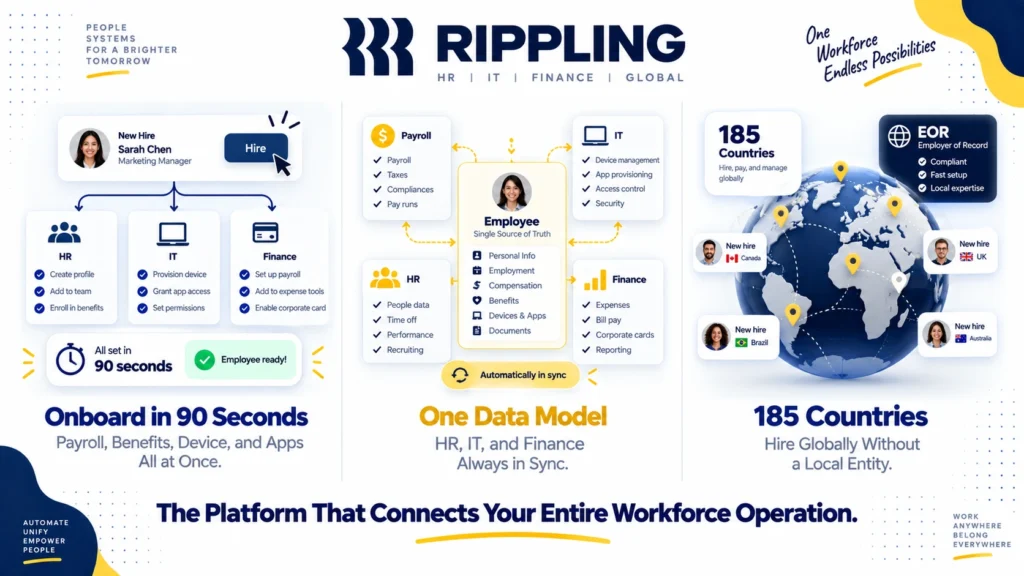
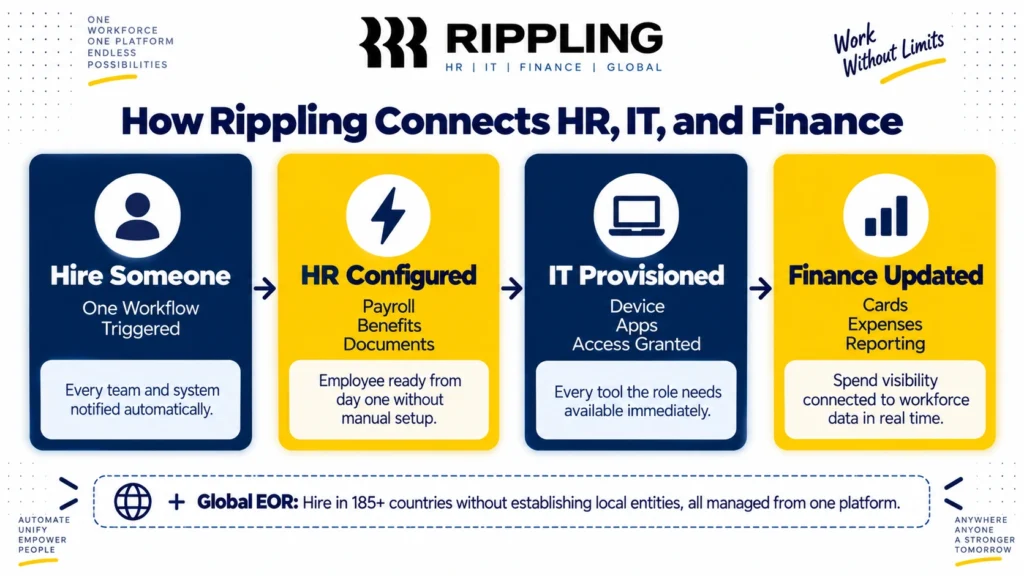
A new hire onboarded in 90 seconds. Payroll configured. Benefits enrolled. Laptop provisioned. Slack, Google Workspace, GitHub, and every other tool the role requires, all granted access. From one workflow. Automatically.
That demo is not a marketing trick. For companies that hire frequently, it represents the elimination of hours of cross-team coordination per hire. And it is the clearest expression of what makes Rippling genuinely different from every other HR platform: a unified employee data model that connects HR, IT, and finance so that a single action in one system triggers the right outcomes across all of them.
With a 4.8 out of 5 rating on G2 across thousands of verified reviews and PCMag’s Editors’ Choice award for Best Payroll Software for growing businesses, Rippling has earned its reputation. However, its modular pricing, lack of published rates, and complexity that makes it overkill for small teams require honest assessment before committing. This review covers everything you need to know.
What Is Rippling?
Rippling is a workforce management platform that unifies HR, IT, and finance operations on a single employee data model. Founded in 2016 by Parker Conrad in San Francisco, it serves technology companies, fast-growing startups, remote and distributed teams, and businesses with global payroll or device management needs.
The fundamental architectural decision that distinguishes Rippling is its unified data model. Every employee’s information, from their job title and compensation to their software access and company-issued device, lives in one system. Consequently, when an employee gets promoted, their payroll, benefits, software permissions, and IT access all update automatically from a single workflow change. No manual updates across disconnected systems. No HR emailing IT emailing finance.
In 2026, Rippling expanded its compliance automation capabilities with Rippling Automated Compliance, which helps customers achieve SOC 2 readiness using data already in the platform without additional tooling. Furthermore, its Employer of Record (EOR) service now covers 185 plus countries, making it one of the most geographically comprehensive workforce platforms available for global team management.
Rippling Pricing in 2026
Rippling’s pricing is modular and quote-based. There are no published rate cards for most modules, which is the most consistent complaint among buyers evaluating the platform. Here is the verified pricing structure as of September 2026:
Core Platform (Unity): Approximately $8 per employee per month plus a $35 monthly base fee. This gives you the core HRIS including employee records, onboarding automation, document management, org charts, time off tracking, and basic reporting. Every Rippling subscription requires the core platform. You cannot purchase individual modules without it.
Payroll: Approximately $8 per employee per month billed annually, or $10 per employee per month billed monthly, added on top of the core platform fee. Includes US domestic payroll with direct deposit, tax filing, garnishments, and compliance. For a 25-person team, payroll adds approximately $200 per month to your base platform cost.
Benefits Administration: Custom pricing. Connects to hundreds of insurance carriers for health, dental, vision, 401k, commuter benefits, and COBRA administration. International benefits run through EOR-administered local plans with depth varying by country.
IT Management: Custom pricing per module. Covers device management (MDM), app provisioning and deprovisioning, inventory tracking, and security policy enforcement. This is one of Rippling’s most distinctive modules and the capability that separates it most clearly from pure HR platforms like BambooHR or Gusto.
Finance Suite: Custom pricing. Covers corporate cards, expense management, bill pay, and real-time spend visibility connected directly to payroll data. No other EOR platform bundles finance management at this depth according to independent analysis of the category.
Global Payroll and EOR: Custom pricing, not published. Rippling’s EOR service covering 185 plus countries requires a demo and custom quote. Independent analysis suggests EOR rates are competitive with Deel and Remote but higher than some single-country specialists.
The real cost model: A 50-person company using core platform, payroll, benefits, and IT management typically pays between $15,000 and $25,000 per year depending on negotiated rates. The $8 per employee entry price is real but represents only the base layer before any operational modules are added. Always request a custom quote with your specific module requirements rather than estimating from the base rate alone.
No self-serve trial: Rippling does not offer a public free trial. Access requires a demo with a sales representative. This is a meaningful barrier for teams that want to evaluate the platform independently before engaging sales. Consequently, budget for the demo process and allow 2 to 4 weeks for evaluation and procurement before your intended start date.
Key Features
Unified Employee Data Model
Every feature in Rippling connects to a single record for each employee. When you hire someone, their information flows automatically from the offer letter through to payroll setup, benefits enrollment, IT provisioning, and software access without manual data re-entry at each step.
When someone leaves, offboarding triggers the reverse automatically. Payroll stops. Benefits terminate. Laptop gets a remote wipe command. Software access revokes across every connected app. What typically takes HR, IT, and finance teams multiple hours of coordination per departure takes minutes in Rippling.
This unified model is what justifies Rippling’s complexity and cost for organizations where employee lifecycle management currently involves significant manual coordination across disconnected systems. For a 100-person company hiring 3 to 4 people per month, the automation savings are real and meaningful.
HR Cloud
Rippling’s HR Cloud covers the complete employee lifecycle. Applicant tracking lets you post jobs and track candidates through a hiring pipeline with information flowing directly into employee records at hire with no duplicate data entry. Onboarding automates the new hire workflow from document signing through first-day access. Performance management handles goal setting, reviews, and compensation planning. Time and attendance tracking integrates with payroll automatically.
The depth of automation in routine HR tasks is consistently cited as Rippling’s most valuable capability by HR teams that have experienced manual workflows. Automated compliance for state-specific employment regulations, automatic I-9 and W-2 management, and ACA compliance reporting all reduce the administrative burden that typically falls on small HR teams managing growing workforces.
Payroll
<cite index=”10-1″>Rippling’s core HRIS platform starts at $8 per employee per month. Payroll is priced at $8 per employee per month billed annually, or $10 per employee per month billed monthly.</cite> The payroll engine handles multi-state compliance, garnishments, contractor payments, and off-cycle runs. <cite index=”10-1″>Once your workers are onboarded, most pay runs can be completed in 90 seconds or less.</cite>
For HR managers who currently spend hours on payroll reconciliation, this speed is transformative. The payroll connects directly to time tracking, benefits deductions, and expense reimbursements so there is no manual reconciliation between systems before running payroll.
IT Management and Device Provisioning
This is Rippling’s most distinctive capability and the one that most clearly separates it from pure HR platforms. Rippling’s IT Cloud manages company-issued devices through MDM (Mobile Device Management), provisions and deprovisions software app access automatically based on role and employment status, tracks IT inventory, and enforces security policies.
The app provisioning automation is particularly powerful. When you hire a software engineer, Rippling can automatically grant access to GitHub, Jira, AWS, Slack, Google Workspace, and any other tools configured for that role, without IT manually processing each access request. When that engineer leaves, all access revokes simultaneously from the same offboarding workflow.
For IT teams managing software access at growing companies, this automation eliminates a significant source of security risk (forgotten access after departure) and operational overhead (manual provisioning for each new hire).
Global Payroll and EOR
Rippling’s Employer of Record service covers 185 plus countries, allowing businesses to hire internationally without establishing local legal entities. The EOR handles local employment contracts, tax compliance, benefits administration, and payroll in each country where you hire.
<cite index=”14-1″>It’s the strongest HRIS layer attached to any EOR product reviewed here, and it doesn’t cost extra if you’re already on Rippling for payroll.</cite> Consequently, companies that need global hiring alongside domestic HR management find Rippling more integrated than using separate EOR providers like Deel or Remote alongside a domestic HR platform.
However, <cite index=”14-1″>reviewers building teams across APAC and Africa consistently hit the 80-country ceiling before their hiring plan is complete.</cite> For companies with hiring plans in less common markets, verifying specific country coverage during the demo is essential rather than assuming the 185-country figure covers your target markets at full depth.
Finance Suite
<cite index=”14-1″>Corporate cards, expense management, bill pay, and real-time spend visibility connect directly to payroll data. No other EOR platform bundles finance management at this depth. For finance teams wanting workforce spend and payroll in one report, this removes a separate tool entirely.</cite>
For CFOs and finance teams at growing companies, having payroll, expenses, and corporate card spend in one system with unified reporting eliminates the reconciliation work that typically happens when these functions live in separate tools. This integration is particularly valuable for companies managing significant contractor and employee expense volumes alongside payroll.
Automated Compliance (2026)
Rippling Automated Compliance, launched in 2026, helps customers achieve SOC 2 readiness using employee and access data already in the Rippling platform without requiring additional compliance tooling. For technology companies pursuing SOC 2 certification, this capability reduces the cost and complexity of the certification process by leveraging workforce data that is already being tracked.
Furthermore, <cite index=”14-1″>SOC 1, SOC 2, SOC 3, ISO 27001, ISO 27018, ISO 42001, and CSA STAR Level 2</cite> certifications make Rippling one of the most comprehensively certified workforce platforms available. For enterprise procurement teams with strict vendor security requirements, this certification stack simplifies vendor approval processes.
Integrations
Rippling connects with 650 plus third-party applications including Google Workspace, Microsoft 365, Slack, Salesforce, HubSpot, QuickBooks, NetSuite, and virtually every major business software platform. Furthermore, the open API enables custom integrations for organizations with proprietary systems.
For organizations already using Notion for documentation, ClickUp or Asana for project management, or n8n for workflow automation, Rippling connects to all of these through its integration layer. Read our Notion review, ClickUp review, and Asana review for how these tools work alongside HR platforms.
What Rippling Does Well
The unified data model genuinely eliminates manual coordination. No competing platform at any price point delivers the same level of automatic synchronization between HR decisions and IT provisioning, finance reporting, and compliance management. For organizations where these functions currently involve significant manual handoffs, the automation value is real and immediate.
<cite index=”11-1″>Rippling has high customer ratings on review platforms: 4.8/5 on G2, 4.9/5 on Capterra, 9/10 on TrustRadius. Across each review platform, customers consistently mention benefits like the following: Advanced automation capabilities that save their team time and boost productivity. Powerful customization options for workflow automations. Strong user experience, with an intuitive interface and robust employee self-service tools. Significant focus on compliance, even for international companies.</cite>
The 90-second new hire onboarding is real for configured organizations. Companies that invest in properly configuring Rippling’s role-based provisioning templates report that new hire onboarding time genuinely drops from hours to minutes. The ROI for high-hiring-velocity companies is quantifiable and significant.
IT management integration is unique in the HR platform category. No major HR platform bundles device management, app provisioning, and security policy enforcement as natively as Rippling. For IT teams at growing companies, this eliminates a separate MDM tool and the manual coordination between IT and HR that generates security risk and administrative overhead.
The security and compliance certification stack is the strongest in the category. The breadth of certifications makes Rippling suitable for enterprise procurement requirements that eliminate less-certified competitors from consideration.
Where Rippling Falls Short
Pricing opacity is the most significant barrier to evaluation. The lack of published module pricing makes budget planning impossible without engaging sales. <cite index=”14-1″>The 3.2 on support and 3.4 on pricing are the honest costs. No published rate means no pre-sales benchmark.</cite> For buyers who want to self-qualify before investing time in a sales process, this opacity is a genuine frustration that competitors with published pricing do not create.
It is overkill for small teams under 25 people. <cite index=”15-1″>For teams under 25 employees who need basic HR, Rippling is likely overkill. The per-seat pricing adds up quickly, and you’ll pay for IT and finance capabilities you may not use.</cite> For small businesses whose primary need is payroll and basic HR, tools like Gusto or BambooHR deliver adequate functionality at lower cost and lower complexity.
The learning curve is real for non-technical HR teams. <cite index=”12-1″>Some users note a common limitation in the learning curve associated with its extensive features.</cite> The breadth of configuration options in Rippling’s automation builder, workflow engine, and module settings requires meaningful investment in learning before the platform runs smoothly.
Module costs stack significantly. The $8 per employee base rate looks affordable. However, adding payroll, benefits, IT, and finance modules at custom per-employee rates means the total cost for a fully configured Rippling deployment is significantly higher than the entry price suggests. Always model the full module stack cost before comparing to all-in-one alternatives with simpler pricing.
No self-serve trial limits independent evaluation. The demo-only access model means you cannot explore the platform at your own pace before engaging a sales representative. Consequently, the evaluation timeline is longer and involves more vendor interaction than platforms with self-serve trials.
Rippling vs Competitors
Rippling vs Gusto: Gusto is the most popular payroll-first HR platform for small businesses with transparent published pricing starting around $40 per month plus $6 per employee. Gusto is simpler, cheaper, and faster to set up. Rippling is more powerful, more configurable, and more expensive. <cite index=”18-1″>Choose Gusto for simplicity and price; choose Rippling for automation, scale, and international reach.</cite>
Rippling vs Deel: Deel focuses primarily on global EOR and contractor management with published pricing starting at $49 per contractor per month. Rippling bundles stronger HRIS, IT management, and finance features alongside its EOR. For companies that primarily need global hiring infrastructure, Deel’s simpler pricing and focused EOR capabilities are competitive. For companies that need comprehensive HR, IT, and finance alongside global hiring, Rippling’s integrated platform is more complete.
Rippling vs BambooHR: BambooHR is a mid-market HRIS focused on core HR functions with a more accessible interface and faster onboarding. It lacks Rippling’s IT management integration, global payroll depth, and finance module. For domestic US businesses without complex IT or global requirements, BambooHR is a simpler and often more affordable choice. For businesses with IT provisioning needs or global teams, Rippling’s additional modules justify the higher cost.
Rippling vs QuickBooks Payroll: QuickBooks Payroll is deeply integrated with QuickBooks accounting and is the natural choice for businesses already on the QuickBooks ecosystem. It covers payroll well but lacks the HR automation, IT management, and global capabilities that Rippling provides. For businesses whose accounting runs on QuickBooks and whose HR needs are straightforward, QuickBooks Payroll is more cost-effective. For businesses that need HR automation depth, Rippling is the stronger choice. Read our QuickBooks review.
Who Should Use Rippling?
Rippling is the right choice if you are:
- A technology company or fast-growing startup with 50 plus employees that hires frequently and wants onboarding automation that eliminates manual coordination between HR, IT, and finance
- A remote or distributed team that needs to manage company-issued devices, software access, and global payroll from one platform
- A company with international hiring needs across 185 plus countries that wants EOR alongside domestic HR rather than separate vendors for each
- An organization pursuing SOC 2 certification that wants to leverage existing workforce data in the compliance process
- A finance-conscious organization that wants payroll, corporate cards, expenses, and bill pay connected in one reporting system
However, Rippling may not be the right fit if you are:
- A small business under 25 employees where Gusto or BambooHR deliver adequate payroll and HR functionality at significantly lower cost and complexity
- A team that needs transparent published pricing to self-qualify before engaging sales
- An organization that wants a self-serve trial rather than a demo-based evaluation process
- A business whose primary need is payroll only, where dedicated payroll providers offer comparable functionality at lower cost without Rippling’s module complexity
Rippling Review: Final Verdict
Rippling is the most technically sophisticated workforce management platform available for growing businesses in 2026. The unified HR, IT, and finance model is genuinely differentiated. The automation depth is real. The 4.8 out of 5 G2 rating reflects genuine customer satisfaction from organizations that have invested in the platform properly.
However, the pricing opacity, the complexity that makes it overkill for small teams, and the demo-only evaluation model create real barriers that competing platforms do not. <cite index=”18-1″>Rippling’s standout feature is its unified HR, IT, and finance on one employee data model with deep automation. Its biggest weakness is complexity and stacked module costs that make it overkill for small, simple teams.</cite>
The honest recommendation is straightforward. If your team is 50 plus employees, hires frequently, manages company devices, or operates internationally, Rippling delivers automation value that no competing platform matches at any price. If your team is under 25 people with straightforward payroll and HR needs, Gusto or BambooHR are better fits.
Overall rating: 4.5 out of 5
Rippling is excellent for the organizations it was designed to serve. The challenge is ensuring your team’s scale and complexity justify the investment in platform configuration and the modular cost model before committing.