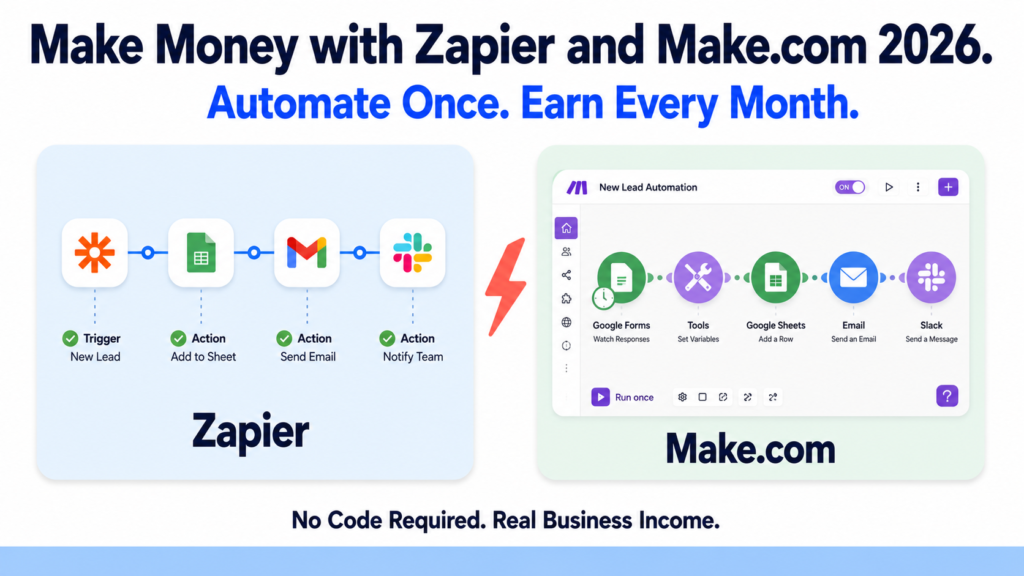
Most people think automation is only for developers. However, that idea is completely outdated in 2026.
Zapier and Make.com are two of the most powerful automation platforms available today. Furthermore, neither requires a single line of code to use. You connect your apps, set up your workflow, and the automation runs on its own, around the clock, without you touching anything.
For freelancers, consultants, and entrepreneurs, this creates a genuine income opportunity. Businesses desperately need automation but lack the skills or time to set it up. You can fill that gap and get paid well for it.
In this article, you will learn exactly what each tool does, how they compare, and the concrete projects you can build to start earning income this month.
What Is Zapier?
Zapier is the world’s most widely used automation platform. It connects over 7,000 apps and automates the workflows between them. When something happens in one app, Zapier automatically triggers an action in another.
For example, when a new customer fills out a form, Zapier automatically adds them to your CRM, sends a welcome email, creates a task in your project management tool, and notifies your team on Slack. All of this happens instantly without you doing anything.
Zapier is the most beginner-friendly automation tool available. Its interface is simple and linear, making it easy to understand even for people who have never built an automation before. Consequently, it is the best starting point for freelancers who want to offer automation services.
However, Zapier is also the most expensive option. The free plan now caps at 100 tasks per month, down from 750 in 2024. Paid plans start significantly higher than competitors.
Key features in 2026:
- 7,000+ app integrations, the largest library available
- Multi-step Zaps with conditional logic, filters, and paths
- AI-powered Zap builder: describe a workflow in plain language and Zapier builds it
- Tables and interfaces for lightweight databases and forms
- Chatbots and agents for automated customer interactions
- Near-instant trigger intervals on paid plans
- Zapier Central for AI agent workflows
Pricing in 2026:
- Free: $0/month, 100 tasks per month, 5 single-step Zaps only
- Starter: $29.99/month (or $19.99/month annually), 750 tasks, multi-step Zaps
- Professional: $103.50/month (or $73.50/month annually), 2,000 tasks, webhooks, custom logic
- Team: $103.50/month (or similar annually), shared workspaces, role-based access
- Enterprise: custom pricing for large organizations
Free plan: Yes, but 100 tasks per month is very limited for real business use.
What Is Make.com?
Make.com (formerly Integromat) is a visual automation platform that handles more complex workflows than Zapier at a significantly lower price. Make is 3 to 5 times cheaper than Zapier for equivalent workflows.
Instead of a linear step-by-step interface, Make uses a visual canvas where you build workflows by connecting modules in a flowchart-style diagram. This makes it more powerful for complex automations involving loops, data transformation, error handling, and branching logic.
Furthermore, as of 2026, Make has native integrations with OpenAI, Anthropic’s Claude, Google’s Gemini, and Stability AI. This means you can build AI-powered automation workflows that process data, generate content, and make decisions automatically.
However, Make has a steeper learning curve than Zapier. Therefore, it is better suited to freelancers who are comfortable spending time learning a more powerful system.
Key features in 2026:
- Visual canvas-based workflow builder with branching and looping
- 3,000+ app integrations
- Native AI integrations with OpenAI, Claude, and Gemini
- Credit-based pricing system introduced in August 2025
- AI agents built into workflows
- Webhooks and API connections on all paid plans
- Advanced data transformation and error handling
- 1-minute minimum run interval on paid plans
Pricing in 2026:
- Free: 1,000 credits per month, 2 active scenarios, 15-minute minimum interval
- Core: $9/month (annual), 10,000 credits per month, unlimited scenarios
- Pro: $16/month (annual), higher credits, priority execution, Make API access
- Teams: $29/month (annual), team collaboration features
- Enterprise: custom pricing for large organizations
Free plan: Yes, the most generous free tier of any major automation platform.
Important note on Make pricing: Make switched from operations to credits in August 2025. Standard module executions cost one credit each, while AI features and code execution cost more. Therefore, always estimate your credit usage before committing to a plan.
Zapier vs Make.com: Which One Should You Use?
Both tools are excellent. However, they serve different needs and different types of freelancers.
Choose Zapier if:
- You are new to automation and want the simplest learning curve
- Your clients use popular apps and need straightforward connections
- You value ease of use over cost savings
- You want to start offering services quickly without a steep learning period
Choose Make.com if:
- You want to build more complex, powerful automations
- Cost efficiency matters and you want to maximize value per dollar
- Your clients need workflows with branching logic, data transformation, or AI integration
- You are comfortable spending 1 to 2 weeks learning a more capable system
For maximum earning potential: Learn both. Zapier clients are more common and easier to find. Make.com lets you deliver more sophisticated solutions at a higher price point. Consequently, knowing both tools makes you more versatile and more valuable.
Real Project Ideas to Make Money with Zapier and Make.com
Project 1: Automation Setup Service for Small Businesses
Small business owners waste hours every week on repetitive manual tasks. They copy data between apps, send follow-up emails manually, update spreadsheets by hand, and notify team members about the same recurring events. You fix all of this for them.
How it works: A client tells you their biggest time-wasting manual tasks. You identify the right automations to solve them and build the workflows in Zapier or Make.com. Common high-value automations include lead capture to CRM, invoice generation from form submissions, social media post scheduling, and customer onboarding sequences.
Charge $200 to $800 per automation setup depending on complexity. A client with 5 workflows to automate is a $1,000 to $4,000 project. Furthermore, offer a monthly maintenance retainer of $100 to $200 to manage and update the automations as the business evolves. With 5 retainer clients, that is $500 to $1,000 in recurring monthly income on top of setup fees.
Where to find clients: LinkedIn outreach to small business owners, local business Facebook groups, and Upwork where “Zapier automation” is a consistently high-demand category.
Project 2: AI-Powered Workflow Automation for Marketing Agencies
Marketing agencies handle enormous volumes of repetitive tasks. Creating reports, publishing content, tracking campaign performance, and moving data between tools. However, most agencies are too busy delivering work for clients to optimize their own internal workflows.
How it works: You offer agencies a “workflow audit and automation package.” You spend one hour understanding how they currently work, identify the 3 to 5 biggest time drains, and build Make.com scenarios that automate them using AI integrations. For example, a scenario that automatically generates a weekly performance summary from Google Analytics data using Claude, formats it as a report, and emails it to the client every Monday morning.
Charge $500 to $2,000 for the initial setup package. Many agencies will keep you on a monthly retainer of $300 to $800 to build additional automations as their needs grow. Moreover, satisfied agencies refer other agencies, making this a strong referral-driven niche.
Where to find clients: LinkedIn outreach to agency owners and operations managers. Search for “marketing agency” and “operations” in your LinkedIn connection requests.
Project 3: E-commerce Automation Service
Online stores run on repetitive processes. Order confirmation emails, inventory alerts, customer segmentation, abandoned cart follow-ups, review requests, and supplier notifications all happen dozens or hundreds of times per day. Each one can be automated.
How it works: You offer Shopify or WooCommerce store owners a complete automation package. You use Zapier or Make.com to connect their store to their email platform, CRM, accounting software, and supplier systems. You set up automated abandoned cart sequences, post-purchase review request emails, low inventory alerts, and customer segmentation rules.
Charge $300 to $1,000 for the setup. Many e-commerce clients will see an immediate increase in revenue from abandoned cart automations alone, making the ROI obvious and the retainer easy to sell. Ongoing retainers typically run $150 to $400 per month.
Where to find clients: Etsy seller communities, Shopify Facebook groups, and cold email outreach to small online stores in niches you understand.
Project 4: Lead Generation Automation for Real Estate and Professional Services
Real estate agents, lawyers, accountants, and financial advisors all need a consistent flow of qualified leads. However, most handle their lead follow-up manually, which means slow response times and lost opportunities.
How it works: You build a complete lead capture and follow-up automation. When a potential client fills out a contact form on the website, Make.com automatically qualifies the lead based on their responses, adds them to a CRM, sends a personalized follow-up email within minutes, creates a task for the agent or advisor, and schedules a reminder if there is no response within 48 hours.
This type of automation directly impacts income for the client, making it one of the highest-value automation services available. Charge $400 to $1,200 for setup. Real estate agents and professional service firms will pay premium rates because the automation directly generates revenue for them.
Where to find clients: LinkedIn outreach to real estate agents, financial advisors, and law firms. These audiences are active on LinkedIn and respond well to direct, value-focused outreach.
Project 5: Sell Automation Templates
Just as Notion templates and Canva templates sell well, pre-built automation templates for Zapier and Make.com are a growing market. You build a polished, well-documented automation template for a specific use case and sell it as a digital product.
How it works: Build automation templates for high-demand use cases. A complete client onboarding automation for freelancers. A social media publishing workflow for content creators. A lead management system for real estate agents. A customer support automation for e-commerce stores. Document each template clearly with setup instructions, video walkthrough, and a troubleshooting guide.
Sell on Gumroad for $19 to $49 per template. Bundle 5 related templates for $99 to $149. Popular templates generate consistent passive income as new freelancers and business owners discover them through search and social media.
Project 6: Monthly Automation Retainer Service
Instead of one-off projects, build a subscription-based automation service. Clients pay a fixed monthly fee and you handle all their automation needs including building new workflows, fixing issues, updating existing automations, and consulting on new opportunities.
How it works: Offer three retainer tiers. A basic tier at $200 to $300 per month for maintenance of existing automations and one new simple workflow per month. A standard tier at $400 to $600 per month for up to three new automations per month and priority support. A premium tier at $800 to $1,500 per month for unlimited automation work and weekly strategy calls.
With 5 clients on the standard tier, that is $2,000 to $3,000 in predictable monthly recurring income. This model is more stable than project-based work and significantly easier to plan around.
What You Need to Get Started
- A Zapier free account for building and testing simple automations
- A Make.com free account for building more complex workflows
- A free Upwork or Fiverr profile for finding your first clients
- A free Gumroad account if you plan to sell automation templates
Total startup cost: $0. Both platforms have free plans that are sufficient for building, testing, and demonstrating your services to potential clients. You only need a paid plan once you are managing live client automations with higher usage volumes.
The Realistic Timeline
Week 1 to 2: Learn both tools using their free plans. Build 3 to 5 sample automations covering different use cases. Connect apps you personally use, such as Gmail, Notion, and Google Sheets, to understand how the platforms work.
Week 3 to 4: Build 2 to 3 polished sample automations to use as portfolio pieces. Create a short video walkthrough of each one showing how it works and what problem it solves.
Month 2: Post your service on Fiverr or Upwork. Reach out to 5 to 10 potential clients directly on LinkedIn. Land your first 1 to 2 paying projects.
Month 3 to 6: Convert project clients into monthly retainers. Build your automation template library for passive income. Raise your rates as your portfolio and reviews grow.
The Bottom Line
Zapier and Make.com represent one of the most accessible paths to building a real, scalable income from AI and automation skills in 2026. The tools themselves are affordable. The demand from businesses is enormous. Furthermore, the skill gap between what businesses need and what they can do themselves is large and growing.
You do not need to be a developer. You do not need years of experience. You need to learn these tools well enough to solve real problems for real clients, and then show up consistently.
Pick one tool and build your first automation today. The income will follow.