“AI video” tools often promise speed but deliver something you’d never publish.
Either the avatar feels off, the voice sounds synthetic, or the pacing kills engagement.
That’s exactly what I ran into before seriously testing HeyGen across real workflows: YouTube scripts, client deliverables, and internal training.
What surprised me wasn’t just what it can do, it’s where it quietly fails, and how small changes dramatically improve output.
This version goes deeper: real limitations, edge cases, and the non-obvious tweaks that separate average results from usable content.
What HeyGen Actually Does
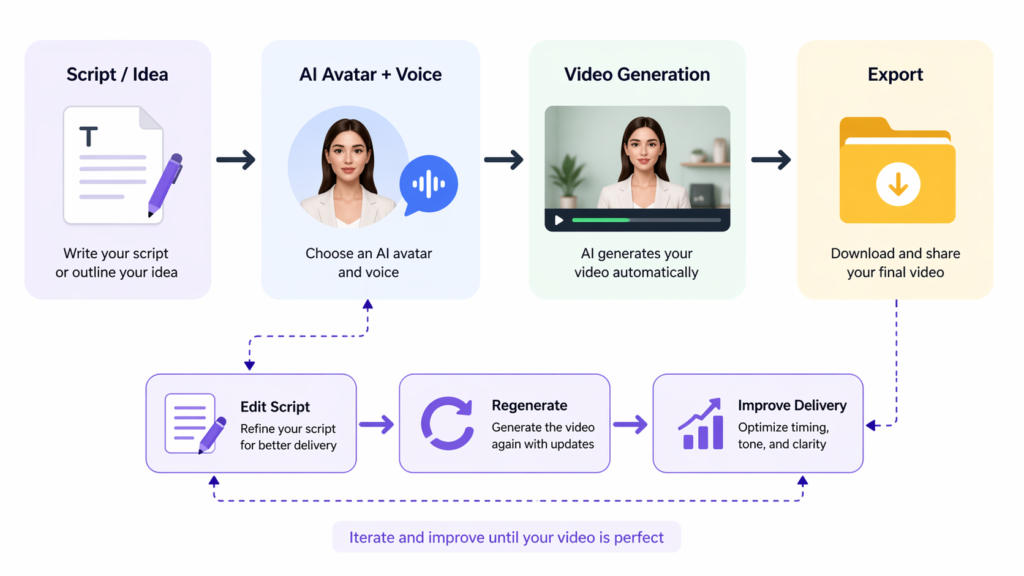
At a basic level, HeyGen turns text into talking-avatar videos.
But in practice, it’s not a “video generator” It’s a script interpreter.
- Good script → surprisingly usable video
- Average script → stiff, unnatural output
- Bad script → unusable content
What I initially misunderstood:
I thought avatar realism was the main factor. It’s not. The linguistic rhythm of your script matters more than visuals.
Where it shines:
- Structured content (tutorials, explainers)
- Repeatable formats (lists, frameworks)
- Low-emotion delivery
Where it breaks down:
- Humor (timing is off)
- Persuasion, heavy content
- Storytelling with emotional shifts
Key Features (Deeper Insights)
| Feature | Hidden Strength | Real Limitation | What Most Users Miss |
|---|---|---|---|
| AI Avatars | Consistency across videos | Micro-expressions feel static | Works best with neutral tone scripts |
| Voices | Fast multilingual output | Emphasis is often wrong | Needs manual punctuation tuning |
| Templates | Speed | Creative constraint | Great for ads, bad for unique content |
| Custom Avatars | Brand control | Lighting + posture limitations | Requires controlled recording setup |
| Translation | Scalable localization | Cultural tone mismatch | Needs human review |
One thing I noticed:
Even small punctuation changes (like adding “…”) significantly affect how natural the voice sounds.
How to Use It (Real Workflow + Mistakes)
Step 1: Start with a “bad” script (on purpose)
Most users jump straight to perfection. That’s inefficient.
I start with something rough:
“Email marketing is important because it helps businesses grow and connect with customers.”
Step 2: Optimize for speech, not reading
Better version:
Email marketing… is still one of the highest ROI channels.But most people use it wrong.Here's what actually works.
Why this works:
- Natural pauses
- Short sentences
- Clear rhythm
Step 3: Generate and observe (not judge)
First output issues I consistently see:
- Slight delay before speech
- Wrong emphasis on key words
- Overly smooth pacing (feels unnatural)
Step 4: Fix timing manually
Non obvious fix:
Add punctuation for timing control:
- “…” → pause
- Line breaks → pacing reset
- Short sentences → better delivery
Step 5: Regenerate selectively
Mistake I made early:
Regenerating entire videos after small changes.
Better approach:
- Fix only weak sections
- Keep strong segments
- Iterate in chunks
Real Life Use Cases
1. High-Volume Content Production
Result: Fast, consistent output
Problem: Viewer fatigue over time
Insight: Rotate avatars and voices to maintain engagement
2. Client Work (Agencies)
Result: Faster delivery
Problem: Clients notice “AI feel” if overused
Insight: Mix AI + real footage for better perception
3. Course Creation
Result: Efficient module production
Problem: Monotony across lessons
Insight: Break videos into shorter segments (2-3 min max)
4. Localization
Result: Massive time savings
Problem: Cultural tone mismatch
Insight: Rewrite scripts per language, don’t just translate
Example Outputs (Realistic)
| Task | Without AI | With HeyGen |
|---|---|---|
| Explainer video | 2–4 hours recording/editing | 20 min + iteration |
| Ad creative | Multiple shoots | Rapid testing variations |
| Training content | Manual recording | Scalable but less engaging |
| Localization | Re-record each version | Fast but needs refinement |
Pricing Strategy (Real Insight)
What most people get wrong
They assume:
“More credits = more videos = more value”
Not true.
What actually happens:
- You waste credits on bad scripts
- Regeneration eats budget quickly
Smarter approach
- Test scripts in short format (30 sec)
- Validate delivery
- Scale only proven formats
Pros and Cons
Pros
- Extremely fast production
- Scales content effortlessly
- Great for structured formats
- Reduces dependency on filming
Cons
- Script quality bottleneck
- Emotional delivery is weak
- Iteration costs can add up
- Can feel repetitive at scale
Who Should Use It
Ideal Users
- Growth marketers
- Course creators
- Agencies with repeat workflows
- SaaS teams
Not Ideal
- Personal brands relying on authenticity
- Storytellers
- High end video creators
Advanced Tips (Non-Obvious)
1. Write “imperfect” scripts
Perfect grammar = robotic delivery
Slightly broken structure = more natural speech
2. Control emphasis manually
Example:
- “This is important” → flat
- “This… is important” → emphasis
3. Use “pattern formats”
Best-performing structures:
- “3 mistakes…”
- “Here’s the truth…”
- “Most people think… but…”
These consistently produce better delivery.
4. Layer visuals externally
HeyGen videos alone can feel static.
Better workflow:
- Export video
- Add B-roll or captions in another editor
5. Avoid long videos
Performance drops sharply after ~90 seconds.
6. Rotate voices strategically
Using the same voice repeatedly reduces perceived authenticity.
Final Verdict
HeyGen is a production multiplier.
Used incorrectly, it creates generic, forgettable content.
Used correctly, it becomes a powerful system for scaling structured video.
Best use case:
High-volume, structured, low-emotion content
Final recommendation:
Treat it like a tool that amplifies your thinking, not replaces it.
FAQ
Can HeyGen replace a video team?
No. It replaces repetitive production, not creative direction.
How do you make videos feel less “AI”?
Better scripts, pacing, and external editing.
Is it good for ads?
Yes, but only after testing multiple variations.
What’s the biggest mistake?
Treating it like a one click solution.
How long until you get good results?
After 5-10 iterations, you start understanding what works.
Call to Action
If you want to scale video without scaling effort, try HeyGen, but don’t rush.
Start with one script.
Refine it.
Test variations.
That’s where the real advantage shows up.