Cold email still works, but most teams approach it inefficiently.
They either send too few emails and get no traction, or they scale too fast and destroy their sender reputation. Deliverability becomes the bottleneck long before messaging does.
Traditional tools focus on sending emails, not on protecting infrastructure. As a result, users often end up in spam folders, even with good copy and targeting.
That’s where Instantly.ai positions itself differently. It’s not just about sending outreach, it’s about scaling it safely. If used correctly, it allows you to send thousands of emails per day across multiple accounts while maintaining deliverability and response rates.
The value is straightforward: more conversations without damaging your domains.
Instantly’s Core Functionality
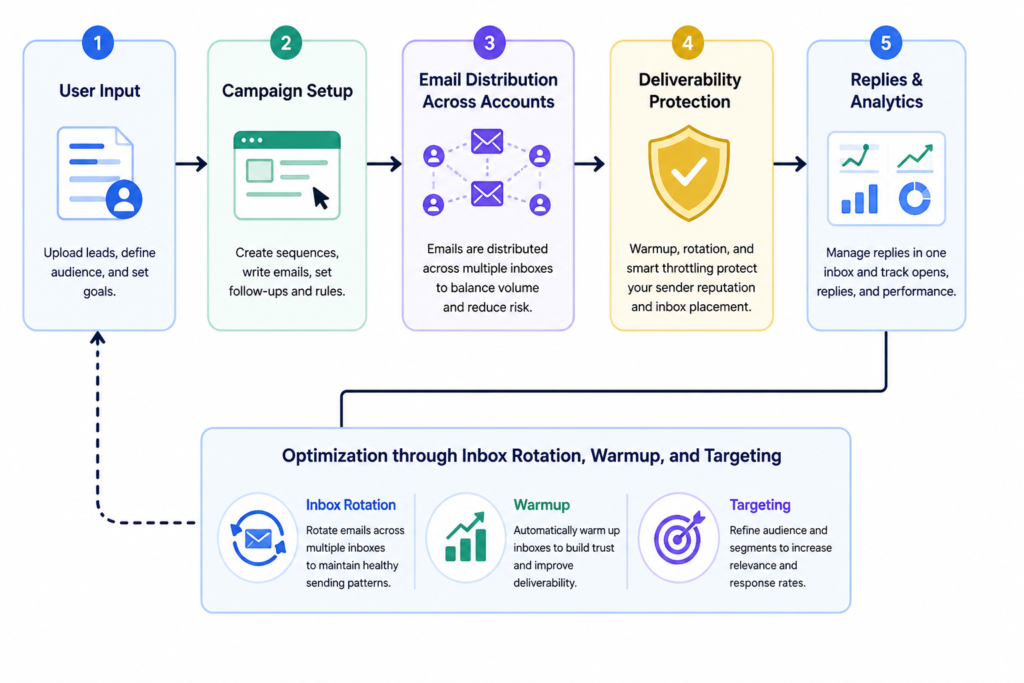
Instantly is a cold email infrastructure platform designed for scale. It combines inbox management, email warmup, campaign automation, and deliverability optimization into a single system.
At its core, it solves a specific problem: sending high volume cold outreach without getting flagged as spam.
It’s primarily used by agencies, sales teams, and growth operators who need consistent outbound lead generation. It performs well when campaigns are structured properly, meaning multiple domains, warmed inboxes, and segmented targeting.
Where it struggles is when users expect it to “fix” bad outreach. If your targeting is weak or your messaging is generic, Instantly will help you send more emails, but it won’t improve your conversion rate automatically.
One important observation: Instantly’s real strength is infrastructure, not copywriting or personalization. Users who treat it like a full outbound solution often miss that distinction.
Key Features
One of the most impactful capabilities is inbox rotation. Instead of sending all emails from a single address, Instantly distributes them across multiple inboxes. This significantly reduces the risk of spam flags.
In practice, this means you can send 5,000 emails per day using 50 inboxes instead of risking everything on one domain. However, this only works if those inboxes are properly warmed up, something many users underestimate.
The built in warmup system simulates real conversations between inboxes to build sender reputation. It’s effective, but slow. Expect at least 2-3 weeks before a new inbox performs reliably. Skipping this step is one of the most common causes of failure.
Campaign automation is flexible but not overly complex. You can create sequences with follow ups, delays, and conditions. The limitation is that personalization depth is basic compared to more advanced tools. You’ll need external enrichment tools for highly customized outreach.
Another important feature is deliverability tracking. You can monitor open rates, reply rates, and bounce rates across campaigns. The insight here is that these metrics are only useful if your list quality is high. Otherwise, they can be misleading.
How to Use It
A typical workflow starts before you even log into the tool. You need multiple domains, each with several inboxes. Most users skip this and try to scale from one domain, which quickly leads to spam issues.
After setting up inboxes, the next step is warmup. This runs automatically, but it requires patience. Launching campaigns too early will hurt performance.
Once warmup stabilizes, you create campaigns. This includes uploading leads, writing sequences, and assigning inboxes.
During usage, Instantly distributes emails across accounts and handles follow-ups. Replies are centralized, which simplifies management.
Where things often break is targeting. Users upload large, unfiltered lists and expect results. This leads to low reply rates and wasted sending capacity.
A better approach is to segment leads carefully and run smaller, controlled campaigns first.
Improved outreach example:
Instead of:
“Hi, I’d love to connect and show you our solution…”
Use:
“Quick question, are you currently handling outbound internally or through an agency?”
This kind of message increases replies because it lowers friction and feels relevant.
Common beginner mistake:
Sending too many emails per inbox too quickly.
Fix:
Limit to 20-30 emails per inbox per day initially, then scale gradually.
Real Life Use Cases
For lead generation agencies, Instantly is used to manage dozens of client campaigns simultaneously. Each client gets separate domains and inbox pools, which reduces cross risk. The result is stable outreach at scale.
In SaaS sales teams, it’s often used to test multiple messaging angles quickly. By distributing campaigns across inboxes, teams can run parallel experiments without risking deliverability.
Recruiters use it to reach passive candidates. Instead of relying on LinkedIn alone, they can contact candidates directly via email, increasing response rates when messaging is targeted.
Freelancers use it for client acquisition. With a small setup (5-10 inboxes), they can consistently generate inbound leads without paid ads.
A key insight across all use cases: success depends more on targeting and structure than on volume.
Example Outputs
| Task | Without AI | With Instantly.ai |
|---|---|---|
| Cold outreach setup | Manual email sending from 1 inbox | Distributed sending across 20+ inboxes |
| Deliverability | Frequent spam issues | More stable inbox placement |
| Follow ups | Often forgotten | Automated sequences |
| Scaling | Risky and inconsistent | Controlled and predictable |
| Reply tracking | Scattered across inboxes | Centralized dashboard |
Pricing
Instantly typically operates on a subscription model based on features and scale.
The cost becomes justified when you’re running multiple campaigns or managing several clients. For small scale outreach, it can feel expensive relative to simpler tools.
A common mistake is over-investing in inbox infrastructure before validating messaging. Users often set up dozens of inboxes but fail to generate replies.
The real cost is often how the tool is used, not the subscription itself. Poor targeting wastes both time and sending capacity.
Strengths and Limitations
Instantly performs exceptionally well at scaling outreach safely. Its inbox rotation and warmup systems are designed for high volume sending without immediate penalties.
However, it doesn’t solve core outreach problems like messaging quality or lead relevance. If those are weak, scaling only amplifies inefficiency.
Another limitation is onboarding complexity. Setting up domains, DNS records, and inboxes requires technical understanding. This can slow down new users.
The trade off is clear: more control and scalability in exchange for more setup effort.
Who Should Use It
Instantly is best suited for agencies, outbound sales teams, and growth operators who need to run multiple campaigns at scale.
It’s less suitable for beginners looking for a simple “plug and play” outreach tool. Without understanding deliverability and targeting, results will be inconsistent.
If you’re only sending a few emails per day, this tool is likely overkill.
Advanced Tips
Use multiple domains instead of scaling a single one. This spreads risk and improves long term stability.
Segment campaigns aggressively. Smaller, highly targeted campaigns outperform large generic ones.
Pause under performing campaigns quickly. Continuing to send low response emails damages sender reputation.
Combine Instantly with data enrichment tools. Better data improves both deliverability and conversion rates.
Monitor reply quality, not just quantity. High reply rates with low intent are misleading.
Final Verdict
Instantly.ai is one of the most effective tools for scaling cold email outreach without compromising deliverability.
It’s worth using if you understand outbound systems and need volume. It’s especially valuable for agencies and teams managing multiple campaigns.
The main limitation is that it doesn’t improve your messaging or targeting. Those still require strategy and discipline.
Used correctly, it becomes a powerful infrastructure layer for outbound growth.
FAQ
How many emails can you safely send per day?
It depends on the number of inboxes. A common benchmark is 20-40 emails per inbox daily.
Does Instantly improve email copy?
No. It focuses on sending and deliverability, not writing or personalization.
How long does warmup take?
Typically 2-3 weeks for stable performance.
Can beginners use it effectively?
Yes, but only if they invest time in learning deliverability basics.
Is it better than traditional email tools?
For scale and deliverability, yes. For simplicity, not necessarily.
Call to Action
If you’re running outbound campaigns and struggling with scale or deliverability, the next step is to test it in a controlled setup.
Start using Instantly.ai with a small batch of inboxes, validate your messaging, and scale gradually.