n8n is the fastest growing automation platform in 2026, up 340% in search interest according to recent SaaS trend data. It is also the most misunderstood. Most automation tools ask you to choose between power and simplicity. Zapier is simple but limited. Custom code is powerful but slow to build. n8n’s answer is a third path: a visual workflow builder with full JavaScript and Python code execution available at any step.
The result is a platform that genuinely serves two audiences simultaneously. Non-developers can build workflows by connecting nodes in a visual canvas. Developers can drop into a Code node at any point and write custom logic that the visual layer cannot express. Consequently, n8n has become the automation tool of choice for technical teams that have outgrown Zapier and Make.com but do not want to build custom integration infrastructure from scratch.
However, n8n is not for everyone. Its learning curve is steeper than no-code alternatives. The pricing gap between its Pro and Business cloud plans is jarring. And self-hosting, while technically free, carries infrastructure management overhead that many teams underestimate. This honest review covers everything you need to decide whether n8n is the right automation tool for your team in 2026.
What Is n8n?
n8n (pronounced “n-eight-n”) is a fair-code workflow automation platform founded in 2019 by Jan Oberhauser in Berlin. It started as an open-source project and has grown into one of the most discussed automation platforms in the developer and technical marketing communities.
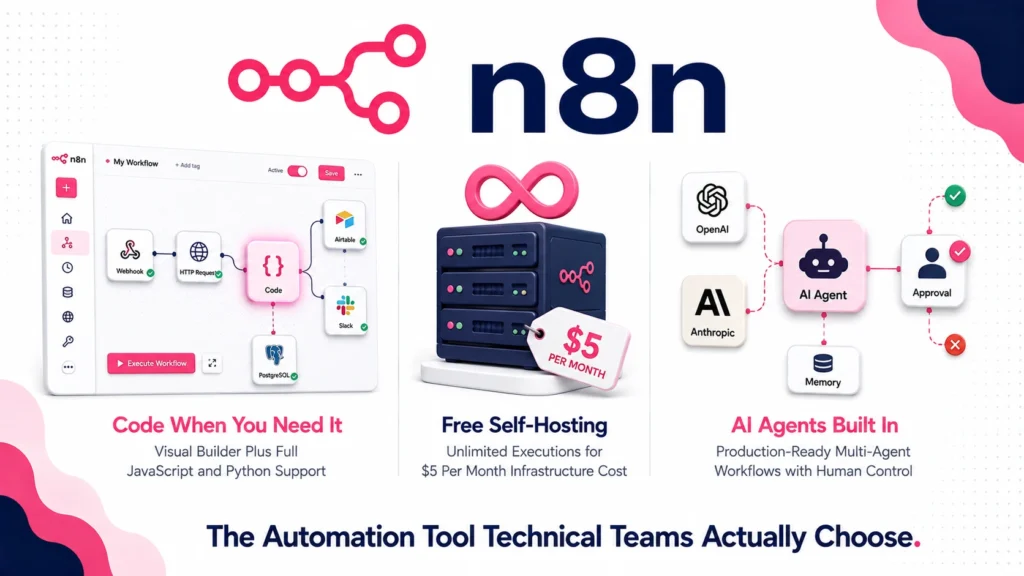
The platform operates on a node-based visual editor where each node represents an action, trigger, or data transformation. You connect nodes to build workflows, and each connection defines how data flows from one step to the next. What makes n8n different from Zapier and Make.com is the Code node, which accepts upstream data, runs JavaScript or Python, and passes results to the next node. This means automation logic is never capped by what the visual interface can express.
In 2026, n8n has invested heavily in AI agent capabilities. The platform includes native Tools Agent and Conversational Agent nodes, multi-agent orchestration, human-in-the-loop approval gates, and native integrations with OpenAI, Anthropic Claude, and other major AI providers. Consequently, teams building production AI automation workflows increasingly choose n8n over dedicated AI agent platforms.
A critical licensing note: n8n uses a fair-code Sustainable Use License rather than a standard open-source license. This means the source code is freely available and self-hosting is free, but commercial redistribution and offering n8n as a managed service are restricted. It is not OSI-approved open source, which matters for legal and procurement teams in regulated organizations.
n8n Pricing in 2026
n8n offers two deployment models with distinct pricing structures. Understanding both before choosing is essential. All prices verified August 2026.
Self-Hosted Community Edition
Free forever. The Community Edition is available at no cost with unlimited workflows, unlimited executions, unlimited active automations, and access to all 400 plus native integrations. You pay only for server infrastructure.
Infrastructure cost for self-hosting runs approximately $3 to $7 per month on managed hosting platforms like Hetzner or a VPS provider. Consequently, teams with technical resources to set up and maintain a Docker or Kubernetes deployment can run full production automation workloads for under $10 per month in total costs.
This is the most significant differentiator in n8n’s value proposition. No other mainstream automation platform at any tier gives you unlimited executions for infrastructure cost alone.
Self-hosted Business plan: Available at approximately €333 per month (billed annually, 50% discount available for startups with under 20 employees and under €5M in funding). Adds SSO and SAML authentication, role-based access control, audit logs, Git version control for workflow management, and dedicated support.
Cloud Plans
Starter: €24 per month (monthly) or €20 per month (annual billing). Includes 2,500 executions per month, unlimited workflows, unlimited active automations (active workflow limits were removed in April 2026), and unlimited users. 14-day free trial available, no credit card required.
Important execution caveat: n8n counts each step in a workflow as a separate execution, not each workflow run. A workflow with 5 nodes that runs once consumes 5 executions. Consequently, 2,500 executions on the Starter plan supports far fewer actual workflow runs than the number suggests. A complex 20-step workflow running 100 times per month consumes 2,000 executions alone.
Pro: €60 per month (monthly) or €50 per month (annual billing). Includes 10,000 executions per month, all Starter features, plus debug executions, workflow history, and custom variables. For teams running moderate automation volume with complex multi-step workflows, Pro is the realistic minimum viable cloud plan.
Business: €800 per month (monthly billing). Includes 40,000 executions per month, shared projects for team collaboration, 30-day execution insights, SSO and SAML, Git version control, and dedicated support. The jump from Pro at €60 to Business at €800 is the most jarring pricing gap in the platform and the most consistent complaint in user reviews. There is no intermediate tier.
Enterprise: Custom pricing negotiated directly. Designed for large organizations with compliance requirements, custom execution volumes, and dedicated support SLAs.
Startup plan: Self-hosted Business features at 50% off for companies with fewer than 20 employees and under €5M in funding. At approximately €333 per month, this makes Business-tier features accessible for early-stage technical teams.
The honest pricing verdict: For technical teams that can self-host, n8n’s Community Edition at infrastructure cost only ($3 to $7 per month) is the best value in automation by a significant margin. For teams that need managed cloud hosting without DevOps overhead, the Pro plan at €50 per month covers most moderate automation needs. The gap between Pro and Business is a legitimate product gap that n8n should address with an intermediate tier.
Key Features
Visual Workflow Builder with Code Nodes
n8n’s canvas-based workflow editor connects nodes visually, similar to Make.com. However, what genuinely distinguishes it is the Code node available at any point in any workflow. You can write JavaScript or Python to transform data, call external APIs with custom logic, implement complex conditional routing, or handle edge cases that visual nodes cannot address.
One documented example from a technical review illustrates this well: parsing complex webhook payloads from a legacy CRM that required custom data transformation took over 10 nodes in Zapier but 5 minutes of code in n8n. For engineering and technical operations teams, this code flexibility is the primary reason to choose n8n over simpler alternatives.
Self-hosted instances also support npm packages and Python libraries inside Code nodes, extending the available logic to virtually any capability the respective ecosystems provide.
400 Plus Native Integrations
n8n includes over 400 pre-configured integration nodes covering Google Workspace, Microsoft 365, Slack, Salesforce, HubSpot, Notion, GitHub, Airtable, and all major AI platforms including OpenAI and Anthropic. Furthermore, the HTTP Request node enables connection to any API that is not natively supported, which effectively makes the integration library unlimited for teams comfortable with API documentation.
The integration depth is meaningful. n8n’s native nodes handle authentication, pagination, error handling, and data mapping automatically, which eliminates significant boilerplate code compared to building custom integrations from scratch.
AI Agent Capabilities
n8n’s AI agent features have advanced significantly in 2026. The native Tools Agent node connects an LLM to a set of available tools and autonomously decides which tools to call to complete a given objective. The Conversational Agent node handles multi-turn dialogue with memory and tool use. Furthermore, multi-agent orchestration lets you build systems where multiple AI agents collaborate, with human-in-the-loop approval gates controlling which steps require human review before proceeding.
Critically, AI agent workflows in n8n run on the same execution model as regular workflows with no separate AI pricing tier. You pay for the executions your agent workflows consume, and LLM API calls are billed separately by your AI provider (OpenAI, Anthropic, etc.) at their standard rates. Consequently, the total cost of running AI agents in n8n is more transparent and often lower than dedicated AI agent platforms that charge per conversation or agent action.
Self-Hosting Flexibility
n8n supports Docker and Kubernetes deployment, making it compatible with virtually any cloud infrastructure including AWS, Google Cloud, Azure, Hetzner, and bare metal servers. The Community Edition runs without execution limits on self-hosted infrastructure, which is the primary reason technical teams choose n8n over cloud-only alternatives.
For organizations with data residency requirements, self-hosting means workflow data never leaves their infrastructure. This is particularly important for companies in regulated industries handling sensitive customer data, financial records, or healthcare information where third-party data processing raises compliance concerns.
Execution-Based Pricing Model
Unlike Zapier which prices by task and Make.com which recently switched to credits, n8n prices by execution (each node step in a workflow). For complex workflows with many steps, this model can be significantly cheaper than alternatives. A 20-step workflow running 500 times per month consumes 10,000 executions, handled by the Pro cloud plan at €50 per month. The equivalent workload in Zapier’s Professional plan at higher per-task rates would cost significantly more.
However, the per-step counting model surprises new users who expect execution to mean workflow run. Calculating actual execution consumption requires understanding your workflow complexity before choosing a plan.
What n8n Does Well
Self-hosted unlimited executions at infrastructure cost is unmatched. No mainstream automation platform offers unlimited production automation for $3 to $7 per month. For technical teams with DevOps capacity, this represents 70 to 90% cost reduction compared to equivalent Zapier or Make.com usage at scale.
Code flexibility breaks the ceiling of visual-only automation. The ability to write JavaScript or Python at any workflow step means n8n can implement automation logic that is impossible to express in purely visual tools. For developers, this makes complex data transformations, custom API integrations, and sophisticated routing logic straightforward rather than requiring workarounds.
AI agent capabilities are production-ready in 2026. Native Tools Agent nodes, multi-agent orchestration, and human-in-the-loop gates make n8n a serious platform for building AI automation workflows. Furthermore, the absence of a separate AI pricing tier means running agent workflows is more cost-transparent than dedicated AI agent platforms.
G2 rating of 4.8 out of 5 across 233 plus reviews reflects genuine satisfaction. Independent user reviews consistently cite the platform’s power, flexibility, and value as primary reasons for recommending it to other technical teams.
The April 2026 removal of active workflow limits significantly improved cloud plan value. Previously, cloud plans capped the number of active automations, which limited scalability. The removal of this cap means cloud plan selection is now driven purely by execution volume rather than workflow count.
Where n8n Falls Short
The learning curve is steep for non-technical users. n8n’s node-based canvas and the need to understand data flow, execution context, and JSON structures make it significantly more complex to use than Zapier for non-developers. Teams without dedicated technical resources often struggle to implement and maintain complex n8n workflows without engineering support. Consequently, non-technical teams are better served by simpler alternatives.
The cloud pricing gap between Pro and Business is jarring. Going from €60 to €800 per month with no intermediate tier is the most consistent complaint in n8n reviews. Teams that outgrow Pro’s 10,000 executions but do not need Business’s SSO, Git, and team features face an awkward choice between overpaying for Business or switching to self-hosting. Therefore, an intermediate tier at €150 to €300 per month would significantly improve cloud plan accessibility.
Complex workflows become visually cluttered. Large, multi-branch workflows with dozens of nodes can become difficult to navigate and debug on the canvas. Furthermore, there is no built-in sub-workflow abstraction to group node sets into reusable components. Consequently, debugging and maintaining large workflow graphs requires more discipline and organization than simpler tools require.
AI agent memory requires external databases. n8n’s AI agent nodes are stateless by default. Implementing persistent memory across agent executions requires connecting to an external database and managing memory state manually. For teams building conversational AI agents that need to remember context across sessions, this adds meaningful technical complexity compared to dedicated AI agent platforms.
Self-hosting carries real operational overhead. While the Community Edition is free, the infrastructure setup, maintenance, updates, security patching, and monitoring required for a self-hosted production deployment are real ongoing costs in engineering time. Teams that underestimate this overhead often find the total cost of self-hosting higher than anticipated once engineering time is factored in.
n8n vs Competitors
n8n vs Zapier: Zapier is simpler, has more integrations (7,000 plus versus 400 plus for n8n), and requires no technical knowledge. However, Zapier’s per-task pricing becomes expensive at volume, and its no-code constraint limits what automations are possible. n8n wins on cost at scale and code flexibility. Zapier wins on simplicity and integration breadth. Read our full Zapier and Make.com review for a deeper comparison of no-code automation options.
n8n vs Make.com: Make.com offers a visual canvas similar to n8n with more polished no-code tooling and better suited for non-technical users. However, n8n’s code flexibility, self-hosting model, and AI agent capabilities exceed what Make.com provides. Furthermore, n8n’s Community Edition eliminates per-execution costs entirely for self-hosters, while Make.com has no free self-hosted option. Therefore, technical teams choose n8n while non-technical teams choose Make.com.
n8n vs Bardeen: Bardeen focuses on browser-based automation that runs directly in your browser as a Chrome extension, targeting sales teams and non-technical users. It excels at tasks that happen inside browser sessions like scraping data from web pages, automating repetitive web actions, and connecting browser-based tools. n8n excels at server-side automation, API integrations, and data pipeline orchestration. Therefore, Bardeen suits GTM and sales automation while n8n suits backend and data workflow automation.
n8n vs custom development: Many technical teams initially consider building custom integration infrastructure rather than using n8n. However, n8n’s 400 plus native integrations, visual debugging interface, and execution monitoring eliminate significant development and maintenance time. The Code node means custom logic is available when needed without abandoning the workflow infrastructure. Consequently, n8n delivers faster time-to-deployment than custom code for most automation use cases, while maintaining the flexibility that no-code platforms cannot match.
Who Should Use n8n?
n8n is the right choice if you are:
- A technical team or developer who wants the flexibility of code combined with the speed of visual workflow building
- An organization with DevOps capacity that wants to self-host for unlimited executions at minimal infrastructure cost
- A team building production AI agent workflows that needs transparent per-execution pricing without separate AI fees
- A company with data residency or compliance requirements that cannot send automation data through third-party cloud services
- A growing startup or scale-up that has outgrown Zapier or Make.com execution limits and needs more control without switching to fully custom development
However, n8n may not be the right fit if you are:
- A non-technical team or business user who wants to build automations without writing code or understanding data structures
- A team that needs the broadest possible integration library, where Zapier’s 7,000 plus integrations exceed n8n’s 400 plus
- An organization without technical resources to manage self-hosted infrastructure or troubleshoot complex workflow issues
- A team that needs a simple, reliable tool for basic app-to-app connections where n8n’s complexity is unnecessary overhead
n8n Review: Final Verdict
n8n is the most powerful and most cost-efficient automation platform available for technical teams in 2026. The self-hosted Community Edition’s unlimited executions at infrastructure cost alone is genuinely unmatched. The code flexibility eliminates the ceiling that constrains purely visual automation tools. And the AI agent capabilities make it a serious platform for production AI workflow automation.
However, the steep learning curve, the jarring Pro-to-Business pricing gap in the cloud plans, and the operational overhead of self-hosting mean n8n is not the right tool for every team. Non-technical teams are better served by Zapier or Make.com. Teams with simple automation needs do not benefit from n8n’s complexity. And organizations without DevOps capacity should honestly assess the true cost of self-hosting before choosing the free Community Edition over a managed cloud plan.
For the right team, n8n is exceptional. For the wrong team, it is an expensive lesson in complexity that simpler tools would have avoided.
Overall rating: 4.5 out of 5
n8n earns its 340% growth in 2026. Technical teams that adopt it consistently report significant cost savings and automation capability improvements that simpler platforms cannot match.