AI image generation has changed completely in 2026. What started as an experimental novelty is now professional workflow software used by marketers, designers, content creators, and businesses worldwide.
However, with dozens of tools available, choosing the right one is genuinely confusing. Each tool has different strengths, different pricing models, and different ideal use cases. Furthermore, the wrong choice wastes both money and time.
This guide cuts through the confusion. You will find the best AI image generators in 2026, organized by use case, with honest assessments of what each tool does well and what it does not. In addition, every tool on this list has been verified with current 2026 pricing.
What to Look for in an AI Image Generator
Before diving into the tools, it helps to know what actually matters. Here are the four most important factors:
Image quality: Does the output look professional or generic? Some tools produce stunning results consistently. Others produce mediocre images that need heavy editing.
Text rendering: Can the tool place readable text inside images? Most tools still struggle with this. Consequently, it matters a lot for creators who need graphics with words.
Commercial rights: Can you use the images for client work, products, and paid content? Not all tools grant commercial rights on free plans.
Pricing model: Subscriptions, credits, or pay-per-image each work differently. Therefore, understanding the pricing model before committing saves money.
Now, let us look at the best tools available.
1. Midjourney, Best for Artistic Quality and Creative Work
Midjourney remains the gold standard for artistic image quality in 2026. No other tool consistently produces images with the same level of visual impact, compositional sophistication, and aesthetic quality. Furthermore, its community and prompt-sharing culture mean there is an enormous library of techniques to learn from.
However, Midjourney has no free plan. You need a paid subscription to use it.
Best for: Artists, designers, content creators, and anyone who prioritizes visual quality above everything else.
Key features:
- Highest artistic quality available
- Extremely active community with shared prompts and styles
- Niji mode for anime and illustration styles
- Image variation and upscaling built in
- Style reference for consistent visual identity across images
Pricing:
- Basic: $10/month, 200 image generations
- Standard: $30/month, 15 hours fast GPU time
- Pro: $60/month, 30 hours fast GPU time, stealth mode
- Mega: $120/month, 60 hours fast GPU time
Free plan: No free plan. However, the Basic plan at $10/month is the most affordable entry point for professional quality.
2. Adobe Firefly, Best for Commercial Safety and Adobe Integration
Adobe Firefly is the only major AI image generator trained exclusively on licensed content. As a result, every image it produces is fully safe for commercial use with no copyright concerns. This makes it the essential choice for agencies, businesses, and anyone using AI images in paid client work.
Furthermore, Firefly integrates directly into Photoshop, Illustrator, and Adobe Express. Consequently, if you already use Adobe products, Firefly is already in your workflow.
Best for: Designers, agencies, marketers, and anyone who needs commercially safe images for client work.
Key features:
- 100% commercially licensed output
- Generative Fill in Photoshop for seamless image editing
- Text effects and vector generation
- Adobe Express integration for fast social media design
- Content Credentials watermark for AI transparency
Pricing:
- Free: 25 credits per month, no commercial rights on free output
- Firefly Standard: $9.99/month, 2,000 credits, commercial rights included
- Firefly Pro: $19.99/month, 4,000 credits, video generation included
- Creative Cloud users: Firefly credits included in existing subscriptions
Free plan: Yes, with 25 monthly credits for testing.
3. Ideogram, Best for Images with Readable Text
Ideogram solves the biggest frustration in AI image generation. Other tools produce garbled, unreadable text when you ask for words inside an image. Ideogram, however, gets text right almost every time.
For social media graphics, posters, thumbnails, book covers, and any design that needs readable typography inside the image, Ideogram is simply the best tool available. Moreover, its overall image quality with Ideogram 3.0 is genuinely competitive with top-tier generators.
Best for: Social media managers, bloggers, marketers, and anyone creating visual content with text overlays.
Key features:
- Industry-leading text rendering accuracy
- Ideogram 3.0 with photorealistic and artistic modes
- 4 variations generated per prompt
- Canvas editor for post-generation editing
- Multiple aspect ratios including 16:9, 9:16, 1:1, and 4:3
Pricing:
- Free: 10 prompts per day (approximately 40 images), public images only
- Basic: $7/month, 400 priority prompts, private images, commercial use
- Plus: $15/month, 1,000 prompts, upscaling, full style access
- Pro: $42/month, 3,000 prompts, batch generation, API access
Free plan: Yes, the most generous free tier of any premium image generator.
4. ChatGPT with DALL-E, Best for Convenience and Versatility
ChatGPT’s built-in image generation through DALL-E is the most convenient option available in 2026. You do not need a separate tool or account. You simply describe what you want in the same chat where you do everything else.
Furthermore, because you can combine text and image generation in one conversation, you can describe a concept, ask ChatGPT to refine it, and generate the image all in one workflow. This makes it ideal for content creators who want speed and convenience over maximum artistic quality.
Best for: Bloggers, content creators, and anyone who already uses ChatGPT and wants image generation without switching tools.
Key features:
- Built directly into ChatGPT, no separate account needed
- Combine text and image generation in one workflow
- Edit images with natural language instructions
- Generate images from uploaded reference photos
- Good text rendering compared to most competitors
Pricing:
- Free: Limited image generations per day on the free plan
- Plus: $20/month, significantly higher image generation limits
- Pro: $100/month, unlimited access
Free plan: Yes, with daily limits.
5. Canva Magic Studio, Best for Non-Designers Who Need Quick Visuals
Canva’s AI image generation is not the most powerful on this list. However, it is the most practical for non-designers who need professional-looking visuals fast. The reason is simple. You generate an image and immediately add it to a designed template, add text, resize it for different platforms, and publish, all in one tool.
Therefore, for social media managers, small business owners, and bloggers who need complete visual content rather than standalone images, Canva is unbeatable for workflow efficiency.
Best for: Non-designers, social media managers, small business owners, and anyone who creates complete visual content rather than standalone images.
Key features:
- AI image generation integrated into the full design workflow
- Thousands of templates for every format
- Background removal, image editing, and brand kit in the same tool
- Text-to-image and image-to-image generation
- Direct publishing to social media platforms
Pricing:
- Free: Basic AI generation with limited credits
- Pro: $15/month, full Magic Studio AI features, brand kit, premium assets
Free plan: Yes, with basic generation features.
6. Leonardo AI, Best for Game Assets and Consistent Characters
Leonardo AI has carved out a strong niche among game developers, illustrators, and creators who need character consistency across multiple images. Its fine-tuning capabilities and model customization options are more advanced than most consumer tools, making it a favorite among professional creators.
In addition, Leonardo’s free tier is one of the most generous available, with 150 tokens refreshing daily.
Best for: Game developers, illustrators, character designers, and creators who need consistent visual styles across multiple generations.
Key features:
- Character consistency across multiple images
- Custom model fine-tuning on your own image style
- Motion generation for animated outputs
- 3D texture generation
- Extensive model library covering different artistic styles
Pricing:
- Free: 150 tokens per day, access to community models
- Apprentice: $10/month, 8,500 tokens per month
- Artisan: $24/month, 25,000 tokens per month
- Maestro: $48/month, 60,000 tokens per month
Free plan: Yes, with 150 daily tokens.
7. Google Gemini, Best Free Option for Realistic Images
Google Gemini uses the Imagen 4 model for image generation in 2026, and the results are impressive, particularly for photorealistic output. Furthermore, it is completely free with a Google account and produces results that rival paid tools in many use cases.
In testing, Gemini consistently follows prompts accurately, including fine details that other tools miss. Consequently, for users who want high-quality realistic images without paying anything, Gemini is the strongest free option available.
Best for: Anyone who wants high-quality realistic images for free, particularly Google Workspace users.
Key features:
- Powered by Imagen 4, one of the strongest image models available
- Excellent prompt adherence and detail accuracy
- Integrated with Google Docs, Slides, and Drive
- Real-time web search integration for reference-based generation
- No additional account needed for Google users
Pricing:
- Free: Full access with a Google account
- Google AI Pro: $19.99/month for higher quality and Google Workspace integration
Free plan: Yes, fully featured on the free tier.
8. Flux, Best for Developers and API Integration
Flux, developed by Black Forest Labs, has become the leading open-source image generation model in 2026. It is available through multiple platforms including fal.ai, Replicate, and various other API providers. Consequently, developers who want to integrate image generation into their own tools and workflows consistently choose Flux.
Furthermore, Flux 2 Pro produces image quality that rivals Midjourney, making it a serious professional option for those comfortable with API-based workflows.
Best for: Developers, technical creators, and businesses building AI image generation into their own products.
Key features:
- Industry-leading open-source image quality
- Available through multiple API providers
- Flux 2 Pro for maximum quality, Flux Schnell for speed
- Image editing and inpainting with Flux Kontext
- Low per-image cost at API pricing
Pricing: Pay-per-image through API providers. Flux Kontext Dev starts at approximately $0.015 per image on fal.ai. Consumer access available through various platforms.
Free plan: Small free credits on most API platforms for testing.
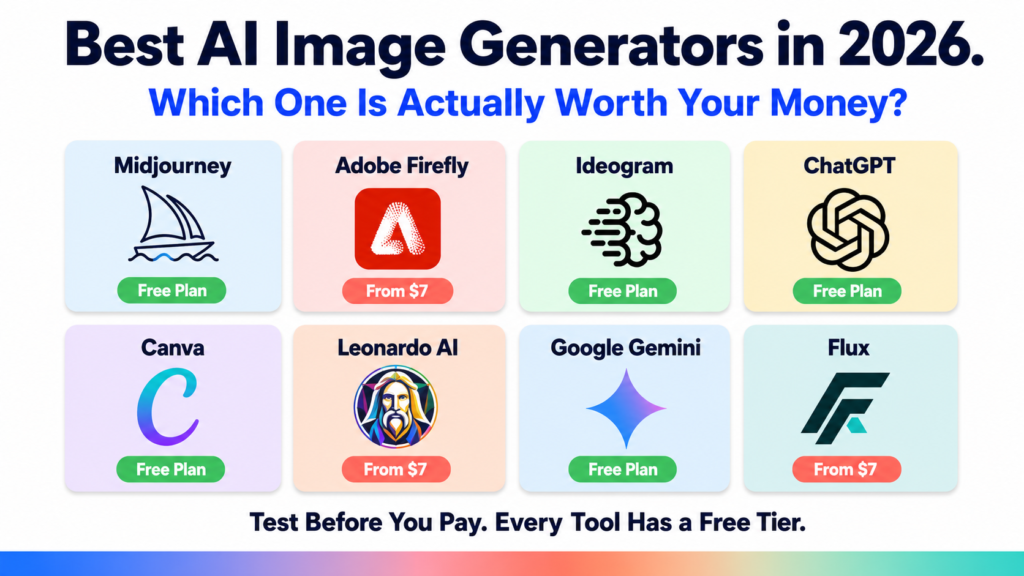
The Quick Comparison Table
| Tool | Best For | Free Plan | Starting Paid Price |
|---|---|---|---|
| Midjourney | Artistic quality | No | $10/month |
| Adobe Firefly | Commercial safety | Yes (25 credits) | $9.99/month |
| Ideogram | Text in images | Yes (generous) | $7/month |
| ChatGPT DALL-E | Convenience | Yes (limited) | $20/month |
| Canva Magic Studio | Non-designers | Yes | $15/month |
| Leonardo AI | Character consistency | Yes (150/day) | $10/month |
| Google Gemini | Free realistic images | Yes (full) | Free |
| Flux | Developers and API | Yes (credits) | Pay per image |
Which Tool Should You Choose?
The right tool depends entirely on what you are creating.
Choose Midjourney if you want the best artistic quality and you create visuals professionally.
Choose Adobe Firefly if you use Adobe Creative Cloud or need commercially safe images for client work.
Choose Ideogram if your images need readable text, posters, social media graphics, or thumbnails.
Choose ChatGPT with DALL-E if you already use ChatGPT and want convenience without switching tools.
Choose Canva Magic Studio if you are a non-designer who needs complete social media content rather than standalone images.
Choose Leonardo AI if you create game assets, characters, or illustrations that need visual consistency.
Choose Google Gemini if you want the best free option for realistic images.
Choose Flux if you are a developer building image generation into your own application.
Common Mistakes to Avoid
Many people give up on AI image generators after their first disappointing result. However, the problem is usually not the tool. It is the prompt.
Here are the three most common mistakes:
Mistake 1: Being too vague. “A nice landscape” produces generic results. “A misty Japanese mountain at sunrise with a lone pine tree in the foreground, soft pink light, cinematic photography style” produces something specific and beautiful.
Mistake 2: Giving up after one try. Good results require iteration. Generate, review, refine, and generate again. Most great AI images take 3 to 5 attempts minimum.
Mistake 3: Ignoring the free tiers. Several tools on this list have genuinely capable free plans. Therefore, test before you pay. Ideogram and Google Gemini especially give you enough free access to know if the tool fits your workflow.
The Bottom Line
AI image generation in 2026 has reached the point where the output is genuinely professional and commercially usable. Moreover, the best tools are now accessible to anyone, regardless of technical skill or budget.
Start with the free tiers. Find the tool that fits your specific use case. Then commit to learning its prompting system properly. The creators who get the best results are not the ones with the most expensive subscriptions. They are the ones who took the time to understand how to communicate with their chosen tool.