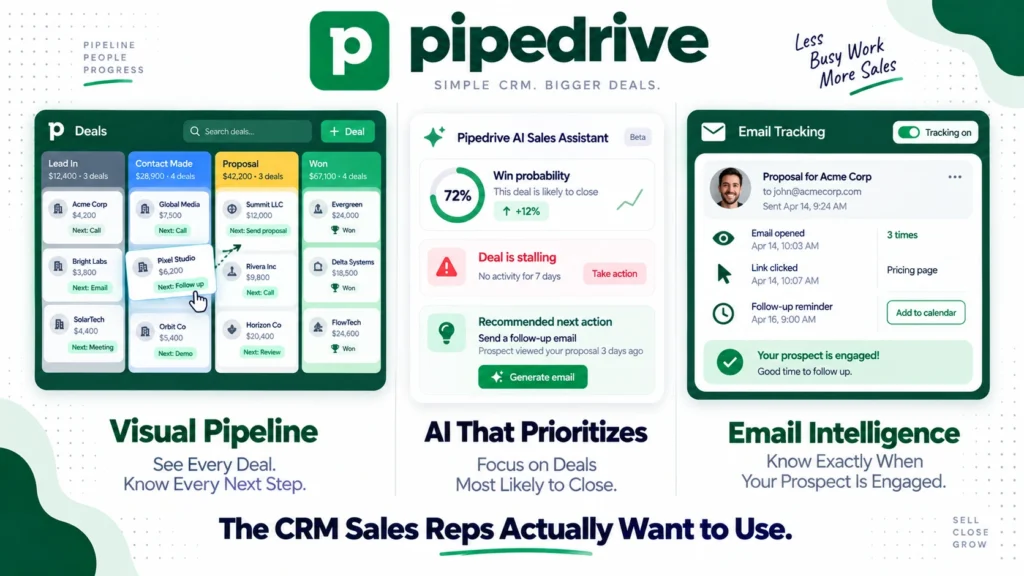
Pipedrive was built with one philosophy: a CRM should be designed for salespeople, not administrators. The result is a pipeline-first platform that sales reps actually enjoy using, with a visual deal board that makes it immediately obvious what needs to happen next and why.
With over 100,000 companies using it in 2026, Pipedrive has carved out a clear position in the CRM market. It sits between lightweight contact managers and heavyweight enterprise platforms like Salesforce and HubSpot, delivering meaningful sales workflow automation without the implementation complexity and cost that enterprise CRMs require.
However, Pipedrive is not without limitations. Marketing automation requires a separate tool. The native reporting is adequate but not exceptional. And several important features, email campaigns, LeadBooster for lead generation, and Smart Docs for contract management, are priced as add-ons that inflate the headline plan cost. This honest review covers the real pricing, the genuine strengths, the documented limitations, and exactly who Pipedrive works best for in 2026.
What Is Pipedrive?
Pipedrive is a sales-focused CRM built around a visual pipeline interface. You see all your deals laid out in stages, from initial contact to closed won, and move them through the pipeline with drag-and-drop simplicity. Every deal shows who owns it, what the next action is, and when it is due.
Founded in 2010 in Tallinn, Estonia, Pipedrive was built by salespeople frustrated with CRMs designed for managers rather than the reps actually doing the work. That origin story shapes the product in 2026. The interface prioritizes daily sales activity over administrative reporting. Setup takes hours rather than weeks. And the learning curve is shallow enough that teams start using it productively within days rather than after lengthy training programs.
In 2026, Pipedrive has four pricing tiers: Lite, Growth, Premium, and Ultimate. The platform serves teams ranging from solo entrepreneurs to mid-sized businesses with 50 plus sales reps. For enterprise organizations needing advanced customization, compliance controls, and deep CRM configuration, Salesforce and HubSpot are more appropriate. For sales-first teams that want to close deals faster without becoming CRM administrators, Pipedrive is the clearest choice in its price range.
Pipedrive Pricing in 2026
Pipedrive has four tiers as of September 2026, all billed per user. Annual billing saves approximately 30 to 40% versus monthly billing. Here is the verified breakdown:
Lite: $14/user/month (annual billing). Includes lead and deal management, visual pipeline with drag-and-drop deal management, contact organization, activity tracking, mobile app access, basic AI assistant, and 500 plus integrations including Gmail, Outlook, and Slack. However, full email sync is not included on Lite. Consequently, teams that rely on email tracking and open rate data need to upgrade to Growth from day one.
Growth: $39/user/month (annual billing). Adds full two-way email sync with open and click tracking, email scheduling, email templates, 30 plus automation templates, smart contact enrichment, group emailing, and advanced AI tools. This is where Pipedrive becomes genuinely useful for active sales teams. Furthermore, SaaSworthy data from over 3,100 user signals shows Growth is a common entry point for teams of 5 to 15 sales reps transitioning from spreadsheets.
Premium: $59/user/month (annual billing). The most widely adopted plan according to SaaSworthy (48% of users). Adds lead scoring, data enrichment from LinkedIn and other sources, built-in contract management, e-signatures, custom deal scoring, revenue forecasting, and full AI assistant capabilities. This is the plan for teams that need the full sales workflow from lead qualification through contract signature in one platform.
Ultimate: $79/user/month (annual billing). Adds phone support, enhanced reporting with unlimited custom reports, and the highest limits across all features. Designed for larger teams that need dedicated support and maximum reporting flexibility.
14-day free trial available on all plans. No credit card required.
Add-ons that inflate real cost:
Several features that many sales teams consider essential are sold as paid add-ons on top of plan pricing.
LeadBooster, Pipedrive’s lead generation toolkit including chatbot, live chat, prospector for finding new leads, and web forms, starts at $32.50 per company per month on annual billing. This is not per user but per account, which makes it more affordable for larger teams but still adds meaningfully to total monthly cost.
Campaigns, Pipedrive’s built-in email marketing tool for sending mass campaigns to your CRM contacts, starts at $16/month for up to 1,000 subscribers. For teams that want email marketing alongside CRM without a separate tool, Campaigns adds this capability without requiring a dedicated platform like Brevo or Mailchimp. However, the automation depth of Campaigns does not match dedicated email marketing platforms. Read our Brevo review for a detailed comparison of standalone email marketing tools.
Smart Docs, for creating and sharing trackable proposals, quotes, and contracts with e-signature, starts at $32.50 per company per month on annual billing. It is included on Premium, which is one reason Premium is the most widely adopted plan.
Always calculate your total monthly cost including the add-ons your team actually needs before comparing Pipedrive’s headline prices to competing CRMs that include these features natively.
Key Features
Visual Pipeline Management
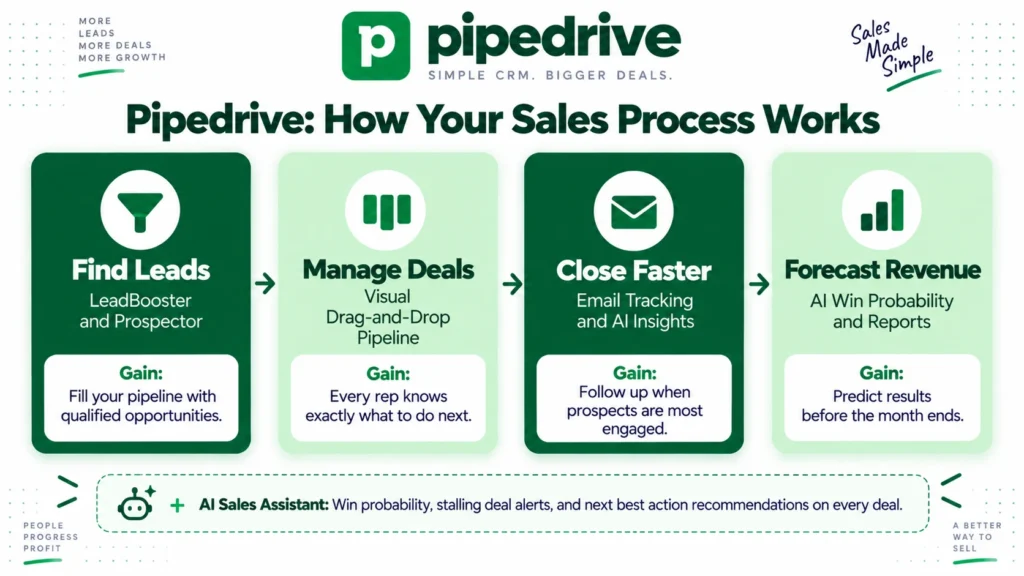
Pipedrive’s visual pipeline is consistently cited as its strongest feature and the clearest reason teams choose it over alternatives. You see all your deals in columns representing pipeline stages, with deal value, owner, and next activity visible on each deal card. Moving a deal from one stage to the next requires a single drag-and-drop.
The pipeline view eliminates the constant question of “what should I work on next” that plagues sales reps using more complex CRMs. Everything that needs attention is visible at a glance. Overdue activities are highlighted automatically. Deals with no scheduled activity are surfaced as at-risk. Consequently, sales rep adoption is consistently higher on Pipedrive than on enterprise CRMs with more complex interfaces.
Multiple pipelines are supported simultaneously, meaning a team managing separate sales processes, such as new business development and upsell or renewal conversations, can maintain distinct pipelines with appropriate stages and views for each.
AI Sales Assistant
Pipedrive’s AI Sales Assistant continuously analyzes your deals, contacts, and email activity to help reps prioritize the right opportunities. It predicts win probability for open deals, flags deals that are stalling or have no scheduled activity, and recommends next best actions based on patterns from past won deals.
On higher tiers, the AI extends to email tools that suggest optimal send times, draft follow-up messages based on deal context, and identify deals at risk of going cold. For sales managers, the AI surfaces performance patterns across the team that would take hours to identify through manual report analysis. Consequently, teams that engage with the AI recommendations consistently report higher close rates than teams that ignore them.
Email Integration and Tracking
Two-way email sync on Growth plans and above connects Pipedrive to Gmail or Outlook so every email to and from contacts is automatically logged against the relevant deal. Open tracking shows when a prospect reads your email. Click tracking shows when they interact with links. Email scheduling lets reps send at optimal times.
For sales teams where email follow-up timing significantly affects conversion rates, this tracking layer makes the difference between following up when a prospect is actively engaged versus following up cold after they have already moved on to a competitor. Consequently, the Growth plan’s email sync is often the feature that justifies the upgrade from Lite for active sales teams.
Workflow Automation
Pipedrive’s automation builder on Growth plans and above lets you create if-then workflows triggered by deal stage changes, email opens, form submissions, and time-based conditions. Pre-built templates cover the most common sales automation scenarios including deal creation from web forms, task assignment when deals move stages, and follow-up email scheduling based on inactivity.
For sales teams that currently spend significant time on manual CRM updates and follow-up scheduling, automation reduces administrative overhead and improves consistency. Furthermore, Pipedrive connects with Zapier and n8n for more complex automation workflows that extend beyond the built-in automation builder. Read our n8n review for how dedicated automation tools extend Pipedrive’s native capabilities.
LeadBooster and Prospecting
LeadBooster is Pipedrive’s lead generation add-on that adds a chatbot for website visitor qualification, live chat for real-time prospect engagement, a prospector tool for finding new leads from a database of 400 million plus business profiles, and customizable web forms for inbound lead capture.
For teams that want to generate leads directly from their CRM platform rather than using separate tools, LeadBooster consolidates several capabilities that would otherwise require multiple subscriptions. The prospector database is particularly useful for B2B outbound teams that need to build targeted prospect lists without a separate data provider like Apollo.io. However, Apollo.io’s 230 million plus contact database with more advanced filtering is stronger for heavy outbound prospecting. Read our Apollo.io review for a detailed comparison.
Reporting and Forecasting
Pipedrive’s reporting covers deal conversion rates by stage, revenue by rep and team, activity completion rates, and pipeline velocity. Revenue forecasting on Premium and Ultimate plans projects future revenue based on deal probability and expected close dates.
The reporting is functional and covers the most common sales management questions. However, it is less flexible and less deep than what Salesforce and HubSpot provide at comparable price points. Teams that need highly customized reporting structures, cross-object reporting, or advanced attribution modeling will find Pipedrive’s reporting inadequate for their needs. Consequently, reporting depth is the most common reason teams outgrow Pipedrive and migrate to enterprise CRMs.
Integrations
Pipedrive connects natively with 500 plus applications including Gmail, Outlook, Slack, Mailchimp, Asana, Monday.com, QuickBooks, Xero, Zoom, and Calendly. The open API enables custom integrations for teams with specific technical requirements. Consequently, Pipedrive fits into most existing business software stacks without requiring significant workflow changes.
What Pipedrive Does Well
The visual pipeline drives genuine sales rep adoption. This is Pipedrive’s most consistent competitive advantage and the reason sales managers choose it over more powerful but more complex alternatives. When reps actually use the CRM consistently, the data quality improves, the forecasting becomes reliable, and the sales process becomes manageable. Pipedrive’s interface makes consistent use the path of least resistance rather than an imposed discipline.
Setup time is measured in hours, not weeks. A 10-person sales team can have Pipedrive configured with their pipeline stages, custom fields, email integration, and initial deal data imported within a single working day. Consequently, the time-to-value is dramatically shorter than enterprise CRM implementations that take months of configuration and training before delivering results.
The AI Sales Assistant genuinely improves deal prioritization. Deal win probability predictions and stalling deal alerts help reps focus attention on opportunities with the highest likelihood of closing rather than spending equal time on deals that are effectively lost. For teams with large pipelines where every deal cannot receive equal attention, AI-assisted prioritization delivers measurable improvement in close rates.
Price-to-value for small and mid-sized teams is strong. At $14 to $59 per user per month for Lite through Premium, Pipedrive delivers meaningful sales workflow automation at a fraction of what Salesforce Enterprise costs at $175 per user per month. For teams that do not need Salesforce’s customization depth and compliance certifications, Pipedrive delivers 70 to 80% of the essential CRM value at 30 to 40% of the cost.
G2 rating of 4.3 out of 5 across 2,000 plus verified reviews reflects consistent quality. The breadth of the review base combined with consistent positive sentiment on core pipeline management, ease of use, and adoption reflects genuine product satisfaction rather than a niche audience finding niche value.
Where Pipedrive Falls Short
No native marketing automation. Pipedrive is explicitly sales-first and does not include the marketing automation capabilities that HubSpot and ActiveCampaign provide. The Campaigns add-on covers basic mass email sending but lacks the behavioral triggers, lead scoring, and nurture sequence depth that dedicated marketing automation platforms deliver. Consequently, teams that want a unified marketing and sales platform in one tool need to look at HubSpot or use Pipedrive alongside a dedicated email marketing tool. Read our ActiveCampaign review and HubSpot review for marketing automation alternatives.
Reporting depth is limited for data-driven sales organizations. The built-in reports cover standard sales metrics well. However, custom multi-object reporting, advanced attribution modeling, and the kind of granular performance analysis that enterprise sales operations teams need require either the Ultimate plan’s enhanced reporting or exporting data to a separate BI tool. Consequently, data-heavy sales organizations often find Pipedrive’s reporting insufficient as they scale.
Add-ons inflate the true cost meaningfully. A Growth plan user who needs LeadBooster for lead generation and Campaigns for email marketing pays $39 per user per month for Growth plus $32.50 per account for LeadBooster plus $16 per month for Campaigns. For a 5-person team, that totals $243.50 per month versus the apparent $195 per month for Growth alone. Always calculate total cost with your required add-ons before comparing Pipedrive to competitors that include these features natively.
Full email sync requires Growth, not Lite. Teams attracted by the Lite plan’s $14 per user per month entry price often discover that the email tracking and sync features they assumed were included require the Growth plan at $39 per user per month. This is a 178% price jump for what many sales teams consider a basic CRM requirement. Consequently, most active sales teams effectively start at the Growth tier rather than Lite.
Integration reliability varies. While the integration library is extensive, multiple user reviews note that certain integrations require manual setup or do not sync as smoothly as native features. Consequently, teams with complex multi-tool stacks should verify specific integration quality before committing, rather than assuming all 500 plus integrations work identically.
Pipedrive vs Competitors
Pipedrive vs HubSpot: HubSpot offers a free CRM with more out-of-the-box features than Pipedrive Lite, and its paid plans combine marketing automation, content management, and sales CRM in one platform. However, HubSpot’s marketing-to-sales platform costs significantly more than Pipedrive for pure sales CRM functionality. For teams that need marketing automation alongside CRM, HubSpot is the more complete solution. For sales-only teams that want the best pipeline management per dollar, Pipedrive delivers superior interface quality and sales-specific workflow at lower cost. Read our full HubSpot review.
Pipedrive vs Salesforce: Salesforce offers dramatically deeper customization, a more extensive AppExchange ecosystem, and enterprise compliance certifications. However, Salesforce Enterprise starts at $175 per user per month and requires significant implementation investment. For teams with under 50 reps that do not need Salesforce’s enterprise complexity, Pipedrive delivers 70 to 80% of the essential CRM value at 30% of the cost with faster implementation. Read our full Salesforce review.
Pipedrive vs Apollo.io: Apollo.io combines a 230 million plus B2B contact database with email sequencing and a basic CRM. For outbound-heavy teams that need prospecting data alongside their CRM, Apollo provides more outbound infrastructure than Pipedrive. However, Pipedrive’s visual pipeline, automation depth, and deal management are stronger for managing an active sales pipeline. Consequently, many B2B outbound teams use Apollo.io for prospecting and Pipedrive for pipeline management as complementary tools. Read our Apollo.io review.
Pipedrive vs ClickUp: ClickUp is a work management platform that includes CRM features alongside project management, docs, and team communication. For teams that want one tool covering both sales and broader project work, ClickUp’s CRM capabilities are functional. However, Pipedrive’s sales-specific depth, AI Sales Assistant, email tracking, and pipeline management far exceed ClickUp’s CRM features for dedicated sales teams. Read our ClickUp review.
Who Should Use Pipedrive?
Pipedrive is the right choice if you are:
- A small to mid-sized sales team of 2 to 50 reps that wants a visual, intuitive pipeline CRM without enterprise complexity or cost
- A team transitioning from spreadsheets or a basic contact manager that needs structured deal management and email tracking without a lengthy CRM implementation project
- A B2B sales organization that wants strong pipeline visibility, AI-assisted deal prioritization, and workflow automation at a price point significantly below enterprise CRMs
- A team that values sales rep adoption above all else and needs an interface that reps actually use consistently rather than administrators maintaining in the background
- A growing startup or SMB that wants to be operational within days rather than weeks
However, Pipedrive may not be the right fit if you are:
- A team that needs marketing automation, lead nurturing, and sales CRM in one unified platform, where HubSpot is more appropriate
- A large enterprise with complex compliance requirements, deep CRM customization needs, and a large AppExchange integration dependency, where Salesforce is the standard
- A data-heavy sales organization that needs advanced custom reporting and multi-object analytics beyond what Pipedrive’s reporting provides
- A team heavily focused on outbound prospecting that needs a large contact database alongside pipeline management, where Apollo.io’s prospecting capabilities are stronger
Pipedrive Review: Final Verdict
Pipedrive delivers on its core promise in 2026. The visual pipeline is the best in its class for at-a-glance sales clarity. Setup is fast. Adoption is high. The AI Sales Assistant genuinely helps reps prioritize. And the price-to-value for sales-first teams of 5 to 50 reps is difficult to beat at the Growth and Premium tiers.
The absence of native marketing automation, the limited reporting depth, and the add-on costs for LeadBooster and Smart Docs are real considerations that require honest assessment before committing. Teams that outgrow Pipedrive typically do so because they need deeper marketing automation or more complex reporting, not because the core sales workflow is inadequate.
If your primary need is giving your sales reps a CRM they will actually use to manage deals effectively, Pipedrive is the strongest choice in its price range. Start with the 14-day free trial on the Growth plan to experience the email tracking and automation that make it genuinely useful for active sales teams before deciding.
Overall rating: 4.4 out of 5
Pipedrive is excellent for the sales-first teams it was designed for. The interface quality, adoption rates, and implementation speed are genuinely best-in-class for its price range. The limitations only matter if your needs extend beyond its sales-first philosophy.