Riverside.fm solves a problem that every remote podcaster and video creator knows well. Standard video conferencing tools like Zoom compress your audio and video in real time, and the quality shows. One participant with a slow internet connection ruins the entire recording for everyone.
Riverside fixes this with local recording technology. Each participant records their own audio and video track directly on their device at full quality. Riverside then uploads these tracks in the background. The result is studio-quality audio and up to 4K video regardless of anyone’s internet connection during the call. That single technical distinction is the reason Riverside has a 4.8 out of 5 rating on G2 and why podcasters, journalists, and content creators consistently choose it over Zoom for recorded interviews.
In 2026, Riverside has evolved into a full content production platform. Recording, editing, clip creation, AI transcription, captions, show notes, and publishing tools all live in one place. This review covers the real pricing, the genuine strengths, the documented limitations, and exactly who Riverside works best for.
What Is Riverside.fm?
Riverside.fm (now rebranded simply as Riverside at riverside.com) is a browser-based recording platform built specifically for podcasters, video creators, and interview hosts who need professional output without professional studio infrastructure.
Founded in 2019, Riverside gained rapid adoption among creators who needed to record remote guests at broadcast quality during the remote work shift. In 2026, it serves individual podcasters, media companies, enterprise brands running webinars and live events, and content marketing teams producing video interviews at scale.
The platform combines local recording technology, a text-based video editor, AI-powered clip and show note generation, live streaming to multiple platforms, and webinar hosting for up to 10,000 attendees in one subscription. Consequently, Riverside has moved beyond a single-use recording tool into a more complete content production ecosystem.
Riverside Pricing in 2026
Riverside offers a free plan and multiple paid tiers. Pricing varies across sources because Riverside has updated its plan structure during 2026. Here is the verified breakdown as of September 2026:
Free: $0. Includes up to 2 hours of recording per month, 720p video quality maximum, up to 3 participants per session, Riverside watermark on all exports, and basic transcription. The free plan is sufficient for testing the platform and recording a few episodes before committing to a paid subscription. However, the 2-hour monthly limit and watermark make it unsuitable for ongoing professional use.
Standard: $15/month (annual billing) or $19/month (monthly billing). Includes unlimited recording time, 1080p video quality, watermark-free exports, up to 8 participants per session, separate audio and video tracks for each participant, basic AI tools, and standard transcription. This is the entry point for solo podcasters and content creators who record regularly.
Pro: $24/month (annual billing) or $29/month (monthly billing). Adds 4K video recording, 15 hours of monthly transcription, full AI suite including Magic Clips for automatic highlight generation, AI show notes, text-based video editing, background noise removal, and audio enhancement. This is the plan most professional creators need. The $9 per month premium over Standard for 4K video and the full AI toolset is generally considered excellent value by regular users.
Teams: $24/user/month (annual billing). Designed for teams of creators sharing a workspace with role-based access, shared storage, and collaborative editing features. The per-user pricing matches Pro’s rate but adds the collaboration infrastructure for multi-creator organizations.
Business: Custom pricing. Adds enterprise-grade features including SSO, SLA guarantees, dedicated support, webinar hosting for up to 10,000 attendees, advanced analytics, and white-label options. Designed for media companies, enterprise brands, and organizations running large-scale live events.
7-day free trial is available on Standard and Pro plans. No credit card required to start the trial.
The honest pricing verdict: Riverside’s Standard and Pro plans are well-priced for what they deliver. The local recording technology that produces studio-quality output at $15 to $24 per month would have required thousands of dollars in equipment and studio rental to replicate just a few years ago. For active creators recording multiple episodes per month, the value proposition is clear. The Business plan’s custom pricing is the only area where costs become unpredictable.
Key Features
Local Recording Technology
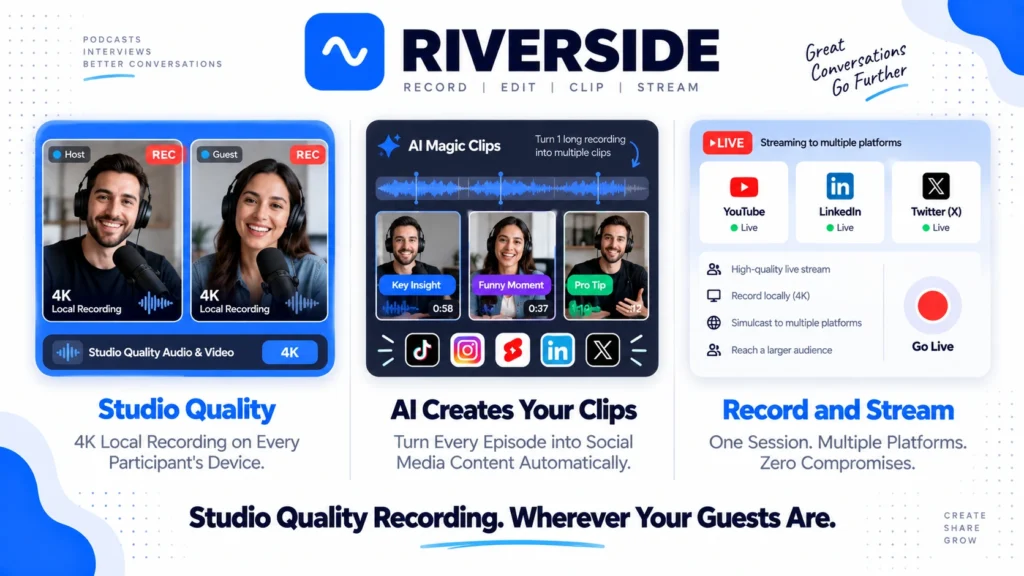
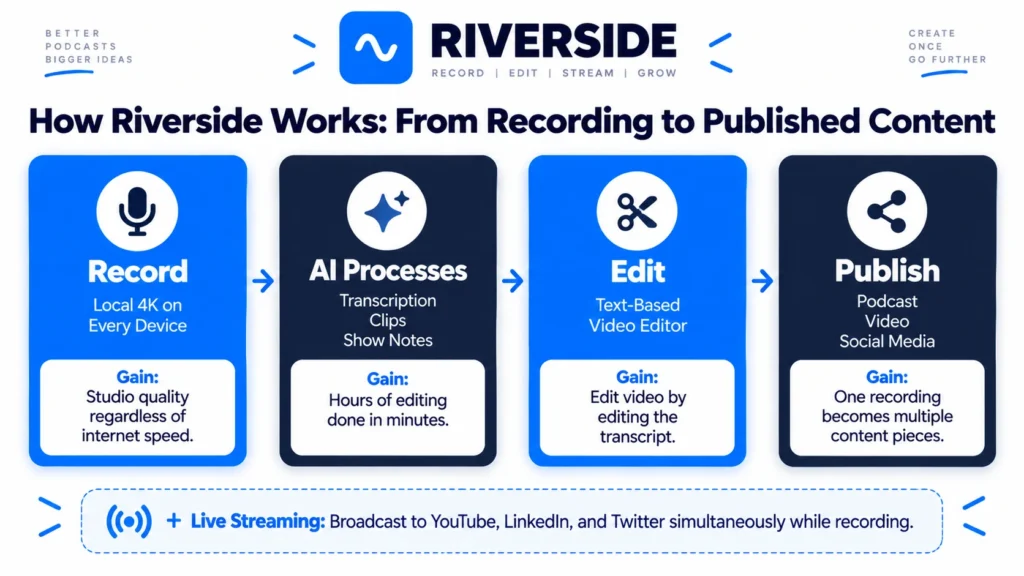
This is Riverside’s defining feature and the primary reason podcasters and video creators choose it over Zoom, Google Meet, or standard streaming tools. Each participant records their own audio and video track directly on their device simultaneously with the live call. Riverside uploads these tracks in the background as the session continues.
The practical result is extraordinary. Even if a participant’s internet connection drops during the recording, their local track continues unaffected. Audio is captured at lossless WAV quality. Video reaches up to 4K resolution. Separate tracks for each participant give editors complete post-production flexibility. Consequently, the output quality from a Riverside recording consistently matches what in-person studio recording produces, regardless of where each participant is located or how their internet performs during the session.
AI Features and Magic Clips
Riverside’s AI suite on Pro plans covers the most time-consuming parts of content production after recording.
Magic Clips automatically identifies the most engaging moments from longer recordings and generates short-form clips optimized for TikTok, Instagram Reels, and YouTube Shorts. AI-generated show notes summarize key topics, timestamps, and discussion points from the recording automatically. Captions are generated from transcription and can be embedded in exported video files. Background noise removal cleans up imperfect recording environments without manual audio editing. Consequently, creators who previously spent hours in post-production find that Riverside’s AI reduces that time to minutes for standard content outputs.
For teams using Notion or ClickUp to manage their content workflow, Riverside’s AI-generated show notes and transcripts integrate naturally into existing content management systems. Read our Notion review for how documentation tools complement a podcast production workflow.
Text-Based Video Editing
Riverside’s text-based editor on Pro plans lets you edit video by editing the transcript. Delete a sentence from the transcript and it disappears from the video. This approach dramatically lowers the technical barrier to video editing and is the same model that Descript pioneered. For creators who find traditional timeline editors intimidating, text-based editing makes professional editing accessible without a learning curve. Read our article on Make Money with Synthesia and Descript for how Descript compares as a dedicated editing platform.
Live Streaming
Riverside supports live streaming to YouTube, LinkedIn, Twitter/X, and custom RTMP destinations simultaneously from the same recording session. This means a podcast recording can be live streamed to multiple platforms while also capturing the high-quality local recording for the edited episode. Consequently, creators get both a live audience and a polished edited episode from a single session without running separate tools.
Webinar Hosting
Business plan users can host webinars and live events for up to 10,000 attendees directly through Riverside. Interactive features including Q&A, polls, and audience chat are included. For brands and media companies that run large live events, having webinar hosting in the same platform as podcast recording eliminates the need for a separate tool like Zoom Webinars or Hopin.
Async Video Messages
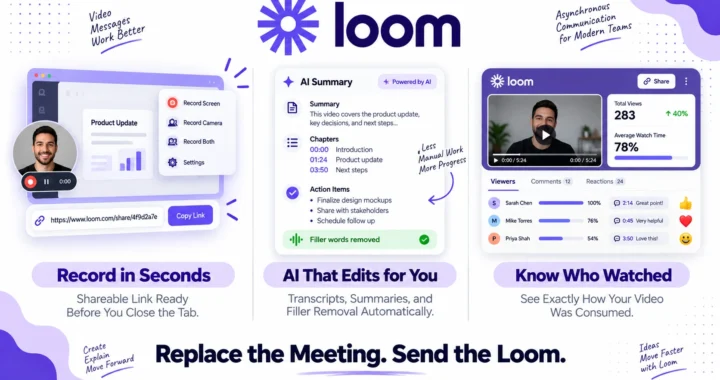
Riverside added asynchronous video messaging in 2026, allowing creators and teams to record and share video messages without scheduling a live session. This feature puts Riverside in direct competition with Loom for async video communication, though Loom’s instant record-to-link workflow remains faster for quick async messages. Read our Loom review for how the two platforms compare for async video needs.
What Riverside Does Well
Local recording quality is genuinely best-in-class for remote interviews. No browser-based recording tool produces consistently higher audio and video quality than Riverside for remote multi-participant recordings. The technical architecture solves the fundamental problem of internet-dependent quality degradation that affects every competing tool. Consequently, podcasters who switched from Zoom or Zencastr to Riverside consistently report that the quality difference is immediately audible and visible.
The AI clip generation saves hours of post-production work. Magic Clips identifies highlights and creates short-form content automatically, which is one of the most time-consuming parts of podcast content repurposing. For creators producing weekly episodes who need to maintain a social media presence alongside their main show, AI clip generation delivers real productivity gains.
G2 rating of 4.8 out of 5 reflects genuine creator satisfaction. The high rating across a substantial review base indicates consistent quality delivery rather than a small, self-selected user sample. Riverside’s core use case is well-served and users consistently recommend it.
The Pro plan at $24/month delivers exceptional value for active creators. 4K recording, unlimited sessions, full AI suite, text-based editing, and live streaming for less than the cost of a monthly streaming service subscription is remarkable value for professional content production capability.
Browser-based access eliminates software installation barriers for guests. Guests join Riverside sessions through a browser link without downloading software. Consequently, technical friction for interview guests, particularly non-technical ones, is minimal. Hosts can onboard guests in under a minute without troubleshooting installations.
Where Riverside Falls Short
The free plan’s 2-hour monthly limit is restrictive for evaluation. Two hours of recording is enough for one or two podcast episodes but limited for teams that want to properly evaluate the platform across their full workflow before committing. The 7-day Pro trial is more generous but time-limited.
Occasional session freezes and delayed uploads are documented. Multiple user reviews in 2026 note temporary session freezes during recording and delayed upload times for large files. While local recording means the quality is preserved even if the connection freezes, the workflow disruption is a real frustration for professional creators on tight production schedules.
The text-based editor is functional but not as advanced as dedicated tools. Riverside’s editing capabilities cover the most common post-production needs but fall short of what Descript offers for complex editing requirements including multitrack mixing, sound design, and advanced audio correction. Creators with sophisticated editing needs often use Riverside for recording and a dedicated editor for finishing.
Participant limits on lower plans restrict larger panel discussions. The Standard plan’s 8-participant maximum is sufficient for most podcast formats but limits panel discussions with large groups. Business plan pricing is required for sessions with more participants than the self-serve tiers allow.
The free plan’s immovable upsell prompt frustrates casual users. Multiple reviews mention a persistent prompt on the free plan pushing users toward the $15/month Standard plan. For users wanting to explore the free tier without sales pressure, this is a friction point that competitors handle more gracefully.
Riverside vs Competitors
Riverside vs Loom: Loom is optimized for quick async video messages with an instant record-to-shareable-link workflow. Riverside is optimized for high-quality multi-participant recordings with professional post-production. These tools serve different primary use cases. Teams use Loom for quick internal video communication and Riverside for external podcast interviews and produced video content. Read our Loom review for the full comparison.
Riverside vs Descript: Descript is primarily a post-production tool with recording capabilities. Riverside is primarily a recording tool with post-production capabilities. Descript’s editing depth exceeds Riverside’s. Riverside’s recording quality exceeds what Descript captures from web-based sessions. Many professional podcast producers use both. Riverside for recording. Descript for editing. Read our article on Make Money with Synthesia and Descript for more on Descript’s capabilities.
Riverside vs Zoom: Zoom compresses audio and video in real time based on internet bandwidth. Riverside records locally at maximum quality regardless of bandwidth. For any recording intended for broadcast, podcast distribution, or professional video content, Riverside produces significantly better output quality than Zoom at comparable or lower price points.
Riverside vs Zencastr: Zencastr is a direct Riverside competitor also focused on local recording for podcasters. Zencastr’s free plan is more generous with unlimited recording. Riverside’s paid plans offer more comprehensive AI features, better video capabilities, and a more polished editing interface. Consequently, audio-only podcasters often prefer Zencastr’s free tier while video podcasters and creators who need AI content tools choose Riverside’s paid plans.
Riverside vs StreamYard: StreamYard focuses on live streaming with a simple multi-guest broadcast interface. Riverside offers higher recording quality, better post-production tools, and AI content generation. StreamYard wins for straightforward live broadcasts where real-time quality is acceptable. Riverside wins for recorded content where quality and post-production flexibility matter more than live streaming simplicity.
Who Should Use Riverside?
Riverside is the right choice if you are:
- A podcaster recording remote interviews who needs studio-quality audio and video without an in-person studio
- A video content creator who produces interview-format content and wants 4K local recording with AI-powered clip generation
- A content marketing team producing regular video podcasts, thought leadership interviews, or customer story videos at scale
- A media company or enterprise brand that needs to combine podcast recording, live streaming, and webinar hosting in one platform
- A creator who wants to maximize content output per recording session with AI show notes, clips, and captions generated automatically
However, Riverside may not be the right fit if you are:
- A creator whose primary need is quick async video messages for team communication, where Loom is more appropriate
- A podcast creator who only needs audio, not video, where Zencastr’s more generous free plan delivers comparable audio quality at lower cost
- A team that needs advanced post-production editing beyond Riverside’s text-based editor, where Descript’s deeper editing suite is more capable
- A live event organizer whose primary need is audience interaction features at scale, where dedicated webinar platforms may offer more specialized functionality
Riverside Review: Final Verdict
Riverside.fm is the best remote recording platform for podcasters and video creators who prioritize output quality in 2026. The local recording technology delivers on its promise consistently. The AI features on Pro plans genuinely reduce post-production time. The G2 rating of 4.8 out of 5 reflects real creator satisfaction rather than marketing polish.
The free plan is too limited for ongoing use, occasional upload delays and freezes are real workflow friction, and the text-based editor falls short of dedicated post-production tools for complex editing needs. However, for the core use case of recording high-quality remote interviews and generating polished content efficiently, Riverside is the strongest platform available at its price point.
The Pro plan at $24/month is the right starting point for most professional creators. Start with the 7-day Pro trial to confirm the workflow fits your production process before committing annually.
Overall rating: 4.5 out of 5
Riverside earns its strong reputation. The recording quality advantage over general video conferencing tools is real and immediately audible. For creators who care about how their content sounds and looks, the investment pays off consistently.