Loom built its reputation on one idea: replacing unnecessary meetings with quick screen recordings that anyone can watch on their own time. With 25 million users across 400,000 plus companies, it became the default async video tool for remote teams worldwide.
However, 2026 is a complicated year for Loom. Atlassian acquired it for $975 million in late 2023, and two years into that ownership, the platform has changed significantly. AI features have arrived and some of them are genuinely useful. But the free plan has been quietly gutted, pricing has increased by approximately 44% from pre-acquisition rates, the Creator Lite viewer seats that previously saved large teams significant money were eliminated in February 2026, and 70% of negative reviews in 2026 mention stability issues and slow uploads since the Atlassian migration.
This honest review covers what Loom does well in 2026, where the cracks have appeared, what the pricing actually looks like now versus what older reviews still quote, and exactly who should and should not be using it.
What Is Loom?
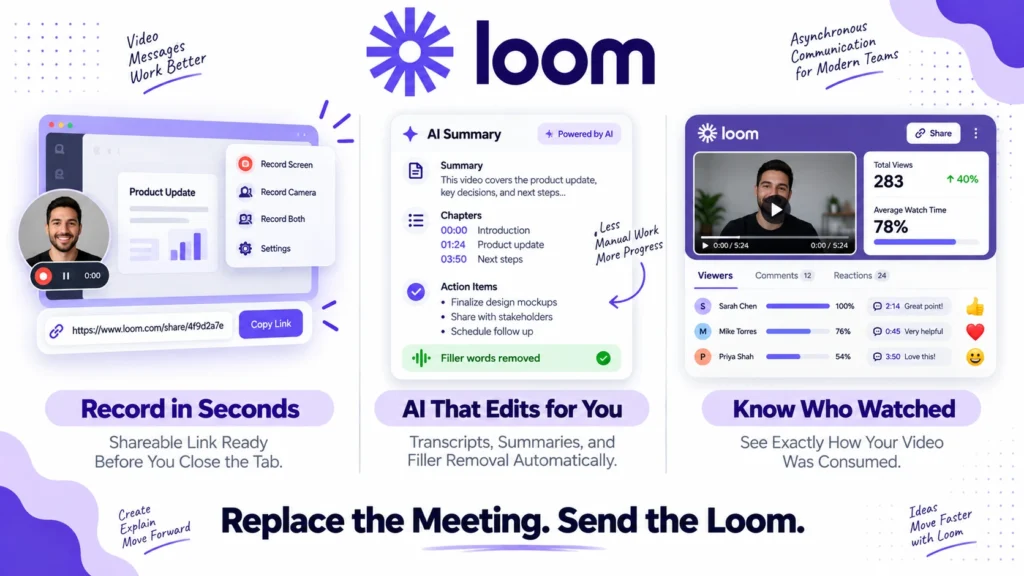
Loom is an asynchronous video messaging platform. You record your screen, your webcam, or both simultaneously. Loom instantly uploads the recording and generates a shareable link. Viewers watch on their own schedule, comment at specific timestamps, and react without scheduling a meeting.
The core use case is replacing communication that would otherwise require a meeting or a lengthy written explanation. Bug reports, product walkthroughs, client feedback, design reviews, team updates, and customer support explanations all happen faster and more clearly as a 2-minute Loom video than as a 500-word email or a 30-minute Zoom call.
The record-to-shareable-link workflow takes approximately 60 seconds. That speed is Loom’s primary competitive advantage and the reason 25 million users adopted it before any competitor matched the experience.
Loom Pricing in 2026
This section is the most important in the review because older articles still quote pre-Atlassian pricing that no longer exists. Here is the verified breakdown from loom.com/pricing as of September 2026:
Free (Starter): $0. Includes unlimited videos but limited to 5 minutes per recording and 100 videos in storage. AI transcription is included in a limited form. No custom branding. Viewer comments are available. This is a meaningful limitation for anyone who records longer product walkthroughs or training content regularly. The free plan is useful for testing but insufficient for most professional use cases.
Business: $18/user/month (monthly) or approximately $15/user/month (annual billing). Includes unlimited recording length, unlimited video storage, password protection, custom branding, engagement insights, and Atlassian integrations with Confluence and Jira. Note that the $12.50/month figure that still appears in many older reviews is a pre-Atlassian annual rate that no longer exists on loom.com/pricing. The current Business plan costs approximately 44% more than the pre-acquisition pricing.
Business + AI: $24/user/month (monthly) or approximately $20/user/month (annual). Adds the full AI feature set including filler word removal, auto-chapters, AI-generated summaries and action items, background noise reduction, and the AI message writer. The $4 to $5 per user per month difference between Business and Business + AI is specifically the AI editing capabilities. No other features differ between the two tiers.
Enterprise: Custom pricing. Adds SSO, SCIM, advanced admin controls, custom data retention, and dedicated support. Designed for large organizations with security and compliance requirements.
The critical billing change from February 2026: Accounts created after February 2026 have no Creator Lite viewer seats available at all. Creator Lite seats previously allowed users who only needed to watch videos, not record them, to access Loom at no extra cost. Their elimination has created dramatic cost increases for large teams.
One documented case from a Supademo pricing analysis describes a team going from $240 per year for 10 active creators to $24,000 per year when all 100 users became required paid seats after the migration. For teams with many viewer-only members, this change fundamentally alters the cost calculation.
Furthermore, annual plans now use tiered billing at 50, 100, and 250 user blocks rather than per-seat pricing. A 55-person team pays for the 100-user tier. A 260-person team pays for the 500-user tier. Always calculate your actual tier cost rather than multiplying by the per-seat price.
Key Features
Record and Share Workflow
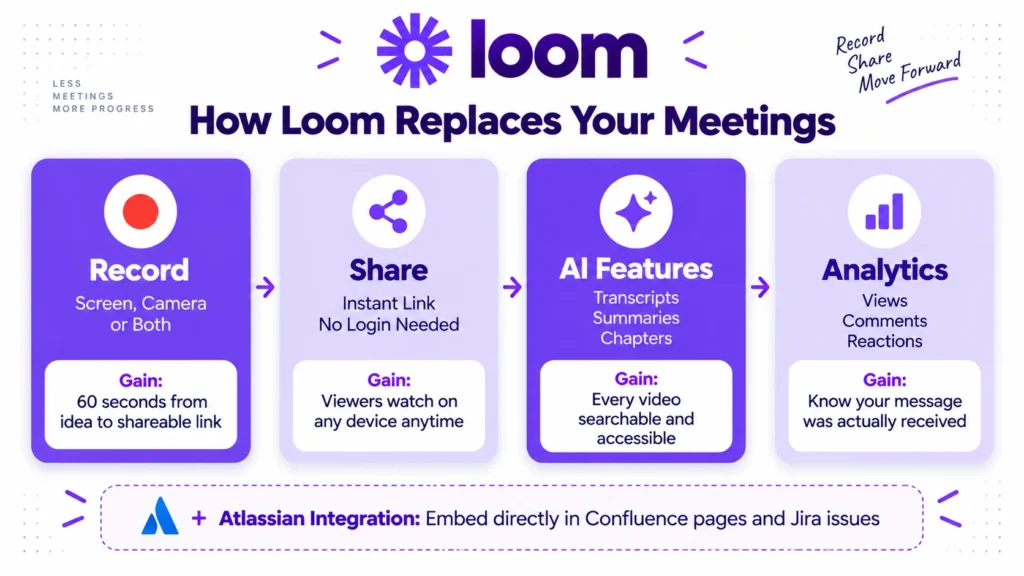
Loom’s core record-to-share workflow remains the fastest in its category in 2026. You click record, capture what you need, click stop, and a shareable link is ready in seconds. No rendering wait. No file download. No format conversion. The link works on any device without requiring the viewer to log in.
This frictionless experience is why Loom built its user base before any competitor replicated it. For teams where the barrier to recording a quick video needs to be near zero, Loom’s workflow is still the benchmark. Consequently, remote teams that switch from Loom to alternatives frequently miss the immediate link generation even when the alternatives offer more features at lower cost.
AI Features (Business + AI Tier)
Loom’s AI suite in 2026 includes several genuinely useful capabilities for teams that record frequently.
Auto-transcription at 95 plus percent accuracy in 50 plus languages is included on Business plans. AI-generated summaries extract key points and action items from recorded videos automatically. Smart chapters divide longer recordings into navigable sections with AI-generated titles. Filler word removal eliminates hesitations and verbal tics from recordings without manual editing. Background noise reduction cleans up audio from imperfect recording environments.
The ROI calculation for Business + AI is straightforward for active recorders. If AI features save 15 minutes per video and you record 20 videos per month, that is 5 hours saved monthly. At $50 per hour in labor cost, the $5 per user per month premium over Business delivers $250 in value for teams that record frequently. The math works for active users. It does not work for occasional recorders.
Atlassian Integration
Post-acquisition, Loom’s Confluence and Jira integrations are the deepest in the async video category. You can embed Loom recordings directly in Confluence pages with inline playback. Jira issues can reference Loom videos with context-aware linking. For teams already on the Atlassian stack, this integration eliminates the friction of linking between tools manually.
If your organization uses Notion, ClickUp, or Asana for project management, Loom also embeds cleanly in all three. Read our Notion review, ClickUp review, and Asana review for how these tools integrate with video messaging workflows.
Viewer Engagement
Loom’s viewer experience includes timestamp comments, emoji reactions, and threaded replies on specific video moments. Engagement analytics show who watched, how much they watched, and where they dropped off. Consequently, senders know whether their message was actually consumed rather than assuming it was.
This engagement layer transforms one-way video into a two-way conversation without requiring both parties to be online simultaneously. For sales teams sending product demos and support teams sharing walkthroughs, knowing that a viewer watched 95% of a video before responding is valuable context.
Screen Recording Quality
Loom records in up to 4K resolution on desktop with configurable quality settings. The camera bubble overlay showing the presenter’s face alongside screen content is clean and professional. Furthermore, drawing tools and spotlight highlighting let presenters direct viewer attention to specific screen elements during recording.
For team communication and internal walkthroughs, the recording quality is entirely professional. For polished external content like marketing videos or training courses, tools like Descript offer more post-production editing capability. Read our Descript review for how the two tools compare for video content with editing requirements.
What Loom Does Well
The record-to-share speed is still unmatched. No competing async video tool matches Loom’s 60-second record-to-shareable-link workflow. For teams where async video communication needs to feel as natural as sending a Slack message, this speed advantage is real and meaningful.
AI transcription accuracy at 95 plus percent in 50 languages is excellent. The auto-transcription quality makes every Loom recording automatically searchable and accessible to hearing-impaired viewers without manual captioning work. Consequently, compliance with accessibility standards becomes automatic rather than requiring post-production effort.
Atlassian integration depth is a genuine differentiator for Confluence and Jira users. If your organization runs on Atlassian tools, Loom’s native integration delivers a level of contextual video embedding that third-party integrations cannot match.
Filler word removal saves meaningful editing time for frequent recorders. Automatically removing “um,” “uh,” and long pauses produces polished recordings without manual timeline editing. For users who record 10 plus videos per week, this AI feature delivers real time savings that justify the Business + AI premium.
Where Loom Falls Short
The post-Atlassian stability problems are real and documented. 70% of negative reviews in 2026 mention slow uploads, lag during recording, and general reliability degradation since the Atlassian migration. 61% of critical reviewers flag bugs and instability as their primary concern. For a tool whose value proposition depends entirely on a frictionless recording experience, reliability issues are not minor inconveniences. They undermine the core reason teams use Loom.
Pricing has increased approximately 44% since the acquisition. The $12.50 per user per month figure that appears in most older Loom reviews no longer exists. The current Business plan at $18 per user per month represents a meaningful cost increase that teams renewing contracts or evaluating Loom for the first time in 2026 should calculate against pre-acquisition expectations.
The Creator Lite seat elimination hurts large teams significantly. Teams with many viewer-only members now pay full per-seat pricing for users who never record a single video. The documented case of a team’s annual cost increasing from $240 to $24,000 is extreme but reflects a real pricing model change that teams should model carefully before committing.
Tiered billing at 50, 100, and 250 user blocks inflates costs for teams that do not fit neatly into those tiers. A 55-person team pays for 100 seats. A 260-person team pays for 500 seats. Always calculate your actual tier cost rather than per-seat price times headcount.
The free plan’s 5-minute recording limit is genuinely restrictive. Many practical async video use cases, product walkthroughs, training recordings, client feedback sessions, exceed 5 minutes. Consequently, most teams discover the free plan insufficient within their first week of use and face an immediate paid plan decision.
Loom vs Competitors
Loom vs Descript: Descript offers more powerful post-production editing including text-based video editing, overdub voice cloning, and studio sound enhancement. However, Descript’s workflow requires more time per video than Loom’s instant record-and-share approach. For polished video content that requires editing, Descript is stronger. For quick async communication that requires zero editing, Loom is faster. Read our article on Make Money with Synthesia and Descript for how Descript fits into a broader video production workflow.
Loom vs Slack Huddles: Slack Huddles provide synchronous lightweight video calls within Slack. Loom provides asynchronous video messages that viewers watch on their own schedule. These tools solve different problems rather than competing directly. Teams use Loom for async communication and Slack Huddles for spontaneous synchronous collaboration. Read our Slack review for a full overview of Slack’s communication capabilities.
Loom vs Screencastify: Screencastify is a simpler, cheaper browser extension-based screen recorder starting at $0 to $3.33 per user per month. It lacks Loom’s AI features, engagement analytics, and Atlassian integration but covers basic screen recording needs at significantly lower cost. For teams that only need simple screen recordings without async collaboration features, Screencastify is a viable budget alternative.
Loom vs Vidyard: Vidyard focuses on sales video, with CRM integration, video analytics, and personalized video at scale for sales teams. Loom is broader, covering team communication, support, and general async video. For sales teams specifically, Vidyard’s CRM-native approach and detailed viewer analytics for sales follow-up are competitive advantages. For general team communication, Loom’s broader use case coverage is more relevant.
Loom vs Claap: Claap is an emerging async video platform that includes collaborative annotation, video wiki features, and meeting recording that Loom does not match. Pricing starts lower than Loom’s current Business tier. For teams frustrated with Loom’s post-acquisition stability and pricing, Claap is the most frequently mentioned alternative in 2026 user communities.
Who Should Use Loom?
Loom is the right choice if you are:
- A remote or hybrid team where async video communication reduces meeting load significantly and the record-to-share speed needs to be near instant
- An organization already on Atlassian tools where Confluence and Jira integration depth is a meaningful workflow advantage
- A team of frequent recorders where AI features including filler word removal, auto-chapters, and AI summaries deliver measurable time savings on the Business + AI plan
- A sales team using video for outreach and walkthroughs where viewer engagement analytics and CRM-like tracking of video consumption matter
- A team with a manageable headcount that fits neatly into Loom’s tiered billing structure without paying for significant unused capacity
However, Loom may not be the right fit if you are:
- A large team with many viewer-only members where the elimination of Creator Lite seats makes per-seat pricing prohibitive
- A team evaluating Loom based on pre-2024 pricing that no longer reflects current rates
- A content creator or marketer who needs post-production editing capabilities rather than quick-share async communication
- A team frustrated by the stability regression reports and unwilling to accept upload lag and bugs as an ongoing reality
Loom Review: Final Verdict
Loom remains the fastest async video tool available in 2026. The record-to-share workflow, AI transcription quality, and Atlassian integration depth are genuine strengths that competing tools have not fully replicated.
However, the post-acquisition reality is more complicated than Loom’s marketing suggests. The pricing increase is real. The Creator Lite elimination hurt large teams significantly. The stability complaints from 70% of critical reviewers reflect a genuine reliability regression. And the tiered billing structure requires careful cost modeling rather than simple per-seat multiplication.
For teams already using Loom who value the workflow and Atlassian integration, the platform remains defensible at current pricing if you record frequently enough for the AI features to pay off. For teams evaluating Loom for the first time in 2026, go in with accurate current pricing, calculate your actual tier cost including viewer-only users, and honestly assess whether the stability concerns are acceptable for your use case.
Overall rating: 4.1 out of 5
Loom is still good. The acquisition has made it more expensive and less reliable than it was at its peak. The core value proposition survives. The execution has room to improve.