Most AI tools promise speed. And they deliver – until you actually try to use the output.
You get drafts that look complete but fall apart when you try to publish, execute, or rely on them. I ran into this repeatedly while testing different tools for content, research, and workflow design.
That’s where Manus AI caught my attention.
After using it across real projects—not just test prompts—I realized something important: Manus doesn’t try to impress you with quick answers. It tries to finish the job. Sometimes it succeeds impressively. Sometimes it fails in ways that are subtle and easy to miss.
In this guide, I’ll show you how it actually behaves in real workflows, where it breaks, and how to extract significantly better results than the average user.
What Manus AI Actually Does
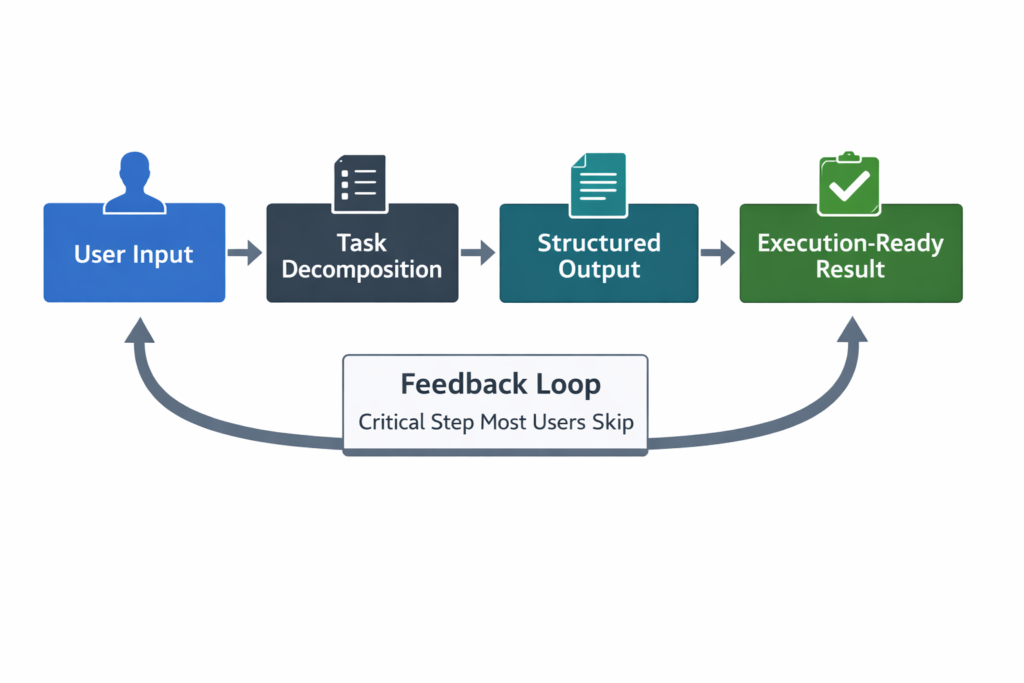
Manus AI is not just a writing assistant. It’s closer to a task execution engine.
It takes a request and tries to:
- Interpret the end goal
- Break it into steps
- Deliver something that feels “finished”
The important nuance
At first, I thought:
“Great, it just organizes outputs better.”
But in practice, I noticed something more subtle:
- It assumes intent aggressively
- It tries to fill in missing details on your behalf
That’s both its strength and its biggest risk.
When it works best
- When the outcome is clearly defined
- When the task has a logical structure
- When you can evaluate the result quickly
When it breaks
- When nuance matters (e.g., strategy, positioning)
- When the input is ambiguous
- When accuracy is critical
Key insight
This tool doesn’t fail loudly.
It produces outputs that look correct, but contain:
- Hidden assumptions
- Slight inaccuracies
- Overconfident structure
If you don’t review carefully, you’ll miss these.
Key Features (With Deeper Insight)
| Feature | Real Value | What I Observed | Hidden Limitation |
|---|---|---|---|
| Task Structuring | Clean, logical outputs | Great for execution | Can create false sense of completeness |
| Context Retention | Maintains flow | Works well in short sessions | Degrades in long threads |
| Output Formatting | Ready-to-use formats | Saves time | Can prioritize format over substance |
| Iteration System | Improves quality fast | Very responsive to feedback | Needs specific feedback, not vague |
| Workflow Simulation | Mimics real processes | Useful for planning | Sometimes invents unrealistic steps |
Non-obvious issue
Manus sometimes optimizes for looking professional instead of being correct.
That’s dangerous if you rely on it blindly.
How to Use It (Real Workflow + Mistakes)
Scenario: Writing a high-quality article
Step 1: Naive Prompt
Write a detailed article about productivity tools
What happened:
- Clean structure
- Generic content
- No real insight
Where it failed
It defaulted to “average internet knowledge.”
Step 2: Constraint-Based Prompt
Write an article about productivity tools for founders.
Include trade-offs, mistakes, and real-world limitations.
Avoid generic advice.
Result:
- Better depth
- Still somewhat surface-level
Step 3: Forcing Depth
Here’s where most users stop. That’s the mistake.
Critique your previous output.
Identify weak sections and rewrite them with more specificity and real-world constraints.
This changed everything.
Output became:
- More realistic
- Less “AI-polished”
- More useful
Key workflow insight
Manus becomes significantly better when you:
- Generate
- Critique
- Regenerate
Most people only do step 1.
Real-Life Use Cases (With Honest Outcomes)
1. Content Creation
What works:
- Structure
- First drafts
- Section expansion
What fails:
- Original insights
- Strong opinions
Insight:
It mirrors existing knowledge well, but rarely creates new angles.
2. Research Synthesis
What works:
- Organizing information
- Creating summaries
What fails:
- Source reliability
- Subtle distinctions
Critical observation:
It blends information smoothly—even when it shouldn’t.
3. Workflow Design
What works:
- Step-by-step processes
- Clear frameworks
What fails:
- Real-world constraints (time, resources, edge cases)
Example:
It might suggest a perfect workflow that’s unrealistic in practice.
4. Decision Support
What works:
- Breaking down options
- Structuring thinking
What fails:
- Prioritization under uncertainty
Insight:
It explains decisions well, but doesn’t own them.
Example Outputs (Realistic)
| Task | Without AI | With Manus AI |
|---|---|---|
| Blog Post | Time-consuming, messy | Structured but needs depth edits |
| Strategy Plan | Fragmented thinking | Clear but slightly idealistic |
| Research Summary | Raw notes | Clean but occasionally inaccurate |
| Workflow Design | Trial-and-error | Logical but sometimes impractical |
Pricing (With Real Strategy)
What matters more than price
The real cost is:
- Time spent fixing outputs
- Risk of subtle errors
When it’s worth paying
Upgrade if:
- You reuse outputs frequently
- You refine instead of rewrite
- You build workflows around it
Hidden cost mistake
Using Manus for tasks where precision matters more than speed
Example:
- Legal writing
- Technical documentation
In those cases, it can cost you more time.
Pros and Cons (More Honest)
Pros
- Excellent structure generation
- Strong for repeatable tasks
- Responds well to iteration
- Reduces cognitive load
Cons
- Overconfidence in outputs
- Can hide weak reasoning behind clean formatting
- Requires active supervision
- Not truly “plug-and-play”
Who Should Use It
Ideal users
- Operators
- Content systems builders
- Founders with repeatable workflows
Not ideal for
- People looking for one-click perfection
- High-stakes accuracy tasks
- Deep creative thinkers expecting originality
Advanced Tips (Non-Obvious)
1. Ask it to challenge itself
This is one of the most powerful tricks:
What’s wrong or weak about this output?
You’ll often uncover:
- Missing depth
- Flawed assumptions
- Overgeneralizations
2. Force constraints
Instead of:
Write a marketing plan
Use:
Write a marketing plan with a $500 budget and 2 weeks timeline
This dramatically improves realism.
3. Use “anti-generic” prompts
Avoid common advice. Focus on non-obvious tactics.
This reduces fluff significantly.
4. Break long tasks into checkpoints
Instead of one big request:
- Step 1: Outline
- Step 2: Expand
- Step 3: Critique
- Step 4: Refine
This prevents quality drift.
5. Watch for “confidence bias”
One thing I noticed repeatedly:
If Manus sounds very confident, that’s exactly when you should double-check it.
Final Verdict
Manus AI is powerful—but not in the way most people expect.
It doesn’t replace thinking.
It amplifies structured thinking.
If you use it passively, you’ll get average results.
If you:
- Guide it
- Challenge it
- Refine outputs
It becomes a serious productivity multiplier.
Best use case
Turning rough ideas into structured, usable outputs quickly
Final recommendation
Use Manus AI as:
- A junior operator
- A structured thinker
- A first-pass generator
But never as the final authority.
FAQ
1. What makes Manus AI different?
It focuses on completing structured tasks, not just answering prompts.
2. Why do outputs sometimes feel “off”?
Because it fills gaps with assumptions that aren’t always correct.
3. How do you get better results?
Iterate. Critique. Add constraints.
4. Is it reliable for professional work?
Yes—with review. Not without it.
5. What’s the biggest hidden risk?
Believing clean output equals correct output.
Call to Action
Don’t test Manus AI with simple prompts.
Give it a real task you actually care about—something you’d normally spend hours on.
Then:
- Push it
- Challenge it
- Refine it
That’s where the real value shows up.