
Most productivity problems aren’t about effort, they’re about repetition.
You’re not stuck because work is hard. You’re stuck because you’re doing the same small actions over and over:
- Copying data between tools
- Sending the same emails
- Updating the same records
I used to think this was just “part of the job.” So I tried shortcuts: templates, reminders, even scripts.
None of them solved the core issue.
They reduced effort – but didn’t remove the work.
That’s where Zapier actually changed things for me.
But not in the way most people think.
It didn’t “automate everything.”
It exposed how messy my workflows really were.
In this article, I’ll show you:
- What Zapier really does in practice
- Where it breaks (and why most people miss it)
- How to build automations that actually hold up over time
- The non obvious tricks that make it worth using
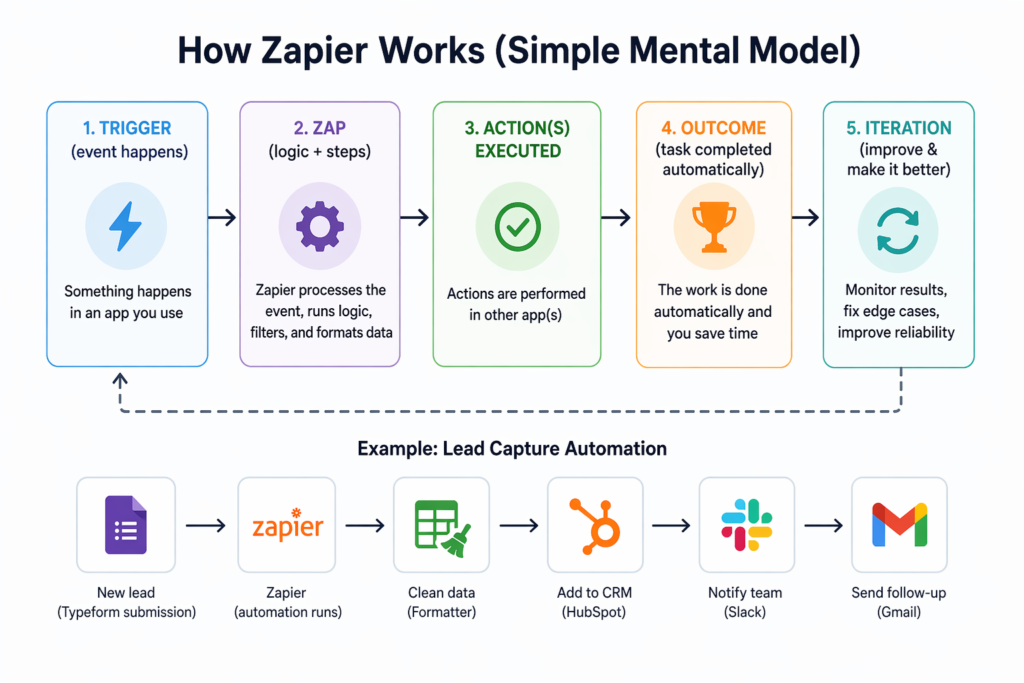
What Zapier Actually Does (Beyond the Marketing)
Zapier connects apps, but more importantly, it enforces structure.
That’s the part people overlook.
Simple explanation
It listens for something to happen in one app, then performs actions in other apps.
Who it’s really for
- People managing multiple tools that don’t integrate well
- Teams with repeatable workflows
- Operators who value consistency over flexibility
What it actually solves
Not automation – coordination.
Zapier shines when your tools are disconnected but your process is clear.
Real insight
At first, I thought Zapier would save me time immediately.
In practice, it did the opposite.
It forced me to:
- Define inputs clearly
- Standardize data
- Remove ambiguity
Only then did it start saving time.
When it works best
- Linear workflows (A → B → C)
- Structured inputs (forms, payments, submissions)
- Low-ambiguity actions
When it struggles
- Anything requiring judgment
- Workflows with frequent exceptions
- Systems with inconsistent data
Key Features (What Actually Matters in Practice)
| Feature | What It Does | Real Value | Hidden Limitation |
|---|---|---|---|
| Multi-Step Zaps | Chain multiple actions | Enables full workflows | Each step = more failure points |
| Filters | Conditional logic | Prevents bad data | Easy to misconfigure silently |
| Paths | Branching workflows | Simulates decision-making | Becomes hard to maintain quickly |
| Formatter | Data cleanup | Critical for reliability | Underused but essential |
| Webhooks | Custom integrations | Powerful flexibility | Breaks easily without monitoring |
One thing I noticed
The most important feature isn’t automation, it’s data formatting.
Most Zap failures come from:
- Missing fields
- Incorrect formats
- Unexpected values
How to Use Zapier (Real Workflow That Broke – Then Worked)
Goal:
Automatically process inbound leads and follow up
Version 1 (What I built first)
Trigger:
- Form submission
Actions:
- Add to Google Sheets
- Send email
What went wrong
- Duplicate entries
- Broken emails (missing names)
- Some leads skipped entirely
The issue wasn’t Zapier.
It was bad assumptions about the data.
Version 2 (What actually worked)
Trigger: Form submission
Step 1: Filter
- Only proceed if required fields exist
Step 2: Formatter
- Normalize names (capitalize, trim spaces)
- Validate email format
Step 3: Deduplication check
- Search existing database
Step 4: Store data
- Structured Google Sheets entry
Step 5: Email
- Dynamic, conditional messaging
Result
- 90% fewer errors
- No duplicates
- More consistent follow-ups
Non-obvious improvement
Instead of sending emails immediately, I added a delay:
- 2–5 minutes
Why?
It reduced:
- API failures
- race conditions
- weird timing bugs
Beginner mistake
Trying to build a “perfect Zap” from the start
Better approach:
Build → Break → Fix → Simplify
Real-Life Use Cases (With Honest Outcomes)
1. Lead Routing
Situation: Multiple lead sources
Use: Route to CRM + notify team
What worked:
Centralization
What failed:
Lead scoring logic got messy fast
Insight:
Zapier handles routing — not decision-making
2. Payment Notifications
Situation: Stripe payments
Use: Notify Slack + log transaction
What worked:
Instant visibility
What failed:
Refunds and edge cases needed separate Zaps
Insight:
Always account for reverse events
3. Content Publishing
Situation: Blog → social media
Use: Auto-post content
What worked:
Speed
What failed:
Formatting inconsistencies
Insight:
Automation doesn’t guarantee quality
4. Internal Reporting
Situation: Weekly metrics
Use: Scheduled report generation
What worked:
Consistency
What failed:
Data lag caused inaccurate reports
Insight:
Timing matters more than automation
5. Tool Synchronization
Situation: CRM ↔ database
Use: Keep data aligned
What worked:
Reduced manual updates
What failed:
Conflicts when both sides changed data
Insight:
Two-way sync is fragile — avoid if possible
Example Outputs
| Task | Without Zapier | With Zapier |
|---|---|---|
| Lead entry | Manual, inconsistent | Automated, structured |
| Email follow-up | Delayed or missed | Immediate but templated |
| Notifications | Reactive | Real-time |
| Data updates | Error-prone | Mostly reliable |
| Reporting | Time-consuming | Scheduled but needs validation |
Pricing (What Actually Costs You)
Zapier charges per task.
Here’s what most people miss:
A single Zap can consume multiple tasks per run.
Example
1 trigger + 4 actions = 5 tasks per event
At scale, this adds up fast.
Real mistake I made
I built one complex Zap instead of multiple small ones.
Result:
- Harder to debug
- Higher task usage
Better strategy
- Break workflows into smaller Zaps
- Use filters early
- Reduce unnecessary steps
When to upgrade
Only when:
- You hit task limits consistently
- You need multi-step workflows
Not before.
Pros and Cons (Real, Not Polished)
Pros
- Fast to implement
- No coding required
- Massive integration ecosystem
- Immediate time savings
Cons
- Expensive at scale
- Debugging is not intuitive
- Silent failures can happen
- Logic becomes messy quickly
Who Should Use Zapier
Best fit
- Operators managing repetitive workflows
- Small teams
- Non-technical users
Not ideal
- Complex backend systems
- High-scale automation
- Processes with heavy decision-making
Advanced Tips (That Actually Make a Difference)
1. Design for failure
Assume things will break:
- Add fallback steps
- Log errors
- Use notifications for failures
2. Always validate inputs
Never trust incoming data.
Use:
- Filters
- Formatters
- Defaults
3. Avoid “mega Zaps”
Big Zaps look efficient.
They’re not.
They’re:
- Hard to debug
- Expensive
- fragile
4. Use delays strategically
This solves:
- API rate limits
- sequencing issues
- inconsistent triggers
5. Log everything
Create a simple log system:
- Google Sheet
- Airtable
Track:
- Inputs
- Outputs
- Errors
This makes debugging 10x easier.
Final Verdict
Zapier is not an automation tool.
It’s a process enforcement tool disguised as automation.
If your workflows are messy, it will expose that.
If your workflows are clear, it will amplify them.
Is it worth it?
Yes, but only if you:
- Keep things simple
- Build incrementally
- Expect things to break
Best use case
Connecting tools and removing repetitive manual steps, not replacing complex systems.
FAQ
Is Zapier reliable?
Mostly, but silent failures can happen. Monitoring is essential.
Can it handle complex workflows?
Technically yes — practically, it becomes difficult to manage.
What’s the biggest hidden issue?
Task usage grows faster than expected.
How do I make my Zaps more reliable?
Validate data and reduce complexity.
Should I automate everything?
No. Automate only stable, repeatable processes.
Call to Action
Pick one repetitive task you do every day.
Automate just that.
Don’t aim for perfection. Aim for reduction.
Build it, watch it fail, fix it, and improve it.
That’s how Zapier becomes genuinely useful.