
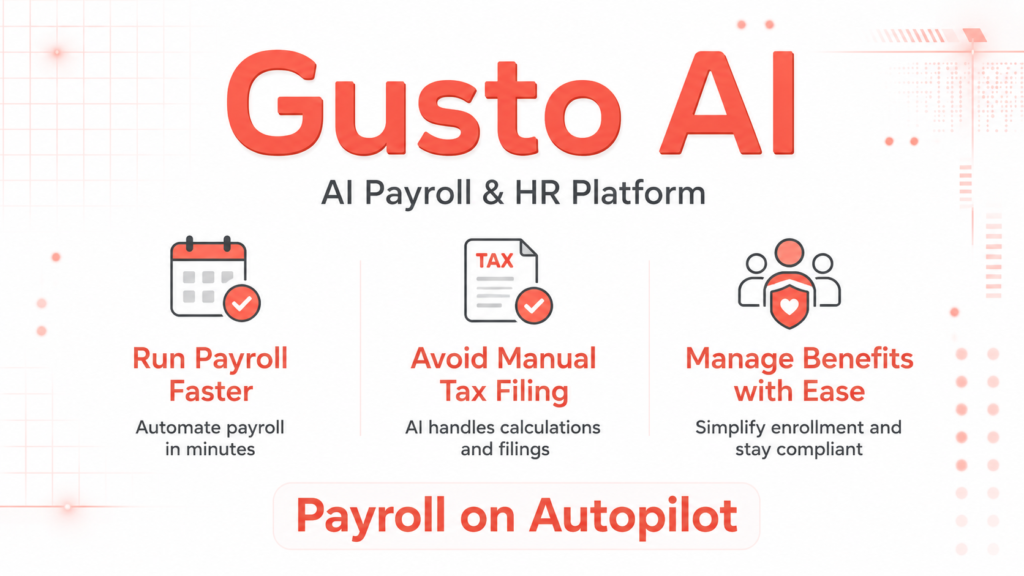
Running payroll manually is a compliance minefield.
Federal taxes, state taxes, local levies, contractor 1099s, W-2s at year end, each one is an opportunity to file late, calculate wrong, or miss a deadline entirely. Most small business owners rely on spreadsheets, legacy software, or their accountant’s availability, all of which create bottlenecks and expose the company to penalties.
Common alternatives fail in predictable ways. Spreadsheets break the moment you hire across state lines. Basic payroll tools handle calculations but leave tax filing to you. Full service firms are expensive and slow to respond. The gap between “doing payroll” and “doing payroll correctly and efficiently” is where most small businesses bleed time and money.
Gusto was built to close that gap. It combines automated payroll processing, full service tax filing, benefits administration, employee onboarding, and an AI assistant into a single cloud-based platform designed specifically for businesses under 100 employees. This article covers how it actually works in practice, where it excels, where it falls short, and how to get the most out of it.
Inside the Gusto Payroll System
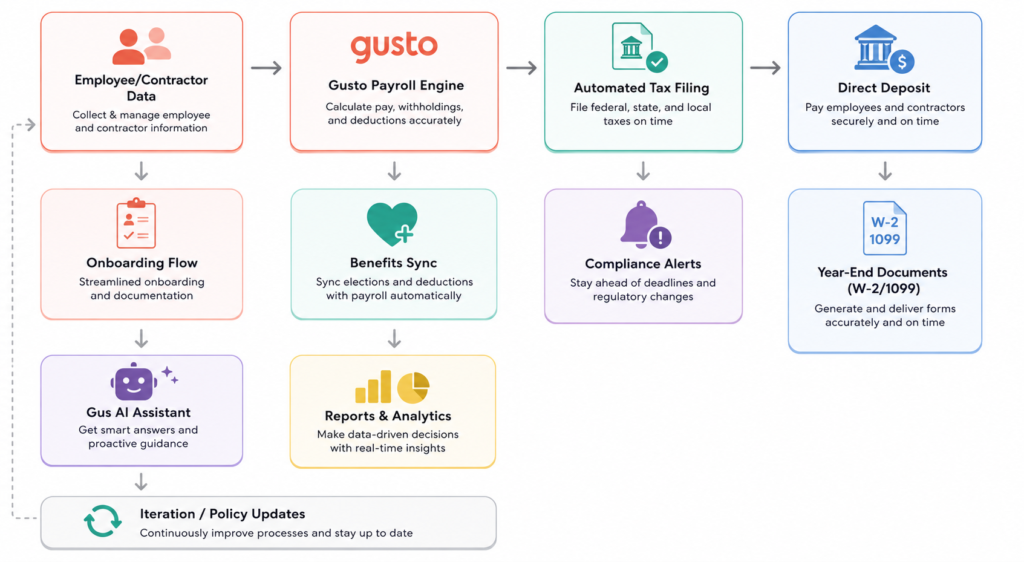
Gusto is not just payroll software. That label undersells it and causes users to underuse it. At its core, it automates the entire employee pay lifecycle, from the moment someone accepts an offer letter to the year-end tax documents they receive after leaving.
When you run payroll in Gusto, the platform calculates federal, state, and local taxes automatically, then files and pays them on your behalf. W-2s and 1099s are generated and distributed at year end without any manual input. Employees get a self service portal where they can access pay stubs, update their direct deposit details, manage benefits elections, and retrieve tax documents without contacting HR.
In 2026, Gusto expanded significantly beyond payroll. It now functions as a full workforce management platform. The addition of Gus, an AI assistant built into the platform, allows administrators to ask HR questions in plain English, pull reports, and approve time off requests through a conversational interface. New features include automated payment rerouting when a deposit fails, assisted payroll prep that flags anomalies before submission, and S corp election guidance powered by AI for solopreneurs looking to reduce self-employment taxes.
Gusto performs best when you have a stable US based workforce of W-2 employees, contractors, or a mix of both, and when you want compliance handled automatically rather than manually reviewed. It starts to struggle with complex enterprise payroll, highly customized compensation structures, union rules, or large organizations with dedicated payroll departments that need system-level customization.
One non obvious reality: Gusto is also a benefits broker. That means it can administer health insurance, dental, vision, 401(k), workers’ compensation, HSAs, and FSAs directly within the platform. This is a significant operational advantage, benefits data syncs automatically to payroll, so deductions are always accurate without a separate reconciliation step.
Key Features
Automated Tax Filing
This is the feature that justifies Gusto for most businesses. Every payroll run triggers automatic federal, state, and local tax calculations, payments, and filings. For businesses operating across multiple states, which is increasingly common with remote teams, this eliminates a genuinely complex compliance task. The limitation is that Gusto covers US tax jurisdictions only. If you have full time international employees (not just contractors), you will need a separate Employer of Record solution.
AutoPilot Payroll
For businesses where employee pay does not vary week to week, salaried teams with consistent hours, AutoPilot runs payroll on a set schedule with no manual trigger required. This is practically useful for founders who process payroll themselves and can forget or delay runs. The caveat is that AutoPilot requires clean data. If an employee’s direct deposit details are wrong or a bank account changes, the system will still attempt the payment and may fail before you notice. The newer automated payment rerouting feature helps here, but it is not a substitute for regular account verification.
Assisted Payroll Prep
New in 2026, this feature compares each payroll run against historical data and flags anomalies, missing entries, unusual hours, or amounts that fall outside expected ranges, before submission. In practice, this catches the most common payroll mistakes: someone forgot to clock out, a bonus was entered twice, or a new hire’s hours were miscategorized. Users who skip the review step and treat Gusto as fully autonomous miss the value of this feature entirely.
Gus AI Assistant
Gus is a conversational AI built into the Gusto platform. After opting in, you can ask questions like “How much PTO does Sarah have remaining?” or “Show me payroll costs for Q1” and get answers without navigating reports manually. Gus can also approve time-off requests and pull data reports on command. One limitation worth noting: Gus works with your company’s own data, so its usefulness scales with how consistently your team uses Gusto for time tracking, leave requests, and documentation. If data is incomplete, Gus answers are incomplete.
Benefits Administration
Because Gusto acts as its own benefits broker, selecting and managing health plans happens inside the same system you use to run payroll. This eliminates the coordination overhead of syncing a third party broker with your payroll provider. The AI powered benefits optimization feature, introduced in 2026, gives personalized plan recommendations based on cost, coverage preferences, and how your offerings compare to similar businesses. The limitation is that plan options depend on your geography and employee count, very small teams in certain states may find limited options.
International Contractor Payments
Gusto supports contractor payments in 120+ countries, which makes it practical for remote first teams that hire freelancers globally. This is not an Employer of Record service, it does not handle foreign employment taxes or compliance obligations for full time international staff. It is specifically for 1099 equivalent contractor payments, and it works well within that scope.
How to Use It:
Setup
The most common onboarding mistake is rushing through the company setup before entering complete tax information. Gusto needs your federal EIN, state tax IDs, and prior payroll data if you are switching mid-year. Importing prior payroll history is optional but important, without it, W-2s at year-end will only reflect wages paid through Gusto, and employees may see discrepancies.
Spend time on the employee profiles during setup. Direct deposit information, tax withholding forms (W-4), and benefits elections all need to be complete before the first payroll run. Gusto does prompt you through this with checklists, but many users skip optional fields that later cause exceptions.
During Usage
Running payroll takes most users five to fifteen minutes once the system is configured. The dashboard surfaces to-do items proactively, upcoming payroll dates, expiring compliance documents, time off requests awaiting approval. The Assisted Payroll Prep review screen is worth reviewing carefully rather than clicking through. Anomaly flags in this step are the system’s best opportunity to catch errors before money moves.
For businesses with hourly staff, connecting Gusto’s time tracking to payroll means approved timesheets sync automatically to the next payroll run. This removes a manual data entry step that is a frequent source of errors in other systems.
After Payroll
After each run, Gusto generates a payroll journal that can sync automatically to accounting software including QuickBooks Online, Xero, and FreshBooks. This sync is reliable but requires initial mapping setup, payroll cost categories need to be mapped to your chart of accounts. Users who skip this step and export manually every cycle are creating unnecessary work.
Where Things Break
Gusto struggles when your accounting software is not on its supported integration list. Some users who switch accounting platforms mid-year find themselves manually exporting payroll data, which negates one of the platform’s primary efficiency gains. Similarly, if you operate in California, the state’s complex break premium and overtime rules require deliberate policy configuration in Gusto, it does not auto detect California specific requirements unless you set up the relevant compliance policies.
Common Beginner Mistake
New users often add employees to payroll before completing their onboarding checklist in Gusto. The result is running payroll for someone whose direct deposit information, tax withholding, or benefits elections are incomplete. The fix is to use Gusto’s onboarding workflow, which sends new hires a self service link to complete their own information before their first payroll run, rather than entering data manually on the employee’s behalf.
Real Life Use Cases
A 12-person marketing agency with remote staff across four states
Before Gusto, this team was filing state taxes manually through four separate state portals, each with different deadlines and forms. After setup, Gusto handled all four automatically. The time savings were immediate, what previously took a half day each quarter was reduced to nothing. The remaining manual task is reviewing the pre-payroll anomaly report, which takes ten minutes biweekly.
A founder run SaaS company transitioning from sole proprietor to S corp
Gusto’s S corp election feature, introduced in 2026, walks solopreneurs through IRS Form 2553 with step by step guidance and an AI advisor that models potential tax savings. For many solopreneurs, the tax savings from S corp status can offset Gusto’s annual cost many times over. The limitation is that this is guidance, not legal advice, you should still confirm the election with a CPA.
A restaurant with 20 hourly employees and California labor law compliance requirements
California’s break premium requirements, paying extra compensation when required breaks are missed, are notoriously difficult to track manually. Gusto’s California specific break policy feature automatically tracks missed breaks and adds required premium pay to payroll. This eliminates a manual compliance step that has generated significant legal exposure for food service businesses in the state.
An accounting firm managing payroll for multiple small business clients
Gusto Pro is the accountant-facing version of the platform. It allows firms to manage multiple client accounts from a single dashboard, with visibility into compliance requirements, benefits opportunities, and payroll anomalies across their entire client base. The 2026 Karbon integration allows payroll work items to sync directly into Karbon practice management, reducing tool-switching for firms that operate across both platforms.
A 5-person startup offering benefits for the first time
First time benefits administration is confusing. Gusto’s benefits brokerage simplifies the process by allowing plan selection, employee enrollment, and payroll deduction setup within a single workflow. The AI powered recommendations help founders who are not benefits experts select plans that are competitive for their team size and location.
Example Outputs: Without vs. With Gusto
| Task | Without Gusto | With Gusto |
|---|---|---|
| Running biweekly payroll for 10 employees | 2–3 hours including manual tax calculation | 10–15 minutes with pre-populated data |
| Filing state taxes across 3 states per quarter | Half day, 3 separate portals, manual forms | Automatic, no manual action required |
| Onboarding a new hire (documents, banking, tax forms) | HR collects and enters data manually | Employee completes self service; HR reviews |
| Year end W-2 distribution | Manual preparation, print or mail | Auto generated and distributed via employee portal |
| Identifying a payroll anomaly | Catch it after payroll runs, or not at all | Flagged before submission in Assisted Payroll Prep |
These outcomes are realistic for a straightforward US based team. More complex scenarios, multi entity structures, deferred compensation, or heavy customization, will see more limited time savings.
Pricing:
Gusto uses a base fee plus per employee monthly pricing across four tiers: Simple, Plus, Premium, and a Contractor only plan. The Simple plan covers single state payroll for very small teams. Plus adds multi-state support and more HR tools. Premium includes a dedicated HR advisor and advanced features. Pricing is transparent and publicly listed, no sales call required to get a quote.
The real cost question is not whether the subscription is affordable, for most small businesses, it is, but whether you are using enough of the platform to justify it. A team of five using only basic payroll is paying for capabilities it never touches. The break even on value comes when you factor in automated tax filing, benefits administration, and onboarding, which, if handled externally, carry real costs in time or professional fees.
The practical insight: businesses that use Gusto as their complete HR stack, not just payroll, get substantially more value per dollar than those treating it as a payroll only tool. The more workflows you consolidate into Gusto, the more compounding efficiency you get from integrations, data consistency, and the AI assistant.
A common cost mistake is staying on the Simple plan past the point where your team operates in multiple states. Multi state payroll on the Simple plan either is not supported or requires upgrading, this catches growing businesses off guard during expansion.
Strengths and Limitations
Gusto’s strongest area is the combination of ease of use and compliance automation. The platform handles complexity, multi-state taxes, benefits deductions, year end filings, without requiring the user to understand the underlying rules. For a business owner who is not a payroll expert, this reduces a significant stress surface. The self service employee portal is also genuinely well designed, reducing inbound questions to HR or admin staff about pay stubs, tax documents, and PTO balances.
The AI assistant Gus adds real utility for routine queries and report generation. It is not a replacement for a benefits advisor or HR professional, but it meaningfully reduces the time spent navigating the platform for common administrative tasks.
On the limitation side, Gusto is built for US businesses. If you have full time international employees, not just contractors, the platform does not provide the employment infrastructure needed in other countries. You will need a separate Employer of Record solution alongside Gusto.
Customization is another limitation that comes up in larger teams. Advanced payroll configurations, custom pay schedules, complex commission structures, equity compensation, are possible but require more setup and sometimes workarounds. Teams that have outgrown the SMB segment and need enterprise grade configuration flexibility may find Gusto’s boundaries more restrictive than competitors like ADP Workforce Now.
Customer support has been a recurring theme in user feedback. Priority support is available only on the Premium plan or as an add on. Users on lower-tier plans may experience slower response times when issues arise, which is worth factoring in if payroll accuracy is business-critical and your team lacks internal expertise.
Who Should Use It
Gusto is best suited for US based businesses with 2 to roughly 100 employees that want payroll, compliance, and HR in one place without building an internal HR function. It is particularly strong for remote first teams operating across multiple states, businesses offering benefits for the first time, solopreneurs considering S corp election, and founders who process payroll themselves and need automation to reduce the cognitive overhead.
Accounting firms with SMB clients benefit significantly from Gusto Pro, which provides multi client visibility and integrations with practice management tools.
Gusto is not the right fit for large organizations with complex payroll requirements, businesses that need global employment infrastructure (not just contractor payments), or companies that require deep customization of pay structures that go beyond Gusto’s templated options. If your team is already running a mature HR department with dedicated payroll staff and custom workflows, the simplicity that makes Gusto valuable to small teams may feel like a constraint.
Advanced Tips
Connect benefits data before running your first payroll.
Benefits deductions are one of the most common sources of payroll errors. Setting up health insurance, 401(k), and other benefits before the first run ensures deductions are correct from day one rather than requiring retroactive corrections.
Use Gusto’s onboarding workflow instead of manual data entry.
The self service onboarding link captures direct deposit information, W-4 elections, and I-9 documentation directly from the employee. This is more accurate and creates a documented audit trail. Entering this data manually on behalf of employees introduces errors and removes the audit trail.
Map payroll to your chart of accounts immediately after setup.
The accounting integration sync is only as useful as the underlying category mapping. Spending 30 minutes on this during setup eliminates weekly manual exports for the life of the account.
Opt into Gus and train your team to use it.
The AI assistant reduces administrative queries but only if the people who would otherwise send those queries know it exists. Making Gus the first point of contact for common HR questions, PTO balances, pay stub retrieval, policy questions, reduces the operational load on administrators meaningfully over time.
Review the Assisted Payroll Prep screen before every submission.
This is not a step to click through. The anomaly flags on this screen represent the system’s best real time check on data quality. Users who treat it as a formality and submit without reviewing lose the primary error-detection layer that makes automated payroll reliable.
For California businesses, configure break policies explicitly.
California’s break premium rules are not activated by default. Setting up the break tracking policies in Gusto’s time management settings is a one time configuration that provides ongoing compliance protection in a state where labor law violations are expensive.
Final Verdict
Gusto is the most practical all in one payroll and HR platform available for US small businesses in 2026. For teams that want compliance handled automatically, onboarding streamlined, and benefits administered without a dedicated HR department, it delivers genuine operational value, not just time savings on a single task, but a consolidation of multiple workflows that previously required multiple vendors, manual steps, or professional fees.
The key limitation is scope: Gusto is built for the US market, for teams under roughly 100 employees, and for businesses that want a platform that works well out of the box rather than one that can be configured to match complex custom requirements. Within those boundaries, it performs better than any comparable alternative.
It is worth using if you are a US based business that currently spends meaningful time on payroll processing, tax filing, or benefits administration, or if you are growing into those responsibilities and want to avoid building manual processes that will need to be replaced later.
FAQ
Does Gusto handle payroll for both W-2 employees and 1099 contractors?
Yes. Gusto manages both employee payroll and contractor payments from the same platform. It generates W-2s for employees and 1099-NEC forms for contractors automatically at year-end. For international contractors, it supports payments in 120+ countries, though this is limited to contractor payments and does not constitute employment infrastructure in those countries.
What happens if payroll is submitted with an error?
Gusto allows corrections after payroll is submitted, which is not universally available in other payroll platforms. Depending on the timing and the type of error, corrections may involve voiding and reissuing a payment or processing an off cycle payroll run. The Assisted Payroll Prep feature is designed to catch errors before submission, which is the more efficient path than correcting after the fact.
Is Gusto suitable for a business that operates in multiple states?
Multi state payroll is supported on the Plus and Premium plans. The Simple plan is designed for single state businesses. For remote first teams or companies with employees in several states, upgrading to Plus is necessary to unlock automatic multi state tax filing.
How does the Gus AI assistant differ from the standard Gusto platform?
Gus is an opt in conversational layer on top of the existing platform. It allows administrators and HR staff to interact with Gusto data and trigger certain actions, approving time off, pulling reports, answering HR policy questions, through natural language rather than navigating the interface. It does not replace any existing functionality; it provides an alternative, faster way to access it.
What is the learning curve for a first-time user with no payroll background?
Gusto’s onboarding process is well guided and requires no prior payroll expertise. Most first time users complete their initial setup and run their first payroll within a few hours. The more complex elements, benefits configuration, multi state tax setup, accounting integrations, take additional time to configure correctly, but the platform provides documentation and support throughout. Users who invest time in setup see the most consistent results, those who rush through configuration create problems that surface later.
Start Using It in a Real Workflow
If your current payroll process requires manual tax filing, spreadsheet based time tracking, or separate systems for payroll and benefits, Gusto is worth evaluating with a real use case rather than a demo walkthrough. Set up a payroll run for your actual team, connect your accounting integration, and configure the onboarding workflow for your next hire. The efficiency difference becomes apparent immediately.
Start using Gusto with the scenario that currently costs you the most time, whether that is multi state tax compliance, benefits administration, or simply the 2-3 hours your team spends processing payroll each cycle. That is where the value is clearest, and where the comparison to your current approach will be most direct.


Your latest blog post was truly inspiring and had some great insights. I can’t wait to see what else you have in store.