The Problem Most Finance Teams Still Face
Manual invoice processing is one of the most expensive hidden costs in small and midsize business operations. Finance teams spend hours chasing receipts, entering data, routing approvals over email, and reconciling payments with accounting records, only to repeat the same cycle the following month. Standard accounting software handles recording. It does not handle the operational workflow that precedes it.
This is the gap BILL AI is designed to close. Built on top of more than a decade of payment data, BILL has evolved from a niche accounts payable tool into a full financial operations platform that combines AP, AR, expense management, and spend controls in one system, with AI running beneath all of it. This article breaks down how the platform actually functions in practice, where it performs well, and where users consistently run into problems.
What BILL AI Actually Does
BILL has evolved from niche AP software into a comprehensive AI powered financial operations platform, unifying AP, AR, expense management, and business credit into one solution. This gives SMB finance teams a single system of record for payables, receivables, corporate cards, and cash flow.
The AI component is not a chatbot layered on top of existing features. BILL’s AI has been trained on an enormous dataset of real business transactions, having processed over $1 trillion in payment volume and 1.3 billion documents, which gives the platform a scale of training data that is difficult for competitors to match. In practice, this means the system can make confident predictions about how invoices should be categorized, which vendor a document belongs to, and whether an anomaly in spending is worth flagging.
The platform performs strongest in structured, repeatable workflows: recurring vendor payments, multi step approval chains, and high volume invoice processing. It struggles when invoice formats are highly irregular, when vendor relationships are new (limiting the AI’s historical pattern data), or when a business requires deep customization in its approval logic.
Key Features That Matter in Practice
Invoice Coding Agent
The Invoice Coding Agent reads a bill, understands it, and codes it based on historical patterns and document data, achieving 99% accuracy in extracting key fields like amount, due date, and PO numbers, and reducing the number of steps in a multi-line item coding process by approximately 90% compared to manual workflows. For teams processing dozens of complex, multi-line invoices each month, this is where the return on investment becomes tangible.
One limitation: accuracy on first-time vendors is lower. The agent relies on historical patterns, so early interactions with a new supplier require more manual review. Teams that onboard a significant number of new vendors regularly will see more exceptions during the first few billing cycles.
Transaction Agent for Spend and Expense
The Transaction Agent works in the background from the moment a card is swiped, capturing receipts, matching them to the correct transaction, and coding every accounting field. When a receipt is missing, the AI agent can generate one using transaction data. This effectively eliminates the end-of-month expense report scramble that most businesses still handle manually.
The catch is that auto generated receipts require admin awareness. They are placeholders, not legitimate documentation, and will not satisfy audit requirements without supplementary records. Teams in regulated industries or those subject to external audits need to configure policies that flag these explicitly rather than letting them pass through silently.
Duplicate Detection and Fraud Monitoring
The platform automatically detects and flags potential duplicate invoices, and uses predictive algorithms to monitor for anomalies or signs of fraud. This is more useful than it sounds. Duplicate payments are a common and costly error in high-volume AP environments, and having this handled automatically rather than through manual reconciliation removes a real operational risk.
Multi Method Payment Execution
BILL supports ACH, physical checks (printed and mailed by BILL), credit card, virtual cards, and international wire transfers. ACH transactions cost $0.59 each, instant payments are charged at 1%, credit card transactions carry a 2.9% fee, and international payments in local currencies are available at $0 wire fees with competitive exchange rates. The diversity of payment methods is an advantage for teams managing vendors with different preferences, but the transaction fee structure means total cost scales with payment volume and method mix.
How to Use It:
Setup (what most teams skip)
The most common mistake is underinvesting in setup. Teams that import their chart of accounts, connect accounting software, and run a few weeks of transactions before going fully live see significantly better AI performance from the start. The AI learns from historical coding decisions, so a cold start with no data produces less accurate suggestions.
Connect your accounting platform first, QuickBooks Online, Xero, NetSuite, or Sage Intacct depending on your tier. Map GL codes and approval roles before processing a single invoice. Most users skip straight to bill entry and then spend weeks correcting miscoded transactions.
Standard AP Workflow
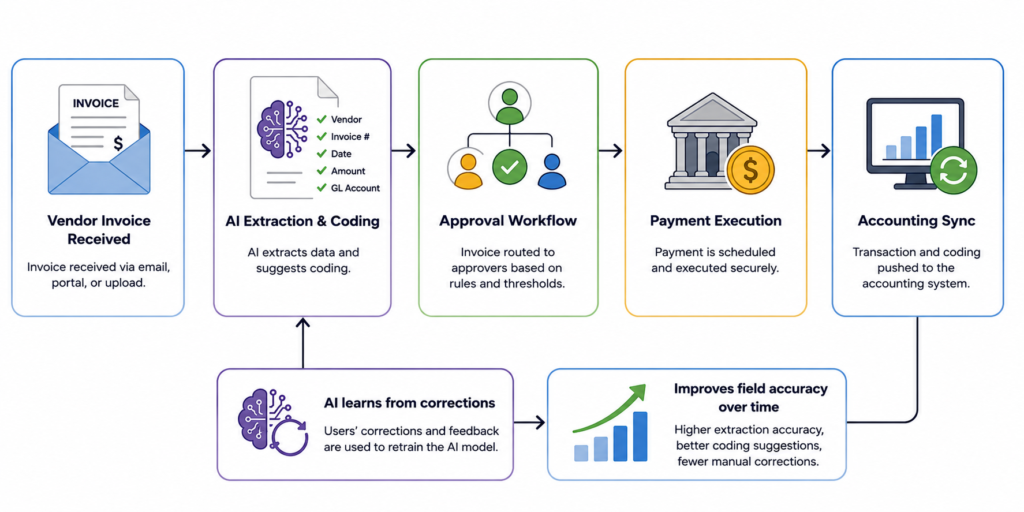
A vendor emails an invoice to a BILL generated inbox address. The Invoice Coding Agent reads the document, extracts fields, matches it to a vendor record, and suggests coding based on prior transactions with that vendor. The bill enters the approval workflow, routes to the designated approver(s), and once approved, can be scheduled for payment in the method the vendor prefers. The completed transaction syncs back to the connected accounting system.
Where Things Break
A consistent limitation reported by users is the inability to sync invoice copies reliably with QuickBooks, and some users find they cannot assign more than one approver at a time on certain plans. The QuickBooks sync issue is the most disruptive, it requires manual correction and introduces the kind of data inconsistency the platform is supposed to prevent.
A better approach for teams using QuickBooks is to run a parallel reconciliation check weekly during the first month, confirming that BILL side transactions match the QB ledger. This catches sync errors early and builds confidence in the automation before reducing manual oversight.
Common Beginner Mistake
New users frequently set up approval workflows based on their current organizational structure and then do not revisit them as the business changes. A year later, bills are routing to the wrong approvers or sitting in queues because someone changed roles. Set a quarterly reminder to audit workflow rules, especially after any staffing changes.
Real Life Use Cases
Small business handling 50+ vendor invoices monthly.
Before BILL, the owner or a bookkeeper manually entered each invoice, emailed approvals back and forth, and reconciled payments with the accounting software. With BILL’s Invoice Coding Agent and automated approvals, the same volume takes a fraction of the time. The practical insight: the time savings are real, but the first two months involve training the AI and correcting edge cases. The return accelerates after the system has learned vendor patterns.
Remote team managing employee spending.
A distributed team issues BILL Spend & Expense cards to employees. Spending limits are set per card and per budget category. When employees make purchases, the Transaction Agent captures receipts and codes transactions automatically. The insight: the Spend & Expense product is completely free with no subscription or per-user fees, which makes it a logical first entry point for teams not ready to commit to paid AP/AR plans.
Accounting firm managing multiple client entities.
Firms manage AP and AR pricing through the Accountant Console and entity model, adding or removing client entities as their business changes, rather than paying per firm user. This is a structural advantage for firms that want to consolidate client financial operations into a single platform without absorbing per-seat costs for every engagement.
E-commerce business paying international suppliers.
BILL’s international wire capability allows direct payment to overseas vendors in local currency. Teams sourcing from multiple countries can consolidate vendor payments into BILL rather than managing separate wire processes through their bank. The limitation: wire transfer timing can vary, and urgent international payments may still require a direct bank transfer if same-day settlement is needed.
Growing company replacing email based approvals.
When approval chains are managed over email, there is no audit trail, no visibility into where a bill is in the process, and no systematic enforcement of policy. BILL replaces this entirely. The non obvious insight: teams coming from email based approvals often underestimate how long it takes to define workflow rules before go live. This setup phase takes longer than expected but pays off immediately once live.
Example Outputs: Realistic Comparison
| Task | Without BILL | With BILL AI |
|---|---|---|
| Code a 20 line utility invoice | 8-12 minutes manual entry | Under 1 minute, with AI suggestions |
| Chase and match 30 employee receipts | Half a day at end of month | Automated on card swipe; ~5 minutes review |
| Route an invoice through 3 approvers | 2-4 days via email thread | Same day, with automatic escalation |
| Reconcile payments with QuickBooks | 1-2 hours manual matching | Automatic sync (occasional errors require fixes) |
| Pay a vendor in local currency overseas | Bank wire form + fees + delays | Initiated in BILL, competitive rates, logged automatically |
Pricing:
BILL’s Essentials plan starts at $45 per user/month, the Team plan at $55 per user/month, and the Corporate plan at $89 per user/month. Enterprise pricing is custom.
For small deployments of 3 to 10 users, total monthly cost typically lands between $300 and $1,200 when subscription and transaction fees are combined. Mid-sized deployments of 10 to 50 users commonly run $2,000 to $7,000 per month.
The real cost driver is often not the subscription but the transaction fee mix. Teams paying many vendors by check or credit card will see transaction costs accumulate quickly. A better approach is to migrate as many vendors as possible to ACH ($0.59 per transaction) and virtual cards (free where accepted), which significantly reduces per-transaction cost at higher volumes.
Because AP and AR pricing is per user, many Corporate and Enterprise customers manage costs by assigning full feature access only to people who create, approve, or manage bills, while using lighter approver roles where available. This is worth structuring intentionally from the start, not as an afterthought.
The Spend & Expense module adds no subscription cost, which is genuinely useful, most platforms charge separately for expense management. For teams evaluating BILL, starting with Spend & Expense at no cost is a low risk way to assess the platform before committing to paid plans.
Strengths and Limitations
BILL performs best when a business has established vendor relationships, consistent invoice patterns, and defined approval hierarchies. In this environment, the AI compounds in value over time, it gets more accurate as it processes more transactions, and manual intervention gradually decreases.
The platform’s network effect is real. With a member network of more than 8 million, BILL’s platform processes roughly 1% of US GDP annually. This means many vendors your business deals with are already in the network, which speeds up setup and payment acceptance.
Customer support accessibility is a consistent complaint, reaching a human specialist requires scheduling or submitting a request rather than immediate access, which creates friction when urgent payment issues arise. For a platform handling financial transactions, this is a meaningful operational risk. Teams should document escalation paths during onboarding rather than discovering them during a payment emergency.
Reporting customization is limited. BILL provides enough for operational visibility, but teams that need sophisticated financial analytics will need to export data to their accounting software or a separate BI tool. The platform is built for operational finance, not financial reporting.
Some users report that AI automations get things wrong frequently enough that they choose to avoid using them where possible. This is usually a symptom of insufficient training data or inconsistent historical coding, both of which can be addressed, but it requires active management in the early months.
Who Should Use It
BILL is best suited for small and mid-sized businesses processing more than 20 to 30 invoices per month, with at least two people involved in payment approvals, and an existing accounting software integration. The ROI calculation improves sharply with invoice volume. At 100+ invoices per month, the time savings from automated coding and approval routing alone justify the subscription cost.
Accounting firms handling AP for multiple clients should evaluate the partner program specifically, the entity model removes per user pricing friction and makes multi client management economically viable.
Teams that should look elsewhere: businesses with very low invoice volume (fewer than 10 per month), solo operators who handle all financial tasks themselves, businesses that require real time payment processing or point of sale functionality, or teams that need highly customized financial reporting built into their AP tool.
Advanced Tips
Train the AI deliberately. In the first 60 days, prioritize consistency in how you code transactions. Every correction you make teaches the AI. Inconsistent coding, using different GL accounts for the same type of expense, creates compounding inaccuracy. Assign one person to review and standardize coding decisions during the onboarding phase.
Use vendor-specific inbox routing. BILL allows you to configure an email address for each vendor to send invoices to directly. Setting this up means invoices land automatically in BILL rather than in someone’s personal inbox. Most teams skip this and continue forwarding manually, which introduces delay and risk.
Audit your approval workflows quarterly. Approval rules do not update themselves when people change roles. A quarterly review of who is in each workflow prevents bills from stalling in queues or reaching the wrong approvers.
Model your payment method mix before committing. Before choosing a plan, run an estimate of monthly transaction fees based on how you currently pay vendors. If a high proportion of your payments go by check or credit card, the transaction fees on higher-volume plans can rival or exceed the subscription cost. Shifting vendor payment methods to ACH where possible is the single highest leverage cost optimization.
Combine Spend & Expense with AP. Teams that run both products in parallel get full cycle visibility, employee card spending plus vendor payables in the same platform. This is more useful than it sounds for cash flow management, because it eliminates the gap between “what is committed” and “what has been recorded.”
Final Verdict
BILL AI is a well built platform for the specific problem it solves: automating the operational layer of business finance for SMBs. It does this better than most competitors, with the training data advantage of processing over a trillion dollars in transactions giving its AI a meaningful accuracy edge.
It is worth using if your business processes meaningful invoice volume each month, has defined approval workflows, and wants a single platform to manage vendor payments, employee spending, and accounting integration. The time savings are real and the AI improves with use.
It is not the right fit if you need deep reporting customization, real time payment capabilities, or responsive live support as a baseline expectation. The support model and occasional sync errors are genuine operational risks for teams that run lean.
The key limitation to hold in mind: the platform’s value is directly proportional to how well it is configured and how consistently the team uses it. Teams that treat it as a set and forget tool will see mediocre results. Teams that invest in setup and actively train the AI will see the efficiency gains compound over time.
FAQ
Does BILL AI work with QuickBooks Online?
Yes, and it is one of the most common integrations. However, sync errors occur periodically and require manual correction. Teams using QuickBooks should run weekly reconciliation checks during the first month and set up alerts for sync failures.
How long does it take for BILL’s AI to get accurate?
Performance improves over the first 60 to 90 days as the system processes transactions and learns from corrections. Teams with clean, consistent historical data will see faster improvement. New businesses with no payment history will need to invest more time in manual review early on.
Is BILL Spend & Expense actually free?
Yes, the Spend & Expense module has no subscription or per user fees. Businesses qualify based on creditworthiness, and the credit line ranges from $1,000 to $5 million. Transaction fees apply in some payment scenarios, but the software cost is genuinely zero.
What is the difference between the Team and Corporate plans?
The Corporate plan adds advanced approval workflow customization, purchase order matching (2 way and 3 way), deeper ERP integrations including NetSuite and Sage Intacct, and the approver only role that allows adding approval level users at a lower per seat cost. For businesses that have grown to need department level controls, Corporate is the appropriate tier.
Can BILL handle international vendor payments?
Yes. BILL supports international wire transfers in local currencies with no wire transfer fee on some plans. Exchange rates are displayed before confirmation. It is not designed for high-frequency, real time international payments, but for standard B2B vendor payments it functions well.
Start Automating Your Financial Workflows
If your team is still managing invoices over email, coding transactions manually, or chasing receipts at month end, the gap between your current process and an automated one is measurable in hours per week. BILL AI is a platform that closes that gap for most SMB finance workflows, and the Spend & Expense module gives you a free entry point to evaluate it without upfront commitment.
Start using BILL AI with the Spend & Expense product, build familiarity with the interface, and then evaluate whether the full AP and AR capabilities match your invoice volume and approval requirements.