Asana is one of the most established project management platforms available in 2026. Founded in 2008 by Dustin Moskovitz and Justin Rosenstein, two of Facebook’s early engineers, it has grown into a platform used by teams at companies including Amazon, Google, Spotify, and thousands of organizations worldwide.
However, Asana is not the cheapest option in the category. At $10.99 per user per month for Starter on annual billing, it costs more than ClickUp at $7 per user per month for equivalent features. Furthermore, purchasing seats in blocks of five rather than individually inflates costs for small teams in ways the pricing page does not clearly communicate.
So is Asana worth the premium in 2026? This honest review covers the real pricing, the genuine strengths, the documented frustrations, and exactly who should choose Asana over faster-growing alternatives like ClickUp and Monday.com.
What Is Asana?
Asana is a work management platform that helps teams organize projects, coordinate tasks, automate workflows, and track progress across departments. Its strongest fit is cross-functional work. Marketing, operations, product, HR, and leadership teams can use the same platform while keeping their own views, fields, templates, and approval steps.
What distinguishes Asana from general task managers is its structured execution model. Every project has clear ownership, defined dependencies, and portfolio-level visibility that connects daily work to organizational goals. Consequently, teams that have struggled with work scattered across emails, spreadsheets, and disconnected conversations consistently find Asana’s structured approach transformative for coordination.
In 2026, Asana has invested heavily in AI through Asana Intelligence and AI Studio, which build AI-powered workflow automation directly into the platform. Furthermore, the platform now separates plans by automation depth, reporting capability, portfolio management, AI access, and enterprise security rather than simply by feature count. This makes plan comparison more nuanced than it was in previous years.
Asana Pricing in 2026
Asana has five tiers as of September 2026, all billed annually for the best rates. Here is the verified breakdown:
Personal (Free): $0. Includes unlimited tasks, unlimited projects, unlimited messages, list, board, and calendar views, basic integrations with Slack and Google Drive, and up to 10 teammates. G2 reviewers consistently note that the free tier is genuinely functional but limited in collaboration depth for larger teams. Consequently, it works well for individuals and very small teams with simple project needs.
Starter: $10.99/user/month (annual billing) or $13.49/user/month (monthly billing). Adds Timeline and Gantt views, Workflow Builder, unlimited automations, custom fields, advanced search, Asana AI access, and dashboards. A 10-person team costs $109.90 per month on the annual plan. This is where Asana becomes a serious project management tool. Furthermore, Asana AI is included at this tier, which distinguishes it from ClickUp where AI requires a separate add-on.
Advanced: $24.99/user/month (annual billing). Adds portfolio management, goals and OKR tracking, workload management, custom rules, approval flows, time tracking, and advanced reporting. A 10-person team costs $249.90 per month. This is the tier for mid-size organizations managing work at an organizational rather than project level. Furthermore, Advanced includes AI Studio Basic for building AI-powered workflows.
Enterprise: Custom pricing. Adds SSO, SCIM provisioning, data export, admin controls, priority support, and advanced security. Designed for large organizations that need compliance controls and dedicated support infrastructure.
Enterprise+: Custom pricing with additional security and compliance features including SIEM integration, eDiscovery, DLP, data residency, IP allowlisting, Enterprise Key Management, and HIPAA compliance. Designed for large enterprises with 500 plus employees in regulated industries.
The hidden cost warning: Asana sells seats in blocks of five on some plans rather than individually. A team of seven needs to purchase 10 seats, paying for three unused seats. Consequently, the per-user price on the pricing page understates actual cost for teams whose size does not divide cleanly into five. Always calculate your actual seat block requirement before budgeting.
Furthermore, AI Studio, which provides advanced AI workflow building capabilities, is priced separately on top of plan costs. Basic AI Studio is included on Advanced. Plus and Pro AI Studio tiers add additional monthly cost per user. Therefore, teams that want full AI workflow automation should factor AI Studio pricing into their total cost calculation before comparing Asana to alternatives.
Key Features
Task and Project Management
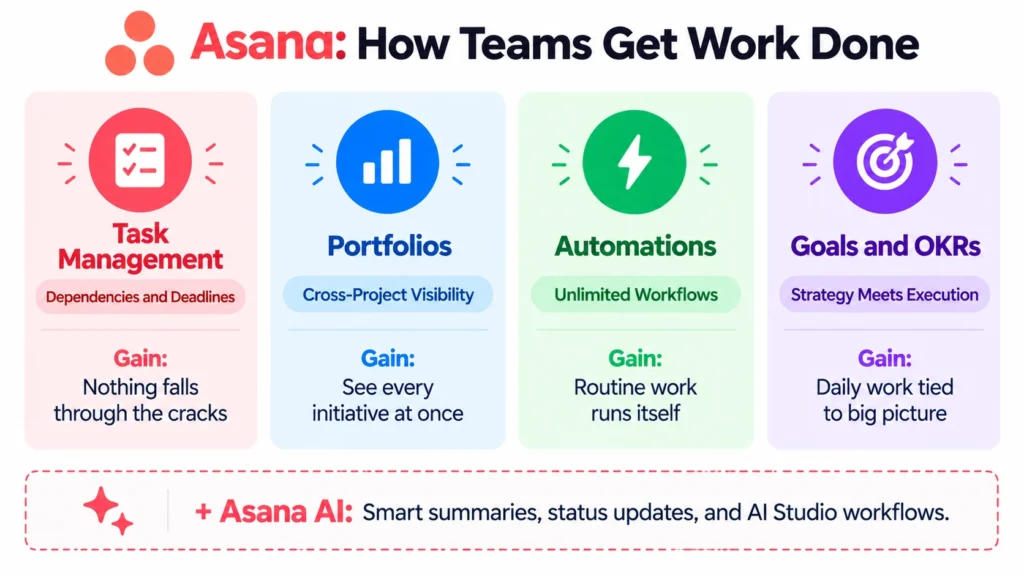
Asana’s task management is highly effective in 2026. Tasks support assignment, deadline setting, subtasks, dependencies, custom fields, attachments, and comment threads. Furthermore, every task can be added to multiple projects simultaneously without duplication, which is particularly useful for cross-functional work where the same deliverable appears in both a team project and a leadership portfolio view.
The structured approach to project organization is Asana’s most consistent competitive advantage. Templates for marketing campaigns, product launches, event planning, hiring, and dozens of other workflows give teams a professional starting structure rather than a blank canvas. Consequently, new projects get set up consistently rather than differently each time someone creates one.
Multiple Views
Asana provides list, board, timeline, calendar, and workload views for every project. The Timeline view, which shows Gantt-style dependency mapping, is available from the Starter plan. This is meaningful because Monday.com requires its Standard plan at $12/user/month for timeline access, while Asana includes it at $10.99/user/month on Starter.
The Workload view on Advanced plans shows how much work each team member has across all projects simultaneously, which is essential for resource management in organizations running multiple concurrent projects. Consequently, managers can identify overloaded team members and redistribute work before deadlines are missed.
Workflow Builder and Automations
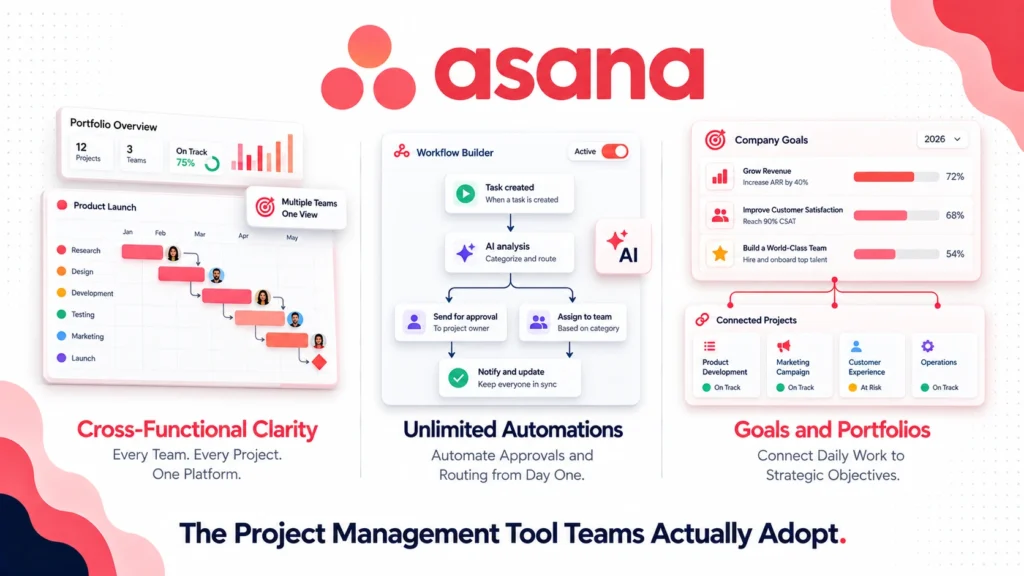
Asana’s Workflow Builder provides a visual interface for creating automated workflows without code. Rules trigger on task creation, status changes, due date proximity, form submissions, and dozens of other events. Furthermore, unlimited automations are included from the Starter plan, which gives Asana an advantage over Monday.com Standard which caps automations at 250 per month.
For teams that need approval flows, Asana’s structured approval feature routes items to designated approvers and tracks approval status automatically. Consequently, creative reviews, legal approvals, and budget sign-offs can be managed within the same project workflow rather than moving to email or separate tools.
Portfolios and Goals
Portfolio management on the Advanced plan gives leadership visibility across all active projects simultaneously. Traffic light status indicators, progress percentages, and custom field columns let executives and program managers understand the health of every initiative without attending each project’s status meeting.
Goals connect organizational objectives to the projects working toward them. When a project milestone is completed, connected goals automatically update their progress. Consequently, the gap between strategic planning and daily execution becomes visible rather than assumed. For teams using OKR frameworks, Asana’s Goals feature provides a structured implementation that does not require a separate goal-tracking tool.
Asana AI and AI Studio
Asana Intelligence, included on paid plans, provides AI-powered features including smart task suggestions, automated status updates based on recent activity, and AI-generated project summaries. Furthermore, AI Studio on Advanced plans lets you build AI-powered workflow steps that classify incoming requests, extract data from attachments, draft responses, and route work automatically.
The AI workflow capabilities position Asana closer to automation platforms like Zapier and n8n for intake and routing workflows, while maintaining the project management interface that operations teams are already comfortable with. Read our n8n review for more on dedicated automation platforms that complement Asana’s workflow capabilities.
Integrations
Asana connects natively with over 300 applications including Slack, Microsoft Teams, Google Workspace, Salesforce, HubSpot, GitHub, Zoom, and Dropbox. Furthermore, the Zapier integration extends connectivity to thousands of additional tools. Consequently, Asana fits into existing software stacks without requiring significant workflow changes from teams adopting it.
What Asana Does Well
Interface quality drives consistent adoption. This is Asana’s most significant and most consistent competitive advantage. G2 reviewers rate Asana’s ease of use higher than ClickUp consistently. New team members can navigate Asana productively within hours rather than days. Consequently, organizations that have struggled with adoption of more complex tools find Asana significantly easier to roll out across non-technical teams.
Cross-functional visibility is genuinely best-in-class. The combination of multi-project task membership, portfolios, and goals gives leadership clear visibility into how daily work connects to organizational strategy. For organizations running many parallel initiatives, this visibility eliminates the status meeting overhead that consumes disproportionate time at most companies.
Unlimited automations from Starter is a meaningful differentiator. Including unlimited automation rules from $10.99/user/month puts Asana ahead of Monday.com Standard at $12/user/month which caps automations at 250 per month. For teams that automate intake, routing, and status update workflows extensively, Asana delivers more automation value at the Starter tier.
AI included on paid plans without a separate add-on. Unlike ClickUp where AI requires a separate add-on subscription, Asana Intelligence is included in paid plans. Consequently, teams evaluating the true AI-inclusive cost often find Asana more competitive than the headline per-user price suggests.
Template library accelerates team onboarding. Professionally designed templates for marketing, product, HR, and operations workflows mean teams start with best-practice structures rather than building from scratch. Consequently, new projects are consistent and well-organized from day one rather than varying based on who creates them.
Where Asana Falls Short
Per-user pricing is higher than ClickUp. At $10.99/user/month for Starter versus ClickUp Unlimited at $7/user/month, Asana costs 57% more per user for comparable core features. For a 20-person team on annual billing, that difference is $960 per year. Furthermore, the Advanced plan at $24.99/user/month is significantly more expensive than ClickUp Business at $12/user/month for similar organizational management features.
Seat block purchasing inflates costs for non-standard team sizes. Teams that cannot purchase exactly the number of seats they need in blocks of five pay for unused capacity. Consequently, a 7-person team pays for 10 seats, a 12-person team pays for 15 seats, and so on. This pricing mechanism is documented but not prominently communicated and catches many buyers by surprise.
Limited native time tracking on lower tiers. Native time tracking requires the Advanced plan at $24.99/user/month. ClickUp includes native time tracking from its $7/user/month Unlimited plan. Consequently, teams that need time tracking for billing or resource management face a higher minimum spend on Asana than on competing platforms.
Feature depth is less than ClickUp for power users. While Asana’s interface is cleaner, ClickUp offers more view types, more customization options, and more granular control over task fields and workflow logic. Consequently, technical teams and power users who want maximum configurability sometimes find Asana’s cleaner approach limiting.
Reporting customization requires Advanced. Custom dashboards and advanced reporting are gated to the Advanced plan at $24.99/user/month. Teams on Starter have access to basic reporting only. Consequently, organizations that need detailed performance reporting must commit to the higher plan tier regardless of other feature needs.
Asana vs Competitors
Asana vs ClickUp: ClickUp offers more features per dollar, particularly for technical and power users who want maximum customization. Asana offers a cleaner interface that drives higher adoption among non-technical teams. Asana’s cross-functional portfolio visibility is stronger. ClickUp’s price is 57% lower at comparable tiers. Read our full ClickUp review and our ClickUp vs Monday.com comparison for detailed head-to-head analysis.
Asana vs Monday.com: Monday.com has a more visually intuitive interface and stronger no-code customization for non-technical teams. Asana has stronger portfolio management, goal tracking, and automation depth at comparable price points. At the Starter tier, Asana’s unlimited automations versus Monday Standard’s 250 per month is a meaningful difference for automation-heavy teams. Read our full Monday.com review for the complete comparison.
Asana vs Notion: Notion excels at knowledge management and flexible documentation alongside project tracking. Asana excels at structured task execution, dependency management, and cross-functional portfolio visibility. Teams whose primary need is documentation choose Notion. Teams whose primary need is project execution choose Asana. Read our Notion review for a full breakdown.
Asana vs Jira: Jira is purpose-built for software development workflows with superior issue tracking, sprint management, and developer tool integration. Asana is better for cross-functional teams spanning engineering and non-engineering departments. Consequently, pure engineering teams often prefer Jira while product teams that coordinate between engineering and other functions choose Asana.
Who Should Use Asana?
Asana is the right choice if you are:
- A cross-functional organization where marketing, operations, product, HR, and leadership need to coordinate work in one platform
- A team that prioritizes adoption speed and interface quality over maximum feature depth and lowest price
- An organization that needs portfolio-level visibility connecting daily project work to strategic goals and OKRs
- A mid-size company where the Advanced plan’s portfolio management and workload features justify the premium over Starter
- A team running complex approval workflows where Asana’s structured approval feature eliminates email-based review processes
However, Asana may not be the right fit if you are:
- A budget-conscious team where ClickUp‘s 57% lower per-user price is a meaningful consideration
- A technical team or agency that wants maximum customization, code-level workflow logic, and all-in-one tool consolidation
- A team that needs native time tracking without paying for the Advanced plan at $24.99/user/month
- An individual or solo operator where the free Personal plan’s 10-teammate limit and collaboration restrictions are immediately constraining
Asana Review: Final Verdict
Asana remains one of the strongest work management platforms available in 2026. Its interface quality drives adoption that more feature-rich but more complex alternatives struggle to match. Its cross-functional portfolio and goals features provide organizational visibility that teams managing multiple concurrent initiatives genuinely need. And its unlimited automations from the Starter plan deliver more automation value than competing platforms at comparable price points.
However, the premium pricing relative to ClickUp, the seat block purchasing constraint, and the Advanced plan requirement for native time tracking and custom reporting mean Asana’s value equation is strongest for teams where the adoption quality and portfolio visibility justify the higher per-user cost.
The honest recommendation: if your team is cross-functional, values a polished interface that non-technical members adopt without training, and needs portfolio-level visibility into organizational work, Asana is worth the premium. If your primary concern is features per dollar, ClickUp delivers more capability at lower cost. If your primary concern is fast visual adoption, Monday.com matches Asana’s ease of use at a comparable price.
Overall rating: 4.4 out of 5
Asana is excellent for the right organization at the right scale. The interface quality and cross-functional visibility are genuinely difficult to match. The premium pricing requires honest assessment of whether your team’s needs justify it.