Two platforms dominate the project management conversation in 2026. ClickUp promises to replace every tool you use with one all-in-one workspace. Monday.com promises to give your team a visual, intuitive work OS that anyone can adopt in minutes.
Both claims are partially true. Both platforms have real weaknesses. And choosing the wrong one can cost a 10-person team $840 per year in unnecessary spending or hundreds of hours in failed adoption.
This comparison is built on verified 2026 pricing, real user data from 3,100 plus agency implementations analyzed by ZenPilot, and testing across 15 project management scenarios. By the end, you will know exactly which platform fits your team and why.
The One-Line Summary
Choose ClickUp if you want one tool to replace your task manager, docs, whiteboards, and chat, and your team will invest time learning it properly.
Choose Monday.com if you want a visually intuitive platform your team can adopt in days without a steep learning curve.
Now let us go deeper.
Pricing Comparison 2026
The project management software market reached $7.6 billion in 2025 and is projected to hit $9.8 billion by 2027. Both ClickUp and Monday.com are competing aggressively for that market, which partly explains why their pricing has remained competitive.
ClickUp Pricing
- Free Forever: Unlimited tasks, unlimited users, 100MB storage, collaborative docs, Kanban boards, sprint management, and 24/7 support
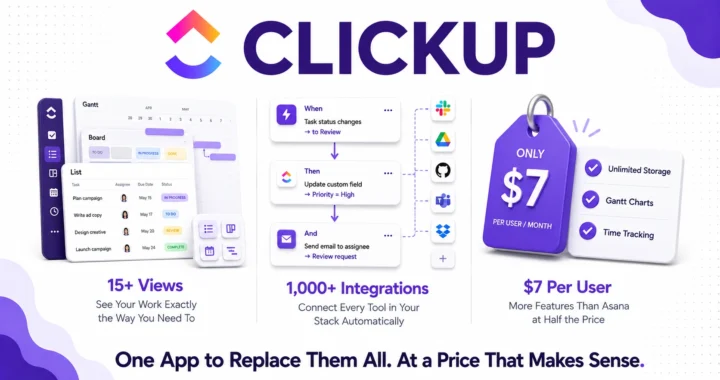
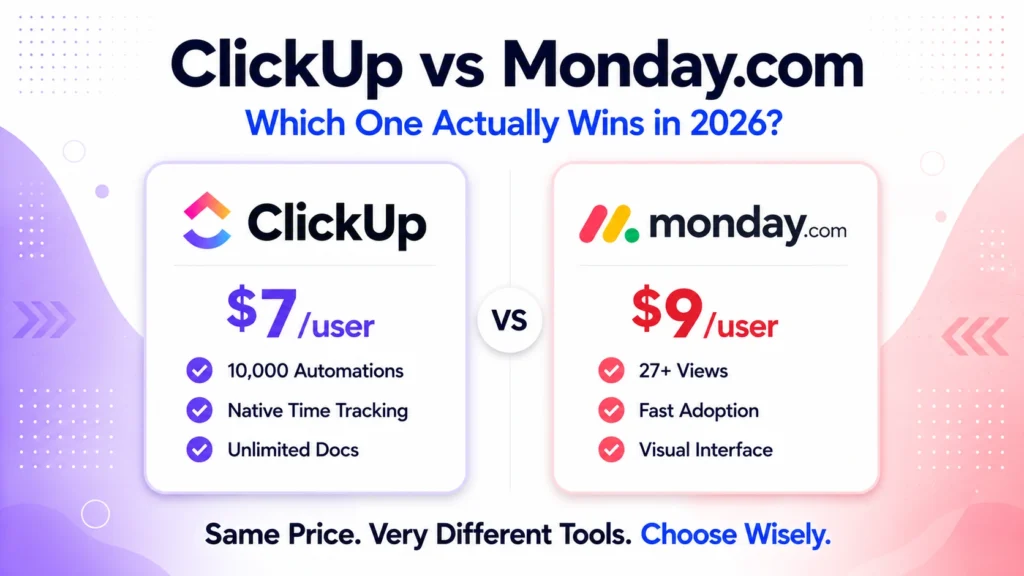
- Unlimited: $7/user/month (annual). Unlimited storage, integrations, Gantt charts, custom fields, dashboards, and native time tracking
- Business: $12/user/month (annual). Advanced automations, workload management, Google SSO, unlimited whiteboards, and mind maps
- Enterprise: Custom pricing with advanced security and compliance
Monday.com Pricing
- Free: Up to 2 seats, 3 boards, unlimited documents, and 200 plus templates
- Basic: $9/user/month (annual). Unlimited viewers, 5GB storage, and priority support
- Standard: $12/user/month (annual). Timeline, Gantt, calendar views, guest access, and 250 automations per month
- Pro: $19/user/month (annual). Time tracking, formula columns, dependency mapping, and 25,000 automations per month
- Enterprise: Custom pricing with advanced reporting, security, and compliance
The Price Gap Reality
For a 10-person team, ClickUp Business costs $120/month versus Monday.com Pro at $190/month. That is an $840 per year difference that compounds fast for agencies managing multiple client workspaces. Furthermore, at the 50-person scale, both platforms cost approximately $11,400 annually on comparable tiers, at which point the choice becomes about workflow preference rather than cost.
The key insight: ClickUp is significantly cheaper at scale, particularly for teams that need advanced automations, workload management, and custom exporting at the Business tier. Monday.com’s Pro plan costs 58% more per user than ClickUp Business for comparable feature sets.
Ease of Use: Monday.com Wins for Adoption
This is Monday.com’s most consistent competitive advantage and the primary reason many teams choose it over ClickUp despite ClickUp’s lower price.
Monday.com’s board-based interface uses color-coded columns, drag-and-drop simplicity, and a spreadsheet-like layout that feels immediately familiar to anyone who has used Excel or Google Sheets. Most teams can set up their first project and start using it productively within hours of signing up. Furthermore, the onboarding experience guides new users through key features without requiring dedicated training sessions.
ClickUp‘s breadth is both its strength and its weakness for adoption. With 15 plus views, deeply customizable task fields, and dozens of features to configure, new ClickUp users frequently report feeling overwhelmed. One consistent G2 reviewer complaint: “There are so many features that you wonder what you might be missing out on.” Teams without a dedicated ClickUp champion who invests in setup and training often end up with an underutilized workspace that costs more than simpler alternatives. Read our full ClickUp review for a detailed breakdown of the learning curve.
Winner: Monday.com for teams that prioritize fast adoption. ClickUp for teams willing to invest in setup for more powerful long-term capability.
Features Head to Head
Views and Visualization
Monday.com offers 27 plus views including Kanban, Gantt, Calendar, Timeline, Chart, and Workload with one-click switching between them. The interface is consistently praised for visual clarity, making it easy to see project status at a glance without training.
ClickUp also provides 15 plus views including Gantt, Timeline, Calendar, Workload, Map, and Mind Map. In June 2026, ClickUp shipped Gantt auto-scheduling that automatically reschedules dependent tasks when dates shift, including skipping weekends, closing a gap that previously gave Monday.com an advantage in dependency management.
Winner: Tie. Both platforms offer comprehensive view options. Monday.com wins on visual polish. ClickUp wins on customization depth within views.
Automations
ClickUp Business includes 10,000 automations per month, which is among the highest in the category at its price point. Automations trigger on task status changes, due dates, field updates, and dozens of other events with multiple action options per trigger.
Monday.com Standard includes only 250 automations per month. You need the Pro plan at $19/user/month for 25,000 automations per month. Consequently, teams that rely heavily on automation for workflow management pay significantly more on Monday.com to access comparable automation volume.
Winner: ClickUp by a significant margin on automation value per dollar. Teams that automate heavily save more on ClickUp Business than Monday.com Pro.
Docs and Knowledge Management
ClickUp Docs integrates directly with tasks and projects, allowing you to create SOPs, meeting notes, and wikis that link to relevant work. Furthermore, ClickUp’s broader all-in-one ambition means docs, whiteboards, and chat all live alongside project management in one workspace.
Monday.com’s document capabilities are more limited. It supports document collaboration but without the deep task integration that ClickUp offers. Teams that need robust knowledge management alongside project tracking find ClickUp’s docs more useful. However, for dedicated documentation needs, Notion remains more capable than either platform. Read our Notion review for a full comparison.
Winner: ClickUp for teams that want docs and tasks in the same workspace.
Time Tracking
ClickUp includes native time tracking on the Unlimited plan at $7/user/month. You can track time directly on tasks from any device.
Monday.com only includes time tracking on its Pro plan at $19/user/month. This is a meaningful feature gate that makes Monday.com significantly more expensive for teams that need time tracking alongside project management.
Winner: ClickUp by a significant margin. Native time tracking at $7/user versus $19/user on Monday.com is a 171% price difference for the same capability.
Reporting and Dashboards
Both platforms offer dashboard builders for real-time project reporting. ClickUp dashboards pull from across your entire workspace and support highly detailed custom metrics. Monday.com dashboards are more accessible to configure for non-technical users but offer less depth for complex reporting requirements.
For agencies specifically, ZenPilot’s analysis of 3,100 plus implementations found ClickUp’s reporting depth and workload management capabilities superior for service delivery tracking. Consequently, agencies managing multiple client projects with resource allocation complexity consistently prefer ClickUp’s reporting.
Winner: ClickUp for complex reporting. Monday.com for teams that want accessible reporting without configuration investment.
Integrations
Both platforms connect with major tools including Slack, Google Workspace, Microsoft Teams, GitHub, Salesforce, and HubSpot. ClickUp offers 1,000 plus native integrations. Monday.com offers 200 plus native integrations with strong Zapier connectivity for extending coverage.
For teams using n8n or Zapier for workflow automation, both platforms connect reliably. Read our n8n review to understand how automation tools connect with project management platforms.
Winner: ClickUp on integration breadth. Tie on quality for major platform integrations.
Who Each Platform Serves Best
Choose Monday.com if you are:
- A non-technical team or small business that wants fast adoption without a steep learning curve
- A team that primarily needs visual project tracking, board management, and basic collaboration
- An organization where different departments need to adopt the tool quickly without dedicated training
- A team comfortable paying a premium for Pro features like time tracking and advanced automations
- A company that values polished interface design and consistent visual clarity over feature depth
Monday.com excels for teams in marketing, HR, sales operations, and client services where non-technical members need to manage work independently without extensive onboarding. Read our full Monday.com review for detailed analysis of every feature.
Choose ClickUp if you are:
- A technical team or agency that wants one tool to replace task management, docs, whiteboards, and time tracking
- A budget-conscious organization where ClickUp’s lower per-user price generates meaningful savings at scale
- A team with diverse workflows spanning engineering, marketing, and operations that needs highly customizable views and fields
- An organization willing to invest in proper setup and training to unlock ClickUp’s full capability
- A growing team where automation volume matters and paying for Monday.com Pro’s automation limits is not justifiable
ClickUp excels for agencies, software teams, and cross-functional organizations where power users drive adoption and the all-in-one consolidation eliminates multiple tool subscriptions. Read our full ClickUp review for the complete picture.
The Verdict: Side by Side
| Feature | ClickUp | Monday.com |
|---|---|---|
| Starting price | $7/user/month | $9/user/month |
| Free plan | Yes, unlimited users | Yes, 2 seats only |
| Ease of adoption | Steep learning curve | Fast and intuitive |
| Automations (mid tier) | 10,000/month at $12 | 25,000/month at $19 |
| Native time tracking | Yes at $7/month | Only at $19/month |
| Docs and knowledge base | Built in | Limited |
| Views available | 15+ | 27+ |
| Integrations | 1,000+ | 200+ |
| Best for | Agencies and technical teams | Non-technical teams |
| G2 rating | 4.7/5 | 4.7/5 |
The Honest Conclusion
Neither platform is universally better. The right choice depends entirely on your team’s profile.
If your team is non-technical, adoption speed matters more than feature depth, and you can absorb Monday.com Pro pricing for time tracking and automations, Monday.com is the right choice. It will get your team productive faster with less frustration.
If your team is technical, cost at scale matters, you want one tool to replace multiple subscriptions, and you have someone willing to invest in proper setup, ClickUp delivers more value per dollar and more capability per feature. The $840 per year savings for a 10-person team is real and compounds over time.
Both platforms offer free plans you can test before committing. Test both. The one your team actually uses consistently is the right one regardless of which wins on paper.