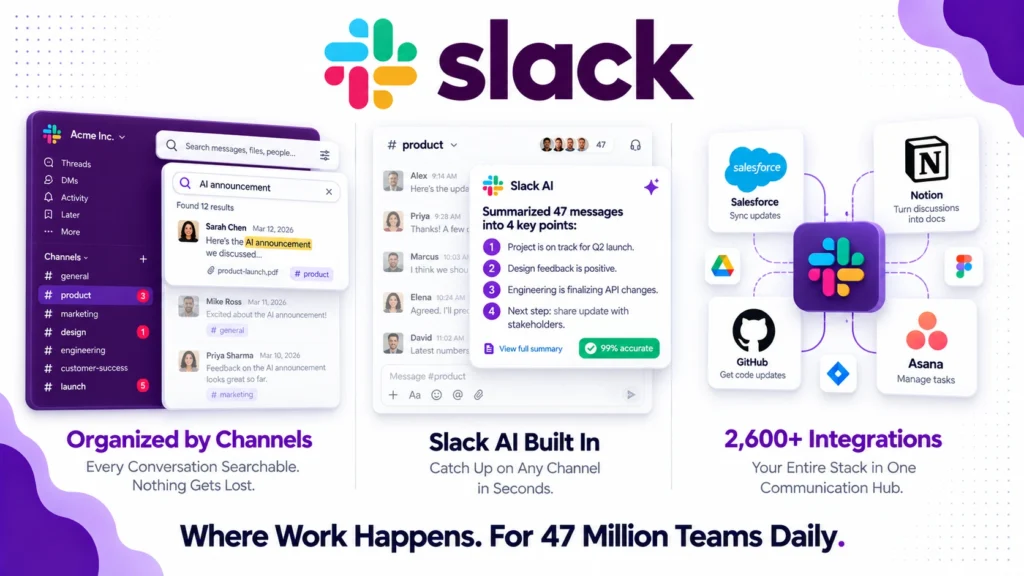
Slack has dominated team communication since 2013. With 47 million daily active users and 77% of Fortune 100 companies on the platform, it is the closest thing to a communication standard that the modern workplace has.
However, 2025 and 2026 have been complicated years for Slack users. The Business+ plan price jumped from $12.50 to $15 per user per month in August 2025. The new Enterprise+ tier bundles AI, advanced security, and Salesforce integrations in a way that enterprise review sites consistently describe as a forced upsell. Furthermore, Slack AI is now bundled into existing plans whether you want it or not, meaning you pay for AI features even if you never use them.
So is Slack still worth it in 2026? This honest review covers the real pricing including the 2025 and 2026 changes most review articles have not updated, the genuine strengths, the documented frustrations, and exactly who should and should not be paying for Slack today.
What Is Slack?
Slack is a team communication platform organized around channels, direct messages, and integrations. It replaced email as the primary internal communication tool for millions of teams by making conversations searchable, organized by topic, and immediately accessible across devices.
Founded in 2013 by Stewart Butterfield and acquired by Salesforce in 2021 for $27.7 billion, Slack has evolved significantly from its origins as a simple chat tool. In 2026, it combines channel-based messaging, direct messaging, audio and video huddles, screen sharing, canvas documents, workflow automation, and AI-powered conversation summaries in one platform. Furthermore, its integration with Salesforce Agentforce introduces autonomous AI agents that can route support requests and compile customer briefs directly within Slack channels.
The platform’s core value proposition remains what it was in 2013. Replace the scattered, unsearchable chaos of email threads with organized, searchable channels where the right people see the right information at the right time. That value proposition still holds in 2026.
Slack Pricing in 2026
Slack offers four main pricing tiers in 2026: Free, Pro at $7.25 per user per month, Business+ at $15 per user per month, and Enterprise Grid at custom pricing typically starting at $15 plus per user per month. All prices are for annual billing. Monthly billing costs approximately 20% more.
Free: Unlimited users and channels, 10 app integrations, 5GB total storage, 90 days of accessible message history, and one-on-one huddles only. The 90-day message history limit is the most important constraint to understand. Messages older than 90 days are hidden, not deleted, which means the data exists but is inaccessible without upgrading. For any team where historical context matters, this limitation becomes frustrating very quickly.
Pro: $7.25 per user per month (annual billing). Adds unlimited message history, unlimited app integrations, group huddles with screen sharing, Slack Canvas, and basic Slack AI summaries. Pro and Business+ have a minimum billing of 3 users, meaning teams of 2 still pay for 3 at $21.75 per month minimum. This is the plan most small to mid-sized businesses need for professional use.
Business+: $15 per user per month (annual billing), <cite index=”29-1″>up from roughly $12.50 per month before the August 2025 price increase.</cite> Adds the full Slack AI feature set, SAML SSO, compliance exports, data retention policies, and 99.99% uptime SLA. The 20% price increase was unpopular because it applies whether you enable AI features or not. You cannot opt out of paying for AI to get the previous price point. A 10-person team on Business+ pays $150 per month, and a 100-person team on Business+ pays $1,500 per month, roughly $18,000 annually.
Enterprise Grid: Custom pricing typically starting above $15 per user per month. Adds centralized administration across multiple workspaces, Enterprise Key Management, advanced compliance controls, and Salesforce Agentforce integration. Slack created the Enterprise+ tier specifically to bundle AI, advanced security, and Salesforce integrations.
The hidden cost warning: Beyond the plan prices, several factors inflate real monthly spend.
The 3-user minimum means small teams pay for unused seats. Teams whose size does not divide cleanly into whole numbers pay for capacity they do not use. Furthermore, the forced AI bundling on Business+ means teams upgrading from Pro for compliance features pay for AI whether they use it or not. Always calculate your minimum seat cost including the 3-user floor before budgeting.
Key Features
Channel-Based Communication
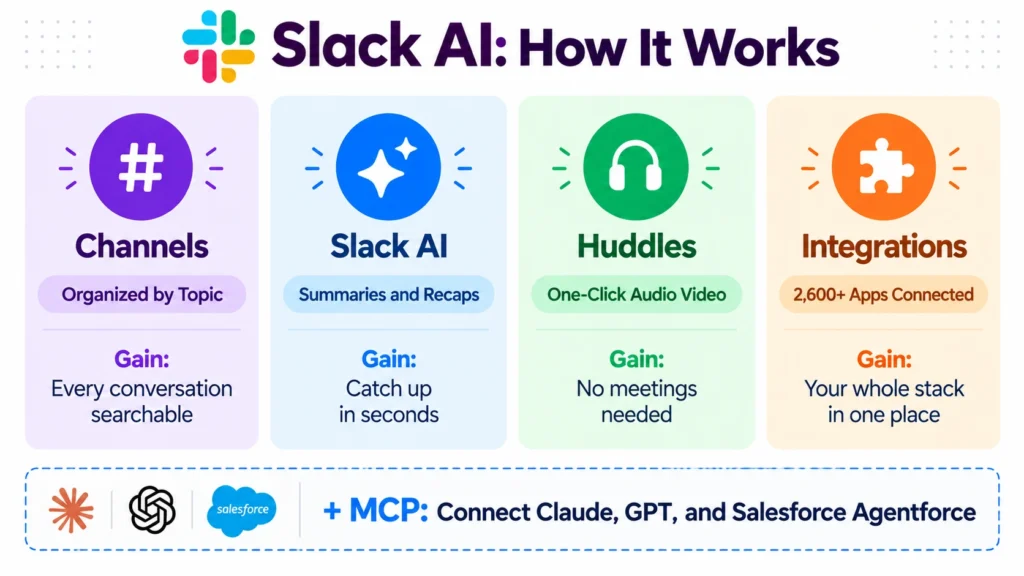
Slack’s channel system remains its strongest and most differentiated feature. Channels organize conversations by project, team, topic, or any other structure your organization finds useful. Public channels are searchable across the workspace. Private channels restrict access to invited members. Shared channels extend communication to external partners and clients without requiring them to join your workspace entirely.
The searchability of channel history is what made Slack transformative when it launched and what continues to make it valuable in 2026. Finding a decision made six months ago, a file shared in a meeting, or the context behind a project takes seconds in Slack rather than minutes of email archaeology. Consequently, organizations that have moved significant institutional knowledge into Slack find it genuinely difficult to migrate to alternatives without losing that accumulated context.
Slack AI
Slack AI is bundled into existing plans, not sold as a separate add-on. Pro plans at $7.25 per user per month include basic AI summaries. Business+ plans at $15 per user per month include the full AI feature set.
The AI capabilities focus on summarization rather than generation. Channel recaps summarize what happened in a channel since you last read it. Thread summaries condense long discussions into key points. Search powered by AI understands natural language queries rather than requiring exact keyword matches. Furthermore, Slack AI posts sub-1% hallucination rates on summarization tasks, beating Microsoft Copilot at 3.2% and Google Gemini at 4.1%, because it recaps existing messages rather than generating new content.
This distinction matters. Slack AI is a retrieval and summarization tool, not a content generation tool. It does not write messages for you or create content from nothing. Consequently, it is most valuable for teams with high message volume where keeping up with every channel becomes genuinely difficult without AI assistance.
Huddles
Slack Huddles provide lightweight audio and video calls directly within Slack without scheduling or switching to a separate meeting platform. You can start a huddle in any channel or direct message with one click. Screen sharing, live captions, and recording are available on paid plans. Furthermore, the informal nature of huddles mimics a spontaneous office conversation more naturally than a formal Zoom meeting.
For remote and hybrid teams that want to reduce the overhead of scheduled video calls for quick questions and collaboration, huddles provide a meaningfully different interaction model. Consequently, many teams use huddles for the equivalent of quick desk-side conversations while reserving dedicated meeting tools like Zoom for more structured sessions.
Integrations
Slack remains one of the most sought-after collaboration platforms, offering flexibility, real-time collaboration, and a vast ecosystem of integrations. With 2,600 plus native integrations, Slack connects with virtually every business tool including Salesforce, HubSpot, Notion, Asana, ClickUp, GitHub, Google Workspace, and Microsoft 365.
The integration depth means Slack becomes a notification and action hub for your entire software stack. A new lead in Salesforce triggers a Slack notification. A completed task in Asana posts to the relevant project channel. A deployment in GitHub alerts the engineering team. Consequently, teams can reduce their active tab count significantly by routing key notifications from multiple tools into organized Slack channels.
Workflow Builder
Slack’s Workflow Builder lets you create automated multi-step processes without code. Common workflows include automated onboarding messages for new channel members, form submissions that create tasks in project management tools, approval requests that route to the right person, and scheduled reminders for recurring tasks.
For teams that find themselves repeatedly performing the same sequence of manual steps inside Slack, Workflow Builder eliminates that overhead. Furthermore, the visual interface requires no technical knowledge, making it accessible to operations and HR teams without developer involvement.
Slack Canvas
Slack Canvas is a collaborative document editor built directly into Slack. You can create structured documents that live alongside channel conversations, embedding messages, files, and dynamic data from connected tools. Consequently, important reference information like team norms, project briefs, and meeting agendas stays in Slack rather than scattered across Google Docs, Notion, and email.
However, Slack Canvas is not a replacement for dedicated documentation tools. Its formatting capabilities are more limited than Notion or Confluence, and it lacks the database functionality that makes dedicated knowledge management platforms valuable for complex content structures. Read our Notion review to understand how the two tools complement each other.
What Slack Does Well
Channel organization scales from 5 to 50,000 people. Slack’s channel structure works for a 5-person startup and a 50,000-person enterprise with different channel taxonomies but the same underlying model. Users consistently praise Slack for its organized communication and intuitive interface, which streamline team collaboration and make it easy to manage conversations across channels.
Integration ecosystem is the deepest in the category. 2,600 plus native integrations means Slack connects to more business tools than any competing communication platform. Consequently, teams that want a single hub for tool notifications and cross-system actions find Slack the most comprehensive option.
Slack AI accuracy is genuinely impressive. The sub-1% hallucination rate on summarization tasks reflects a focused, retrieval-based approach that produces reliable results. For teams with high message volume, AI-powered channel recaps and thread summaries save meaningful time daily.
Huddles reduce meeting overhead for quick collaboration. The one-click audio and video huddle model provides a meaningfully lower-friction alternative to scheduled video calls for spontaneous collaboration. Remote teams that adopt huddles consistently report fewer unnecessary formal meetings.
Search quality is excellent. Slack’s search is fast, accurate, and understands context in ways that competing tools do not always match. For organizations where institutional knowledge lives in Slack, the ability to find any message, file, or decision quickly is a core operational capability.
Where Slack Falls Short
The price increase and forced AI bundling frustrated existing users. An overwhelming number of users on enterprise review sites view the Business+ price increase as a forced upsell. Paying for AI features you do not use because you need compliance features is a legitimate grievance that Slack has not addressed transparently.
Notification overload is the most consistent complaint. Many users note that the volume of notifications can become overwhelming, especially in larger teams. Without disciplined channel management and notification settings, Slack can create more noise than the email threads it was designed to replace. Consequently, teams that do not invest in Slack channel hygiene often find the platform creates new productivity problems rather than solving old ones.
The free plan’s 90-day message limit is a meaningful constraint. For any team where historical context matters, losing access to messages older than 90 days creates genuine operational gaps. Consequently, teams often discover this limitation only after they have already invested in building their communication culture around Slack, making the upgrade feel forced.
Limited meeting support compared to dedicated platforms. Slack has no equivalent to Teams’ full meeting transcription with speaker identification, action item extraction, and customizable recap templates. For organizations where structured meetings with formal action item tracking are a significant workflow, Microsoft Teams or a dedicated meeting tool handles that better.
The 3-user minimum catches small teams off guard. Teams of two pay for three seats at Pro and Business+ pricing. This is not prominently communicated during signup and generates consistent surprise among small team buyers.
Slack vs Competitors
Slack vs Microsoft Teams: Microsoft Teams is included in Microsoft 365 subscriptions, making it effectively free for organizations already on Microsoft. It offers stronger meeting capabilities including full transcription, speaker identification, and action item extraction that Slack’s huddles do not match. However, Slack’s channel organization, integration ecosystem, and user experience are consistently rated higher by teams not already invested in the Microsoft ecosystem. Therefore, Microsoft-centric organizations choose Teams while others default to Slack. Read our Salesforce review to understand how Slack fits into the broader Salesforce ecosystem.
Slack vs Discord: Discord started as a gaming communication platform and has expanded significantly into professional team use. It offers a permanent free plan with no message history limits, which is a meaningful advantage over Slack’s 90-day free tier restriction. However, Discord’s professional tooling, compliance features, and integration ecosystem are significantly less developed than Slack’s. Therefore, gaming communities, creator communities, and small teams with no compliance requirements choose Discord, while professional organizations choose Slack.
Slack vs Google Chat: Google Chat is included in Google Workspace subscriptions, making it free for Google-centric organizations. However, its channel organization, integration ecosystem, and overall user experience are rated consistently below Slack in independent reviews. Consequently, organizations choose Google Chat primarily for cost reasons rather than capability preference.
Slack vs n8n and Zapier: Slack’s Workflow Builder handles internal communication automation well. For more complex cross-platform automation that goes beyond Slack’s ecosystem, dedicated automation tools like n8n or Zapier provide more capability. Read our n8n review and Zapier and Make.com comparison for how these tools integrate with Slack.
Who Should Use Slack?
Slack is the right choice if you are:
- A team of 5 to 500 people that wants organized, searchable team communication with a deep integration ecosystem
- An organization already invested in the Salesforce ecosystem where Agentforce integration adds meaningful AI capability
- A remote or hybrid team that wants to reduce formal meeting overhead with lightweight huddles for spontaneous collaboration
- A business that needs compliance features including data retention, SSO, and export capabilities at the Business+ tier
- A team with high message volume where Slack AI’s summarization features save meaningful daily reading time
However, Slack may not be the right fit if you are:
- A very small team of 2 where the 3-user minimum makes Slack more expensive than alternatives per actual user
- An organization already on Microsoft 365 where Teams is included at no additional cost
- A team with a tight budget where the Business+ price increase to $15 per user per month is difficult to justify
- A team whose primary need is structured meeting management with full transcription and action item tracking
Slack Review: Final Verdict
Slack remains the strongest team communication platform for organizations not already locked into the Microsoft ecosystem in 2026. Its channel organization scales reliably from small teams to enterprise, its integration ecosystem is unmatched, and Slack AI’s sub-1% hallucination rate on summarization makes it genuinely useful for high-volume teams.
However, the August 2025 price increase, forced AI bundling on Business+, and the 3-user minimum create real friction for budget-conscious and small team buyers. For most small businesses with 5 to 50 employees running a modern software stack, Slack remains the strongest team communication platform in 2026. Just go in knowing the pricing traps before committing to an annual contract.
The honest recommendation: use the free plan to test and build your communication culture. Upgrade to Pro at $7.25 per user per month when message history becomes critical. Evaluate Business+ at $15 per user per month only when you genuinely need compliance features or AI summaries, not simply because you have grown beyond Pro’s limits.
Overall rating: 4.3 out of 5
Slack is excellent for the right team size and budget. The platform quality is genuine. The pricing trajectory requires careful evaluation before annual commitment.