
Many AI voice tools still sound synthetic under real world conditions.
They handle short demos well, but once you scale into longer scripts, emotional delivery, or multilingual content, the cracks show, flat tone, awkward pacing, and unnatural emphasis.
This becomes a serious limitation for content creators, educators, and product teams who rely on voice as a core interface.
That’s where tools like ElevenLabs position themselves differently. Instead of just converting text to speech, they focus on voice realism, emotional control, and adaptability.
The result is not just audio output, it’s something closer to a usable voice layer for real products and media.
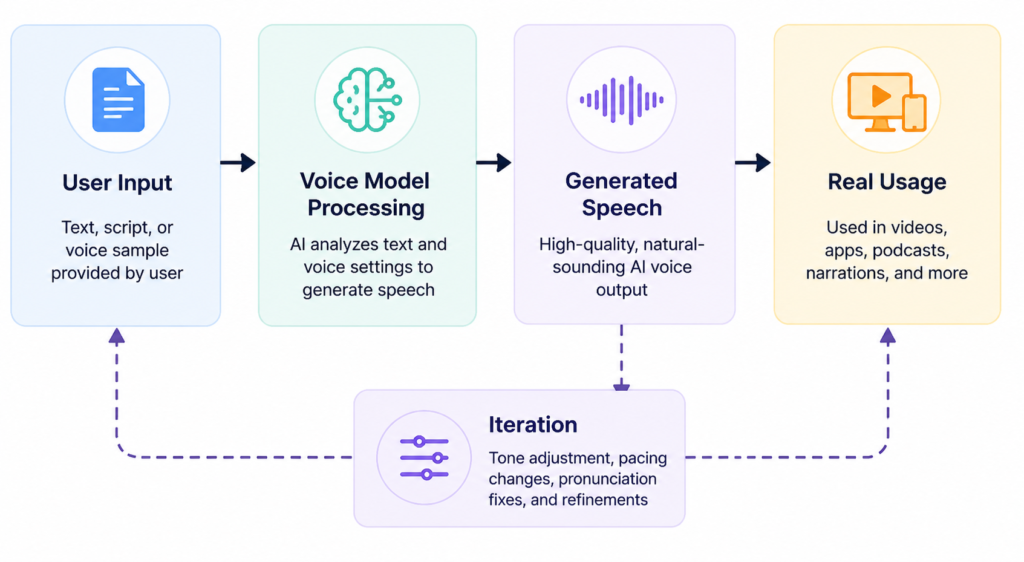
How ElevenLabs Generates Voice
ElevenLabs is fundamentally a neural text to speech and voice cloning platform.
But that description undersells what it actually does in practice.
It allows you to:
- Generate highly realistic speech from text
- Clone voices from short audio samples
- Control tone, pacing, and emotional delivery
- Produce long form narration without noticeable degradation
It performs particularly well when:
- The script is structured clearly
- You need consistent voice across multiple outputs
- Emotional nuance matters (e.g., storytelling, training content)
However, it struggles when:
- Input text lacks punctuation or structure
- You expect perfect pronunciation of niche terms without guidance
- You rely too heavily on default settings
A key difference from older TTS systems is that ElevenLabs doesn’t just “read text”, it interprets it, sometimes unpredictably.
Key Features
The voice cloning feature is one of the most impactful, but also the most misunderstood.
You can create a custom voice from a relatively short sample. In controlled conditions, the output is extremely convincing. However, the quality depends heavily on:
- audio clarity
- background noise
- consistency of tone in the sample
A common mistake is uploading poor quality recordings and expecting studio level results.
The voice design and tuning controls are where experienced users gain an advantage.
You can adjust:
- stability (consistency vs variation)
- clarity
- style exaggeration
In practice, lowering stability slightly often produces more natural speech, but too low, and it becomes inconsistent.
Multilingual capability is strong, but not perfect.
It can handle multiple languages in the same voice, which is useful for global content. However:
- accent consistency varies
- some phonetic transitions sound unnatural
This matters if you’re building localized products rather than simple translations.
How to Use It
Most users jump straight into text input and hit generate. That’s why their results feel average.
A better workflow looks like this:
- Start with a structured script
Short sentences, clear punctuation, intentional pauses. - Choose or create a voice
Avoid default voices for production use, they’re overused and recognizable. - Generate a short sample first
Never render the full script immediately. - Adjust parameters
Stability and clarity have the biggest impact. - Iterate in segments
Long form audio works better when generated in sections.
Where things break:
- Long paragraphs → robotic pacing
- No punctuation → unnatural rhythm
- Over-tuned settings → artificial tone
Improved input example:
Instead of:
“This is a product that helps users create content quickly and efficiently without needing technical skills”
Use:
“This product helps users create content quickly.
Without needing technical skills.”
Common beginner mistake:
Trying to fix everything with settings instead of rewriting the input text.
Better approach:
Fix the script first, then fine tune the voice.
Real Life Use Cases
Content creators use it for narration where consistency matters more than personality. The result is faster production, but the key insight is that script quality becomes the bottleneck, not the voice.
Product teams integrate it into apps for voice interfaces. It works well for onboarding and guidance flows, but struggles when responses must feel highly dynamic.
Educators use it to convert lessons into audio. It performs best when content is segmented into modules rather than long lectures.
Marketing teams generate ad voiceovers quickly. The advantage is speed, but overuse of similar voices can reduce brand distinctiveness.
Audiobook creators use it for draft narration. It saves time, but still requires human review for emotional consistency.
Example Outputs
| Task | Without AI | With ElevenLabs |
|---|---|---|
| YouTube narration | Inconsistent tone, time consuming recording | Fast, consistent voice but needs script tuning |
| App voice assistant | Robotic, limited variation | Natural tone but requires parameter tweaking |
| Training content | Flat delivery | Clear and structured, but depends on input quality |
| Ads voiceover | Expensive and slow | Fast but sometimes lacks emotional punch |
Pricing
ElevenLabs uses a tiered subscription model based on usage (characters generated, voice features, etc.).
It becomes worth paying when:
- You produce content regularly
- You need consistent voice output
- You replace human recording workflows
Common cost mistake:
Generating large amounts of content without testing smaller segments first.
The real cost is often how the tool is used, not the subscription itself.
Strengths and Limitations
The biggest strength is realism. In many cases, the output is indistinguishable from human voice especially for short to medium content.
Another advantage is scalability. Once configured properly, it can produce large volumes of audio quickly.
However, it struggles with unpredictability. Small changes in input can produce noticeably different outputs.
This matters in production environments where consistency is critical.
Another limitation is emotional depth. While it’s better than most competitors, it still lacks true contextual understanding.
Who Should Use It
This is best suited for:
- content creators producing narration at scale
- startups building voice enabled products
- educators converting structured content into audio
It’s not ideal for:
- users expecting zero editing or iteration
- projects requiring deep emotional storytelling without manual control
- one off casual use cases
Advanced Tips
Break long scripts into logical segments. This improves pacing and reduces errors.
Use slight variation in settings between segments to avoid monotony.
Create multiple versions of the same line. The best output is often not the first.
Treat voice generation as part of a system, not a one click task.
Most users overlook that text structure drives voice quality more than settings do.
Final Verdict
ElevenLabs is one of the most capable AI voice tools available in 2026.
It’s worth using if:
- voice quality directly impacts your output
- you’re willing to refine your workflow
It’s not a magic solution. The key limitation is that it still depends heavily on how you structure and control the input.
Used correctly, it delivers results far above average.
FAQ
Does ElevenLabs replace human voice actors?
Not entirely. It works well for scalable content, but human voices still outperform in complex emotional delivery.
Why does my output sound unnatural?
Usually due to poor text structure or lack of punctuation not the model itself.
Can it handle long form content?
Yes, but it performs better when broken into smaller segments.
Is voice cloning reliable?
It’s powerful, but highly dependent on input audio quality.
How do I improve realism?
Focus on script formatting first, then adjust stability and clarity.
Call to Action
If you’re working with voice content at scale, the difference becomes obvious quickly when used correctly.
Start using ElevenLabs in a real workflow and evaluate how it performs with your actual content, not just short demos.
