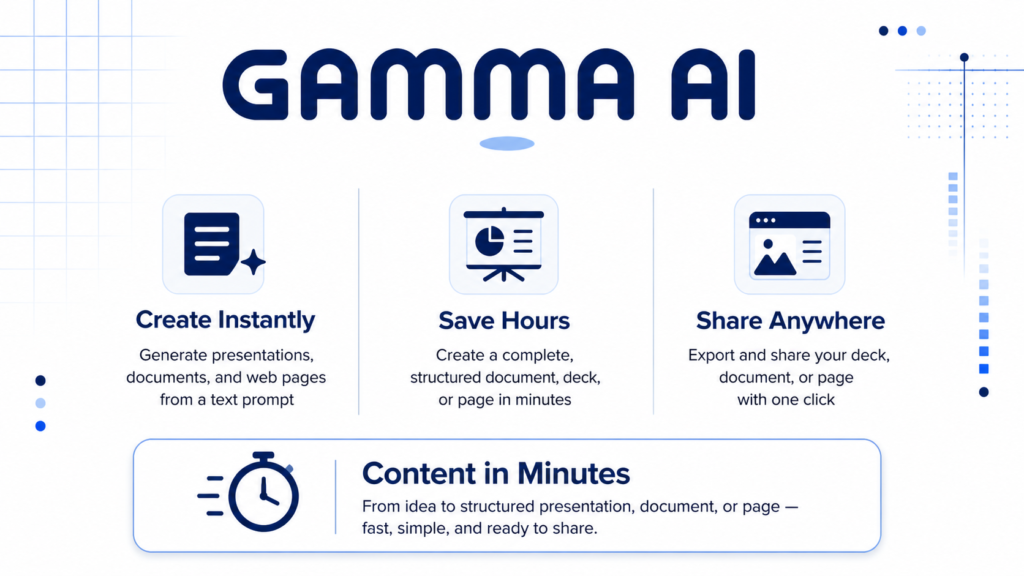
For professionals who spend hours formatting slides instead of shaping ideas, Gamma AI reorganizes the equation. This analysis breaks down what the tool genuinely delivers, where it falls short, and how to extract real value from it in 2026.
Creating a presentation has always split effort unevenly. The bulk of time goes to layout, font hierarchy, color consistency, and spacing, not to thinking about the argument being made. Traditional tools like PowerPoint and Google Slides give full control, but that control comes at a cost: every pixel is a decision you have to make.
Pre-built templates help, but only until your content doesn’t fit the template’s assumptions. Extending or reworking a template typically produces inconsistency that then requires more manual cleanup. Most professionals default to a mediocre deck delivered on time over a polished one delivered late.
Gamma AI approaches this differently. Rather than offering better templates, it generates the entire document, structure, layout, and visual design from a prompt or outline. The goal is to collapse the distance between an idea and a shareable artifact. This article explains when that actually works, when it doesn’t, and how to get the most out of it.
How Gamma AI Works
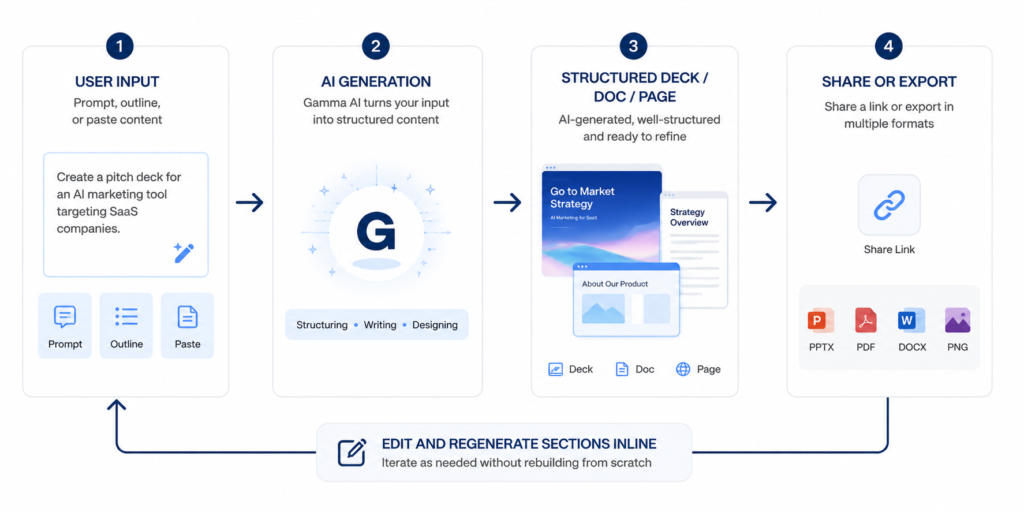
Gamma is a web based document creation platform that uses AI to generate presentations, documents, and web pages from text input. It is not a slide editor with an AI assistant bolted on the AI is the starting point. You provide a topic, an outline, or a block of pasted content, and Gamma produces a multi-card document with chosen themes, visual hierarchy, and supporting images.
The output format is closer to a web native card deck than a traditional PowerPoint. Each slide is a card with responsive layout behavior, meaning it adapts well to both presentation and asynchronous sharing in a browser. This is a real advantage for teams that distribute decks via link rather than screenshare.
It works best for standard business content: strategy decks, internal reports, training materials, project proposals, and onboarding documents. When the content structure is familiar, a problem, a recommendation, a few supporting points, Gamma’s AI generates layouts that are appropriate without much guidance.
It struggles with highly technical or data heavy content. Complex charts, precise financial tables, and custom infographics are areas where the tool either approximates or leaves gaps the user must fill manually. Anyone who needs precise chart control or pixel level design accuracy will run into friction.
Key features that actually matter in practice
The AI generation flow lets you start from a topic sentence, a bullet outline, or a paste from another document. Gamma will propose a card structure, which you can adjust before the full generation runs. This pre-generation outline review step is often skipped by new users, but it’s where the most structural control sits. Accepting the default outline without editing it is the single most common reason the final output misses the mark.
Once generated, every card is independently editable. You can prompt the AI to rewrite a specific card, change its layout, expand a bullet point into a paragraph, or swap the image. This card level regeneration is fast and generally coherent, the rewritten card maintains tone consistency with the rest of the document. One limitation: if the source prompt was vague, regenerating individual cards tends to produce generic filler rather than substantive improvement.
Gamma includes a set of built-in themes and allows theme customization through brand settings on paid plans. The auto-image insertion pulls from an integrated stock library and, in some configurations, allows AI generated images. Image quality is adequate for internal use; for client-facing work, images often need to be swapped manually. The alt text and visual logic that places images are functional but occasionally produce mismatches, a photo of a handshake dropped onto a cybersecurity slide, for example.
The sharing model is link based by default. Recipients can view in a browser without any account. Analytics on paid plans show view counts and time on card data, which is genuinely useful for asynchronous presentations where you want to know whether a stakeholder read past slide three.
How to use it effectively
The setup most users skip: before entering your topic, define your audience and purpose in one sentence in the prompt. Gamma’s default behavior optimizes for general readability. A prompt like “explain our Q2 roadmap for the engineering all hands” produces a noticeably different structure than “explain our Q2 roadmap”. The additional context shifts tone and depth in the generated output.
When the outline appears, treat it as a first draft, not a final structure. This is the fastest place to make high impact edits. Reorder sections, rename cards with precise language, and delete placeholder cards that don’t belong. A generation from a well-curated outline requires significantly less post-edit time.
After generation, do a pass on images first, they are the most visible weakness and the fastest to fix with a manual replacement. Then review card-level copy, focusing on headers. Gamma’s AI tends toward verbose headers. Tightening them to five words or fewer improves the deck’s clarity immediately.
Common beginner mistake: Entering a broad topic like “digital marketing” and expecting a focused output. Gamma will generate a coherent-looking deck, but it will be generic by design, it has nothing specific to work with. A better prompt specifies audience, purpose, and key points: “Digital marketing strategy for a B2B SaaS company targeting mid-market HR teams, focused on LinkedIn and content channels”. The improvement in output specificity is significant.
Real life use cases
A consultant producing an initial proposal deck for a client can paste their notes from a discovery call and generate a structured first draft in under five minutes. The result won’t be final, but it’s a credible scaffold that’s faster to edit than to build from scratch. The practical insight here is that Gamma is better as a starting point than a finishing point, expect to spend 20-40% of the time you’d spend in PowerPoint, not 5%.
A product manager running a weekly sync can use Gamma to turn a bullet point update into a shareable link that the team can review asynchronously before the meeting. The link-based sharing model removes the friction of attachment emails and version conflicts. The card analytics let the PM see who actually read the update, which changes how the meeting time gets used.
A trainer creating onboarding materials for new employees gets substantial value from Gamma’s document format, which works as well in a browser as in a presentation context. A single Gamma document can serve as both a walkthrough during live onboarding and a reference guide afterward. The limitation is that highly structured instructional content, with numbered steps, nested conditions, and decision trees, often requires manual cleanup to render correctly.
A startup team building an investor pitch can use Gamma to get a visually presentable first draft quickly, especially if they lack a designer. The output won’t match a professionally designed deck, but it reaches a “ready to share” threshold faster than most alternatives. Teams that have tried this consistently report needing to manually rework the problem and solution slides, Gamma’s AI tends to understate differentiation unless explicitly prompted.
Example outputs
| Task | Without AI | With Gamma |
|---|---|---|
| 5-slide project update | 45–60 min (design + copy) | 8–15 min (prompt + edit) |
| 10-slide pitch deck first draft | 3–5 hours | 30–60 min (includes manual image swap) |
| Internal training doc (8 sections) | 2–3 hours | 40–70 min |
| One-page company overview | 1–2 hours | 15–25 min |
| Custom infographic heavy report | 4–6 hours | Not recommended, limited chart control |
Pricing and when it makes sense to pay
Gamma operates on a freemium model. The free tier includes a limited number of AI credits per month, sufficient for occasional use or evaluation. The paid plans unlock unlimited AI generations, custom brand settings, analytics, and higher export quality. Pricing sits in the range typical for AI productivity tools in 2026, affordable for individual professionals, easy to justify as a team subscription.
The free tier is worth using to evaluate the tool on two or three real projects before committing. The most common cost mistake is subscribing immediately after a single positive generation, the real cost benefit picture requires a few weeks of use across different content types, since Gamma’s value varies considerably by use case.
The real cost consideration: The cost of a Gamma subscription is not the primary variable. The real cost is time, specifically, how long it takes to brief the AI effectively and edit the output to a professional standard. Users who invest in learning how to prompt and structure input well recover that investment quickly. Users who treat it as a one-click solution and then spend an hour fixing the result are not using the tool at its ceiling.
Strengths and limitations
SpeedSharingLow design barrierWeak data vizGeneric defaultsExport fidelity
Gamma’s strongest area is removing the blank page problem for people who know what they want to say but lack the design skill or time to say it visually. The quality floor for a Gamma generated deck is higher than what most non designers produce manually, which matters in organizations where presentation quality varies widely.
The link based sharing with analytics is a feature set that traditional tools don’t offer without third party add ons. For teams that share decks asynchronously, this changes the feedback loop in a practically useful way.
The weakness most users hit is the template ceiling. Gamma’s layouts are flexible, but they follow conventions. Anything that requires a non standard visual arrangement, a side by side comparison with custom icons, a complex flowchart, a multi-variable chart, either can’t be done or requires workarounds that take as long as building manually. This is not a limitation unique to Gamma; it reflects the current state of AI-generated layout generally.
PowerPoint and Keynote export is available but introduces formatting degradation. Text boxes shift, fonts substitute, and spacing changes. For workflows that require a native .pptx deliverable, for legal, compliance, or brand template reasons, Gamma should be treated as a drafting tool, not a final output format. The browser-native experience is where it genuinely excels.
Who should use it
Gamma is the right tool for professionals who produce internal documents and presentations regularly but don’t have design support. Consultants, product managers, HR teams, and startup founders all fit this profile. If your work involves turning information into shareable documents on a regular cadence, the time savings are real and compounding.
It is also well suited for anyone who shares content asynchronously and wants visibility into engagement. The analytics feature alone differentiates it from most alternatives for this specific workflow.
Designers, engineers building technical documentation with precise diagrams, and anyone who requires a deliverable in a specific locked format (branded .pptx, print ready PDF) will find Gamma’s constraints frustrating before long. The tool is built for speed and sharing, not for precise production-grade output.
Advanced tips for experienced users
Use the paste from document input, not the topic prompt, when you already have content written. Pasting a structured text document, even a rough one, gives the AI substantially more material to work with and produces more specific, less generic output. This approach is faster than prompting from scratch for any topic you’ve already thought through.
Create a saved prompt template that includes your audience, tone, and structural preferences. Gamma allows some customization in how you initiate generations. A template prompt with your standard framing eliminates the setup time on repeat document types.
When editing, use the card level AI prompt to rewrite specific sections rather than regenerating the whole deck. Full regenerations from a revised prompt lose the edits you’ve already made. Targeted card rewrites preserve the rest of the document while improving the section that needs work.
For team use, set up a shared workspace with brand settings configured before distributing Gamma to colleagues. Teams that skip this step end up with decks in inconsistent styles, which undermines the consistency benefit the tool is supposed to provide.
Final verdict
Gamma is worth using if you produce presentations, internal documents, or shareable briefs regularly and spend meaningful time on layout and formatting. The time savings are genuine, most users report a 60-70% reduction in time spent on comparable documents once they’ve learned to write effective input prompts.
The tool is best for content that is narrative and informational. It is not a replacement for specialized tools when precise data visualization, custom infographics, or exact brand compliance are requirements.
The one limitation that experienced users consistently flag: the output quality ceiling is noticeably lower than what a skilled designer produces with the same amount of time. Gamma closes the gap for non designers, it does not close it entirely. What it reliably delivers is a professional looking document fast, which, for most internal and stakeholder facing use cases, is exactly what’s needed.
FAQ
Can I export a Gamma deck to PowerPoint and keep the formatting?
You can export to .pptx, but expect formatting changes, font substitutions, shifted text boxes, and spacing differences are common. If your deliverable must be a polished .pptx, use Gamma for the first draft and rebuild the layout natively in PowerPoint from there.
How much does the AI actually improve with better prompts?
Meaningfully. A vague prompt produces a structurally correct but generic document. A specific prompt, with audience, purpose, and a few key points, produces output that requires significantly less editing. The improvement in output quality roughly tracks the amount of useful context you provide upfront.
Is Gamma suitable for client facing deliverables?
It depends on the client and the use case. For early stage proposals, async briefings, and internal stakeholder updates, Gamma’s output is presentation ready. For formal deliverables where precise brand compliance and design quality are expected, plan for significant manual polish or use Gamma only for the content skeleton.
Does Gamma work for long form documents, not just slides?
Yes. Gamma generates documents as well as decks, and the document format works well for internal wikis, written proposals, and reference guides. The card based layout adapts from a linear reading format to a visual one depending on content density. It handles long form content better than most expect.
What happens to your data when you use Gamma?
Gamma stores documents on its servers as part of the workspace model. For sensitive content, financial projections, personnel information, unreleased product strategy, review Gamma’s data processing terms before use. Some enterprise plans offer additional data controls.
The most useful test is applying Gamma to a real document you have to produce this week, a project update, a proposal, an onboarding guide. That single trial will tell you more about whether it fits your workflow than any overview can.
Start using Gamma AI