ClickUp’s tagline is bold: “One app to replace them all.” The promise is that you can cancel your project management tool, your docs tool, your whiteboard tool, your time tracking tool, and your goal tracking tool, and run everything from ClickUp alone.
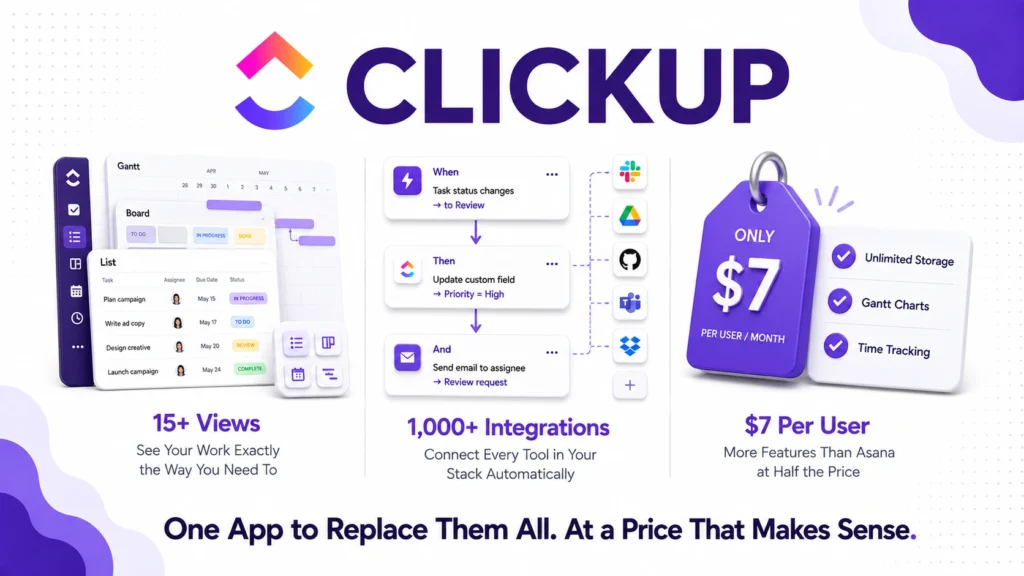
In 2026, ClickUp has over 10 million users and is consistently rated as one of the best value project management platforms available. On a pure price-per-feature basis, it is genuinely difficult to argue with. The Unlimited plan at $7 per user per month includes capabilities that competitors like Asana gate to plans costing two to three times more.
However, ClickUp is also famous for its steep learning curve, its overwhelming feature density, and the gap between what it promises and what teams can realistically implement. This honest review covers the real pricing, the genuine strengths, the real frustrations, and who ClickUp actually works best for in 2026.
What Is ClickUp?
ClickUp is a cloud-based work management platform that combines task management, project tracking, document creation, whiteboards, goals, time tracking, dashboards, and team chat in one application. Founded in 2017 in San Diego, it has grown rapidly by targeting teams frustrated with paying for multiple specialized tools that do not talk to each other.
The philosophy is horizontal rather than vertical. Instead of doing one thing exceptionally well, ClickUp does an extraordinary number of things well enough that most teams never need to leave the ecosystem. Whether that is a strength or a weakness depends entirely on your team’s appetite for complexity and your willingness to invest time in configuration.
In 2026, ClickUp added significantly expanded AI features and deepened its automation capabilities, positioning itself more directly against Notion in the AI-powered workspace category. If you read our Notion review, you will find the comparison between the two platforms directly useful.
ClickUp Pricing in 2026
ClickUp has four tiers as of August 2026, all billed annually for the best rates. Here is the verified breakdown:
Free Forever: $0. Unlimited tasks, unlimited users, 100MB storage, collaborative docs, whiteboards, real-time chat, Kanban boards, sprint management, in-app video recording, and 24/7 support. Furthermore, the free plan includes AI compatibility, meaning you can use ClickUp Brain features with limited credits. This is one of the most generous free plans in the project management category.
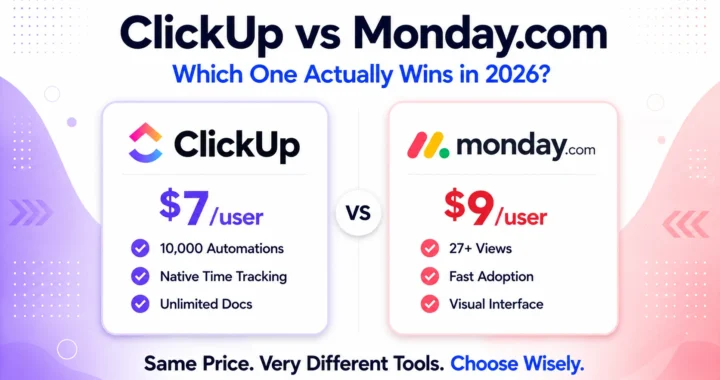
Unlimited: $7/user/month (annual) or $10/user/month (monthly). Adds unlimited storage, unlimited folders and spaces, unlimited integrations, unlimited Gantt charts, unlimited custom fields, unlimited dashboards, native time tracking, goals management, and resource management. Furthermore, guests with permissions and up to three teams are included. This is the sweet spot for small to mid-sized teams. At $7 per user per month, it includes capabilities that Asana’s Advanced plan at $24.99 per user per month and Monday.com at roughly $14 per user per month do not match at comparable price points.
Business: $12/user/month (annual) or $19/user/month (monthly). Adds unlimited activity views, unlimited whiteboards, unlimited mind maps, unlimited dashboards, sprint points, Google SSO, advanced automations, advanced time tracking, workload management, and export options. This is the tier most growing businesses with serious project management needs actually need. The jump from Unlimited to Business at $12 is reasonable given the automation and reporting depth added.
Enterprise: Custom pricing. Adds SAML SSO, custom permissions, white labeling, contract and compliance features, dedicated customer success manager, and enterprise API. Designed for large organizations with security and governance requirements.
ClickUp Brain (AI Add-On): Not included in standard pricing except on Enterprise. Available as a paid add-on on lower tiers. Includes AI writing assistance, task summarization, automated standup reports, and natural language task creation. Therefore, teams that expect to use AI features heavily should factor this add-on cost into their total monthly spend.
The honest pricing verdict: ClickUp’s pricing is genuinely competitive. At $7 per user per month for the Unlimited plan, it delivers more features per dollar than almost any competing platform. However, the AI add-on cost on non-Enterprise plans and the complexity tax of actually using all these features are real considerations that pure pricing comparisons miss.
Key Features
Task and Project Management
ClickUp’s task management is its core strength. Tasks support subtasks, checklists, custom fields, priorities, multiple assignees, time estimates, time tracking, dependencies, and relationships between tasks. Furthermore, tasks can be viewed in over 15 different views including List, Board, Gantt, Timeline, Calendar, Workload, Map, and Mind Map, giving every team member the perspective that fits their working style.
The Spaces, Folders, and Lists hierarchy lets organizations structure their workspace around their exact workflow rather than conforming to a tool’s imposed structure. Consequently, engineering teams can set up sprint workflows while marketing teams run campaign trackers and HR runs onboarding checklists in the same ClickUp workspace simultaneously.
Docs
ClickUp Docs is a full document editor that integrates directly with tasks. You can create SOPs, meeting notes, wikis, and project briefs that link to relevant tasks and projects. Furthermore, documents are searchable across the workspace and can be shared publicly with a link.
However, ClickUp Docs is not as refined as Notion‘s block-based editor. If rich document creation and knowledge management are your primary need, Notion remains more purpose-built. ClickUp Docs excels when documents need to live alongside tasks rather than when documentation is the primary workflow.
Automation
ClickUp’s automation builder lets you create if-then workflows that trigger on task status changes, due date arrivals, field updates, form submissions, and many other events. On the Business plan, automations include advanced conditions, multiple actions per trigger, and scheduling options.
Furthermore, native integrations with Zapier, Make.com, Slack, Google Workspace, Microsoft Teams, GitHub, Salesforce, and over 1,000 other tools extend automation beyond the ClickUp ecosystem. Consequently, teams can build workflows that span their entire software stack without manual handoffs.
Goals and OKRs
ClickUp Goals lets you set company, team, and individual objectives with measurable targets linked directly to tasks and lists. Progress updates automatically as work gets done, giving leadership real-time visibility into how daily work connects to strategic objectives.
This integration between daily task execution and high-level goal tracking is genuinely useful for growing teams that struggle to connect the work their teams do every day to the outcomes leadership cares about. Consequently, many teams replace separate OKR tools with ClickUp Goals once they adopt the platform.
Dashboards and Reporting
ClickUp Dashboards let you build real-time reporting views combining task completion rates, time tracked, workload distribution, goal progress, and custom metric widgets in a single view. Furthermore, dashboards pull from across your entire workspace, meaning you can see project health across every team simultaneously.
The reporting depth on Business plans is significantly stronger than what most comparably priced tools provide. However, building useful dashboards requires time investment to configure properly. Consequently, teams that want out-of-the-box reporting often find ClickUp’s flexibility more of a burden than a benefit during initial setup.
ClickUp Brain (AI)
ClickUp Brain is the platform’s AI layer, available as an add-on on most plans. It includes an AI writing assistant for tasks and docs, automated standup reports that summarize team progress from task data, natural language task creation, and AI-powered answers to questions about your workspace content.
The natural language question answering is particularly useful. You can ask “what tasks is Sarah working on this week” or “what are the blockers on the marketing campaign” and get answers drawn directly from your workspace data. However, the quality of AI answers depends on how well your workspace is organized and how consistently your team updates task statuses. Consequently, teams with inconsistent data hygiene get less value from ClickUp Brain than teams with disciplined workflow management.
What ClickUp Does Well
Price-to-feature ratio is unmatched in the category. At $7 per user per month for Unlimited, ClickUp includes native time tracking, Gantt charts, unlimited integrations, and goals management that competitors charge significantly more to provide. For budget-conscious teams that need full project management capability, the value is genuine.
View flexibility serves every working style. With 15 plus views covering every way a team might want to visualize their work, ClickUp accommodates everyone from developers who prefer list views to executives who need Gantt timelines. Furthermore, views are saved and shareable, so each team member works in the view that fits them without disrupting others.
The free plan is genuinely usable. Unlimited tasks, unlimited users, and collaborative docs on the free plan means individuals and very small teams can run real work without paying. Consequently, testing ClickUp thoroughly before committing to a paid plan is straightforward.
Integration ecosystem is one of the strongest available. Over 1,000 native integrations including Slack, GitHub, Salesforce, Google Workspace, and Zoom, plus Zapier connectivity for everything else, makes ClickUp connectable to virtually any existing software stack.
Consistent reliability. Multiple long-term users in verified reviews note that ClickUp reliably works as expected with no major bugs or slowdowns, which is not always the case with feature-rich platforms.
Where ClickUp Falls Short
The learning curve is genuinely steep. This is the most consistent complaint across G2, Capterra, and real user reviews in 2026. The sheer number of features, settings, views, and customization options can be paralyzing for new users. Furthermore, onboarding entire teams to ClickUp typically requires dedicated training time and a champion who understands the system deeply. Consequently, teams without someone willing to invest in setup often end up with an expensive, underutilized workspace.
Feature overload leads to inconsistent adoption. When a tool can do everything, teams often implement it inconsistently. Some members use tasks, others use docs, others use chat, and the workspace becomes fragmented rather than unified. The promise of replacing all other tools often fails in practice because teams continue using familiar external tools alongside ClickUp rather than fully migrating.
Performance can lag on complex workspaces. Users with large, heavily nested workspace structures, many custom fields, and complex automations report slower load times and occasional performance issues. Furthermore, the mobile app is consistently rated as less capable and less stable than the desktop experience.
AI features require an add-on. Unlike Notion which includes AI in the Business plan, ClickUp Brain is a separate add-on cost on most plans. Therefore, teams that want AI-powered features need to factor additional monthly cost beyond the plan price.
Customer support response times vary. While 24/7 live chat is available on all plans including Free, response quality and resolution times for complex technical issues are inconsistent in user reviews. Consequently, teams without internal ClickUp expertise sometimes struggle to resolve configuration problems quickly.
ClickUp vs Competitors
ClickUp vs Notion: Notion is a documentation-first workspace with project management features. ClickUp is a project management-first platform with documentation features. Consequently, teams whose primary need is knowledge management and flexible documentation choose Notion, while teams whose primary need is task tracking, time management, and project reporting choose ClickUp. Read our full Notion review to compare directly.
ClickUp vs Asana: Asana has a more polished, less overwhelming interface that drives stronger user adoption without dedicated onboarding. However, Asana’s comparable Advanced plan costs $24.99 per user per month, more than double ClickUp’s Business tier. Furthermore, ClickUp’s native time tracking, goals management, and view flexibility exceed what Asana provides at comparable prices. Therefore, teams that prioritize ease of adoption choose Asana while teams that prioritize feature depth and value choose ClickUp.
ClickUp vs Monday.com: Monday.com’s visual Work OS interface is more intuitive than ClickUp for non-technical teams. However, Monday.com costs approximately $14 per user per month at comparable tiers and offers less feature depth. Furthermore, ClickUp’s free tier is significantly more generous than Monday.com’s. Therefore, visual-first teams with moderate project management needs prefer Monday.com while feature-hungry teams prefer ClickUp.
ClickUp vs Linear: Linear is a purpose-built engineering project management tool with superior issue tracking, sprint planning, and developer workflow features. However, it lacks ClickUp’s breadth across non-engineering use cases. Consequently, pure engineering teams often prefer Linear while cross-functional organizations that need to serve both engineering and non-engineering teams choose ClickUp.
ClickUp vs HubSpot: HubSpot focuses on CRM, marketing automation, and sales pipeline management rather than project and task management. These tools serve different primary needs and are typically used together rather than as alternatives. Read our HubSpot review if your primary need is customer relationship management.
Who Should Use ClickUp?
ClickUp is the right choice if you are:
- A growing team of 5 to 500 people that wants to consolidate project management, docs, goals, and time tracking into one platform
- A budget-conscious organization where ClickUp’s $7 per user per month Unlimited plan provides genuinely better value than more expensive alternatives
- A cross-functional team with engineering, marketing, operations, and HR all needing project visibility in the same workspace
- An organization willing to invest time in setup and configuration to unlock ClickUp’s full capability
- A team that needs strong automation, custom fields, and reporting without paying enterprise prices
However, ClickUp may not be the right fit if you are:
- A small team or individual who wants simplicity over features and does not have time for a steep learning curve
- A documentation-first team where Notion’s block-based editor and knowledge management features are more central than task tracking
- An engineering team that needs purpose-built issue tracking and sprint management at Jira or Linear’s depth
- A team with low data discipline where AI features and automated reporting will not work well without consistent task updates
ClickUp Review: Final Verdict
ClickUp earns its strong reputation in 2026. The price-to-feature ratio is genuinely unmatched, the view flexibility serves every working style, and the free plan is one of the most capable in the project management category. For cross-functional teams willing to invest in configuration and onboarding, ClickUp delivers more than most platforms at twice the price.
However, the learning curve is real, feature overload leads to inconsistent adoption without dedicated champions, and the AI features require a separate add-on that competing platforms increasingly bundle into their standard plans.
The honest recommendation is straightforward. If your team is disciplined, willing to invest in setup, and wants the best value in full-featured project management, ClickUp is an excellent choice. If you need simplicity, faster onboarding, or documentation-first workflows, explore Notion or Asana first.
Overall rating: 4.3 out of 5
ClickUp delivers outsized value for teams that use it fully. The challenge is getting your team to actually use it fully.