If you’ve ever tried to scale content production – whether for marketing, SEO, or social media – you’ve probably hit the same wall: writing consistently high-quality content takes time, and outsourcing often creates inconsistency.
I ran into this while managing multiple content pipelines. Freelancers varied in tone, AI tools felt generic, and templates produced robotic outputs that needed heavy editing.
That’s where Copy.ai came in. On paper, it promised fast, structured content generation. In practice, it’s more nuanced than that.
In this article, I’ll walk you through:
- What Copy.ai actually does (beyond marketing claims)
- How I used it in real workflows
- Mistakes I made and how to avoid them
- Practical strategies to get better results than most users
What the Tool Actually Does
At its core, Copy.ai is an AI writing assistant designed to generate marketing and business content quickly.
Simple explanation:
You give it a prompt, context, or brief, and it produces structured text—ads, blog posts, emails, product descriptions, and more.
Who it’s for:
- Marketers
- Founders
- Content teams
- Freelancers handling multiple clients
What problem it solves:
Speed and consistency in content creation.
When it works best:
- First drafts
- Idea generation
- Structured formats (ads, emails, product pages)
When it doesn’t:
- Deep expertise content without guidance
- Highly opinionated writing
- Unique brand voice without training
Real insight:
At first, I thought Copy.ai would replace writing entirely. In practice, it works best as a draft accelerator, not a final writer.
Key Features (With Real Value)
| Feature | What It Does | Why It Matters | Example | Limitation |
|---|---|---|---|---|
| Templates | Pre-built formats (ads, blogs, emails) | Speeds up workflow | Facebook ad copy | Feels generic if overused |
| Chat Interface | Conversational content generation | Flexible prompting | Blog outline | Can drift off-topic |
| Brand Voice | Stores tone/style preferences | Improves consistency | SaaS tone writing | Needs manual tuning |
| Workflow Automation | Multi-step content generation | Saves time at scale | Blog → social posts | Setup takes time |
| Long-form Editor | Creates articles | Useful for drafts | Blog post | Needs heavy editing |
One thing I noticed:
Templates are fast, but the chat interface gives better results if you know how to prompt properly.
How to Use It (Real Workflow)
Let me walk you through an actual blog-writing workflow I used.
Step 1: Basic Prompt (Beginner Mistake)
Prompt:
“Write a blog post about email marketing.”
Result:
- Generic
- Repetitive
- No unique insight
Problem: Too vague.
Step 2: Improved Prompt
Prompt:
“Write a blog post for SaaS founders explaining why email marketing still works in 2026. Include examples, mistakes, and actionable tips.”
Result:
- Better structure
- More relevant
- Still slightly generic
Step 3: Advanced Prompt (What Actually Works)
Prompt:
“Act as a SaaS growth marketer. Write a blog post explaining why email marketing still works in 2026. Include:
- 3 real mistakes founders make
- 2 examples of successful campaigns
- Practical steps to improve results
Tone: practical, slightly opinionated, no fluff.”
Result:
- Much stronger structure
- More usable content
- Less editing required
Key Lesson
A better prompt = less editing later.
Common beginner mistake:
Writing vague prompts and expecting great output.
Fix:
Add:
- Audience
- Tone
- Structure
- Constraints
Real-Life Use Cases
1. Blog Content Production
Situation: Needed 5 articles per week
How I used it: Generated outlines + drafts
Result: Cut writing time by ~60%
Insight: Works best for structure, not final polish
2. Ad Copy Testing
Situation: Needed multiple ad variations
How I used it: Generated 10+ variations per campaign
Result: Found 2 high-performing angles quickly
Insight: Quantity matters here—Copy.ai excels
3. Cold Email Campaigns
Situation: Outreach for B2B SaaS
How I used it: Drafted sequences
Result: Good base, but needed personalization
Insight: AI struggles with authenticity in outreach
4. Product Descriptions
Situation: E-commerce content
How I used it: Bulk-generated descriptions
Result: Fast, consistent output
Insight: Works extremely well for structured content
5. Social Media Posts
Situation: Daily LinkedIn content
How I used it: Idea generation + drafts
Result: Saved time, but needed rewriting
Insight: AI tone can feel “too safe”
Example Outputs
| Task | Without AI | With Copy.ai |
|---|---|---|
| Blog intro | Takes 30 mins, inconsistent | 3 options in 10 seconds, needs editing |
| Ad copy | 2–3 variations manually | 10+ variations instantly |
| Email draft | Slow and repetitive | Fast but generic tone |
| Product description | Time-consuming | Quick and structured |
Pricing (With Strategy)
Copy.ai typically offers:
- Free plan (limited usage)
- Paid plans (higher limits + features)
When to upgrade:
- You’re producing content weekly
- You need workflows or automation
Cost mistake to avoid:
Upgrading too early without knowing how to prompt effectively.
Better approach:
Master prompting first, then scale.
Pros and Cons
Pros
- Fast content generation
- Great for structured formats
- Strong template library
- Saves significant time
Cons
- Generic output without good prompts
- Requires editing
- Brand voice needs manual refinement
- Can feel repetitive over time
Who Should Use It
Best for:
- Marketers producing high volumes
- Founders managing content alone
- Agencies handling multiple clients
Not ideal for:
- Writers seeking originality without editing
- Deep technical experts
- People expecting “one-click perfection”
Advanced Tips
1. Use Constraints
Instead of:
“Write a blog post”
Use:
“Write a 1000-word blog post with 3 sections, examples, and actionable steps”
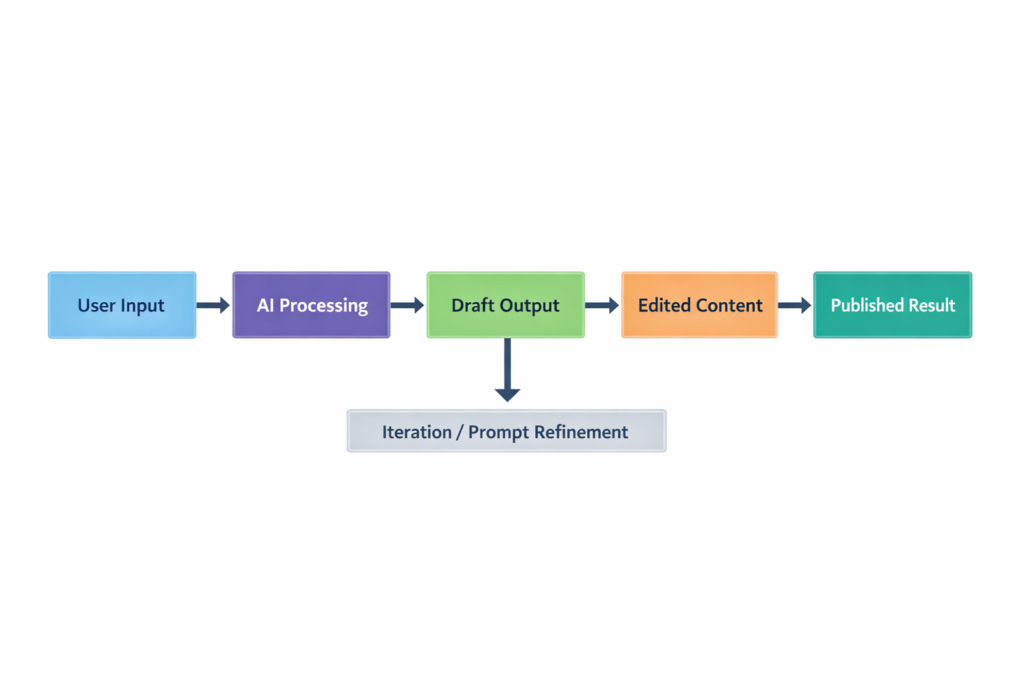
2. Chain Prompts
Don’t do everything at once:
- Generate outline
- Expand sections
- Refine tone
This improves quality significantly.
3. Edit Strategically
Don’t rewrite everything. Focus on:
- Opening paragraph
- Transitions
- Unique insights
4. Build Prompt Templates
Save your best prompts. Reuse them.
5. Combine With Human Insight
This works best when you add:
- Opinions
- Experiences
- Real examples
Copy.ai is not a magic content machine, but it is a powerful productivity tool.
Is it worth it?
Yes, if you understand its role.
Best use case:
Generating structured drafts and scaling content production.
My recommendation:
Use it as a thinking partner, not a replacement for writing.
FAQ
1. Is Copy.ai better than other AI writing tools?
It depends on your workflow. It’s strong in templates and structured content, but output quality depends heavily on prompting.
2. Can it replace human writers?
No. It accelerates writing but still needs human editing and insight.
3. Does it work for SEO content?
Yes, especially for drafts and outlines—but optimization still requires manual work.
4. Is it beginner-friendly?
Yes, but beginners often get generic results due to weak prompts.
5. How do I get better results?
Be specific. Add constraints, audience, tone, and examples.
Call to Action
If you’re producing content regularly, try Copy.ai with a real workflow, not just random prompts.
Start with one use case (blog, ads, or email), refine your prompts, and iterate. That’s where the real value shows up.