Three AI giants. All priced at $20 per month. All promising to be the smartest assistant you have ever used.
So which one do you actually choose?
In 2026, ChatGPT, Claude, and Gemini have each carved out a clear identity. They are not equals trying to do the same thing. Each one dominates a specific type of work, and choosing the wrong one means paying for a tool that is not the best fit for what you actually do.
This article gives you the honest breakdown: what each AI does best, where it falls short, who it is for, and how the pricing stacks up. By the end, you will know exactly which one, or which combination, is right for you.
The Quick Answer
If you want to skip straight to the verdict:
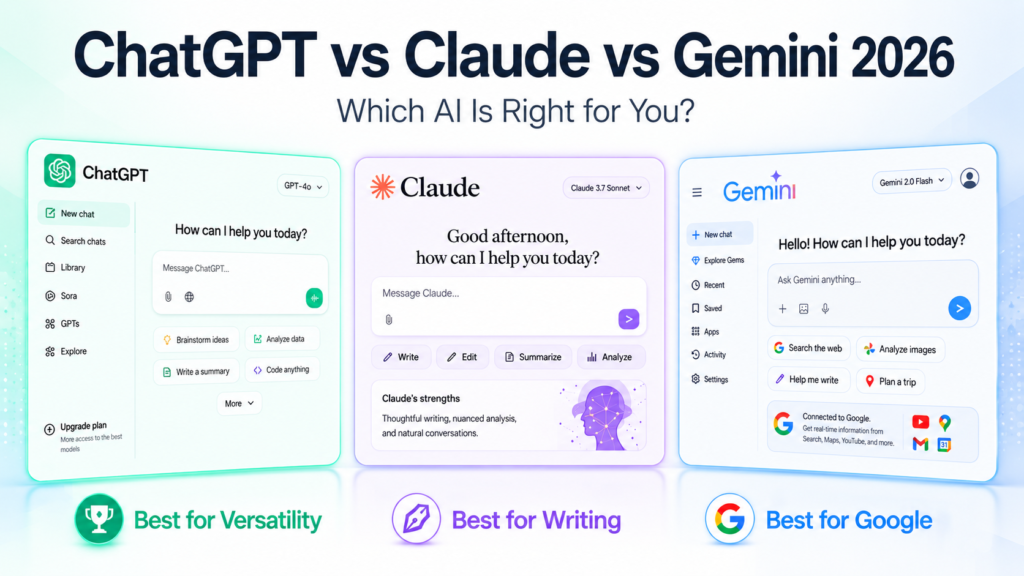
- Choose ChatGPT if you need the broadest ecosystem, the best integrations, and a tool that handles creative tasks, coding, and data analysis in one place.
- Choose Claude if you write, analyze documents, or need an AI that follows complex instructions carefully and produces the most nuanced, human-quality output.
- Choose Gemini if you live in Google Workspace, work with large files, or need an AI that is deeply integrated into Gmail, Docs, Drive, and Search.
Now let us go deeper.
ChatGPT: The Most Versatile AI in 2026
ChatGPT is made by OpenAI and runs on the GPT-5.4 model as of May 2026. It is the most widely used AI assistant in the world and has the broadest ecosystem of integrations, plugins, and third-party tools of any AI platform available.
What ChatGPT Does Best
Creative and multi-format tasks. ChatGPT is the strongest all-around performer for tasks that cross multiple formats in one session, writing a blog post, generating an image, analyzing a spreadsheet, and writing Python code, all within the same conversation. No other AI matches its versatility in one interface.
Ecosystem and integrations. ChatGPT connects with more third-party apps, plugins, and platforms than any competitor. If you use tools like Zapier, Notion, Slack, or any popular SaaS product, ChatGPT likely has a native integration or plugin for it.
Coding and technical tasks. GPT-5.4 is excellent at writing, debugging, and explaining code across virtually every programming language. Developers and technical freelancers consistently rate it as their primary AI coding tool alongside Claude.
DALL-E image generation. ChatGPT includes built-in image generation through DALL-E, making it the only tool in this comparison that handles both text and image creation natively.
Voice mode. ChatGPT’s advanced voice mode is the most natural and capable AI voice conversation experience available in 2026, with real-time interruption, emotion detection, and multi-language support.
Where ChatGPT Falls Short
Consistency. Output style and quality can vary more than expected between sessions, even with similar prompts. Businesses that need consistent brand voice often need to invest extra time in system prompting and instructions.
Long document analysis. ChatGPT’s context window is 128K tokens, which is competitive but shorter than what Gemini and Claude offer for very large document-heavy workflows.
Nuanced writing quality. For long-form, nuanced writing that requires careful reasoning and a consistent voice, Claude consistently produces more polished and reliable output.
ChatGPT Pricing
- Free: limited GPT-5.2 access with daily caps, now includes ads on free and Go tiers
- Go: $8/month, faster responses and slightly higher usage caps
- Plus: $20/month, full GPT-5.4 access, DALL-E image generation, advanced voice mode, and data analysis
- Pro: $100/month (added April 2026), unlimited access to advanced reasoning models
- Team: $30/user/month, higher rate limits and data excluded from training
- Enterprise: custom pricing with SSO, admin controls, and compliance features
Claude: The Best AI for Writing and Deep Analysis
Claude is made by Anthropic and runs on Claude Opus 4.7, the current flagship model as of May 2026. Among the three tools in this comparison, Claude has built the strongest reputation for writing quality, careful reasoning, and working with large, complex documents.
What Claude Does Best
Writing quality. Claude consistently produces the most nuanced, human-sounding writing of the three. For long-form content, client deliverables, proposals, reports, and anything where tone and voice matter, Claude sets the standard. Freelance writers and content professionals consistently rate it as their primary tool for a reason.
Long document analysis. Claude’s 1 million token context window on enterprise plans is the largest available. On Pro plans, it handles documents far longer than most workflows require. Upload a 200-page PDF, a full legal contract, or an entire codebase and Claude works through all of it intelligently.
Following complex instructions. Claude is the most reliable of the three at following detailed, multi-step instructions without drifting or simplifying. If you give it a precise brief with specific requirements, it delivers exactly what you asked for more consistently than competitors.
Projects and Memory. Claude’s Projects feature lets you create a dedicated workspace for each client with custom instructions and uploaded files that persist across every conversation. Since March 2026, Memory is available on all plans, meaning Claude remembers your preferences and working context without you having to re-explain anything.
Safety and reliability. Anthropic’s focus on AI safety means Claude is less likely to produce confidently wrong information. It is more likely to say it is uncertain when it is, which matters enormously for professional use cases.
Where Claude Falls Short
No image generation. Claude does not generate images natively. For visual content you need a separate tool like Midjourney or Canva.
Smaller ecosystem. Claude has fewer native third-party integrations than ChatGPT. If your workflow depends on a wide range of connected apps, ChatGPT or Gemini may fit more naturally.
No voice mode. Claude does not offer a voice conversation mode comparable to ChatGPT’s advanced voice feature.
Claude Pricing
- Free: access to Claude Sonnet on web, iOS, Android, and desktop with rolling usage limits
- Pro: $20/month, 5x usage, full Opus 4.7 access, Projects, file uploads, and Memory
- Max 5x: $100/month for heavy users who regularly hit Pro limits
- Max 20x: $200/month for unrestricted, high-volume usage
- Team: $25/seat/month (annual) with shared Projects and collaboration features
- Enterprise: custom pricing with 1M context window, HIPAA compliance, and SSO
Gemini: The Best AI for Google Users and Large Files
Gemini is made by Google and runs on Gemini 3.1 Pro as of May 2026. Its core advantage is deep integration with the Google ecosystem: Gmail, Google Docs, Google Drive, Google Search, YouTube, and Google Maps. If your work and life run on Google, Gemini is the AI that fits most naturally into your existing workflow.
What Gemini Does Best
Google Workspace integration. Gemini is built into Gmail, Docs, Sheets, Slides, and Drive at a level no competitor can match. It drafts emails directly in Gmail, rewrites documents inside Google Docs, analyzes spreadsheets in Sheets, and searches through your entire Drive. For anyone already working in Google Workspace, this integration alone is worth the subscription.
Multimodal capabilities. Gemini handles text, images, audio, video, and code within the same conversation. It is the strongest of the three at tasks that require combining multiple media types simultaneously.
Large context window. Gemini’s context window is among the largest available, making it well suited for processing very long documents, entire books, or extensive codebases in a single session.
Google Search integration. Gemini has direct access to Google Search, meaning its answers can draw on real-time web data with a depth and freshness that reflects Google’s core search infrastructure.
YouTube and Maps integration. Gemini can analyze YouTube videos and pull information from Google Maps, capabilities that are unique in this comparison and valuable for content creators, marketers, and local businesses.
Where Gemini Falls Short
Outside the Google ecosystem. If your business does not run on Google Workspace, Gemini loses much of its structural advantage. Its integrations with non-Google tools are thinner, and the value proposition narrows significantly.
Writing quality. For long-form nuanced writing, Gemini produces solid but less polished output than Claude. It is functional, but professionals who care deeply about writing quality tend to prefer Claude.
Consistency. Like ChatGPT, Gemini can be inconsistent across sessions for complex creative or analytical tasks.
Gemini Pricing
- Free: access to Gemini Flash, limited features
- Google AI Pro: $19.99/month (formerly Gemini Advanced), full Gemini 3.1 Pro access and Workspace integration
- Google Workspace Business add-on: $30/user/month, full enterprise Workspace integration
- Google AI Ultra: $249.99/month for the highest model access and no usage restrictions
Head-to-Head Comparison
| Feature | ChatGPT | Claude | Gemini |
|---|---|---|---|
| Best for | Versatility and ecosystem | Writing and analysis | Google Workspace users |
| Current flagship model | GPT-5.4 | Opus 4.7 | Gemini 3.1 Pro |
| Standard paid plan | $20/month | $20/month | $19.99/month |
| Image generation | Yes (DALL-E) | No | Yes (Imagen) |
| Voice mode | Yes (advanced) | No | Yes (basic) |
| Context window | 128K tokens | 1M tokens (Enterprise) | Very large |
| Google Workspace integration | Limited | Limited | Native |
| Writing quality | Good | Excellent | Good |
| Long document analysis | Good | Excellent | Excellent |
| Third-party integrations | Excellent | Limited | Good |
| Free tier | Yes | Yes | Yes |
Who Should Use Which Tool
You should use ChatGPT if you:
- Need one tool that does everything reasonably well
- Work with a wide range of third-party apps and need integrations
- Create images and text in the same workflow
- Use voice mode regularly
- Are a developer who needs versatile coding support
You should use Claude if you:
- Write long-form content, reports, or client deliverables professionally
- Work with large documents, contracts, or research papers regularly
- Need an AI that follows precise, detailed instructions reliably
- Manage multiple clients and want dedicated project workspaces
- Want the most consistent, highest-quality writing output
You should use Gemini if you:
- Live in Google Workspace: Gmail, Docs, Drive, and Sheets daily
- Need your AI integrated directly into your existing Google tools
- Work with multiple media types including video, audio, and images together
- Want an AI with native Google Search access for real-time information
Can You Use All Three?
Yes, and many professionals do. The most common combination in 2026 is:
- Claude for writing, document analysis, and client work
- Perplexity for research and real-time information (often replacing Gemini for non-Google users)
- ChatGPT for image generation, coding, and tasks requiring broad integrations
At $20/month each, using all three costs $60/month, which is less than a single hour of professional freelance work at most rates. If you are using AI seriously for your income, the math makes sense.
That said, most people starting out should pick one, learn it deeply, and add others only when they hit a clear gap in what their primary tool can do.
The Honest Verdict
In 2026, there is no single winner. Each tool leads in its own category and the best choice depends entirely on what you actually do every day.
If you write for a living or work with complex documents, Claude is the clearest choice. If you need the most versatile all-in-one tool with the best integrations, ChatGPT is the answer. If your entire professional life runs on Google, Gemini fits most naturally.
The good news is that all three offer free tiers. You can test each one this week before committing to a paid plan. Start with the one that matches your primary use case, use it for two weeks, and you will know immediately whether it is the right fit.